Dell 4320 Projector SNMP Command Set Document
Summary
This document is the SNMP table test case specification for the Dell 4320 projector. It provides SNMP OID listings for monitoring the projector device, including system information, network interfaces, and projector-specific parameters such as product name, serial number, asset tag, hardware version, device age, power-on count, and lamp status. The manual covers controller information, temperature sensors, fan monitoring, and alert configurations. Intended for IT administrators integrating the Dell 4320 into network management systems using SNMP protocols.
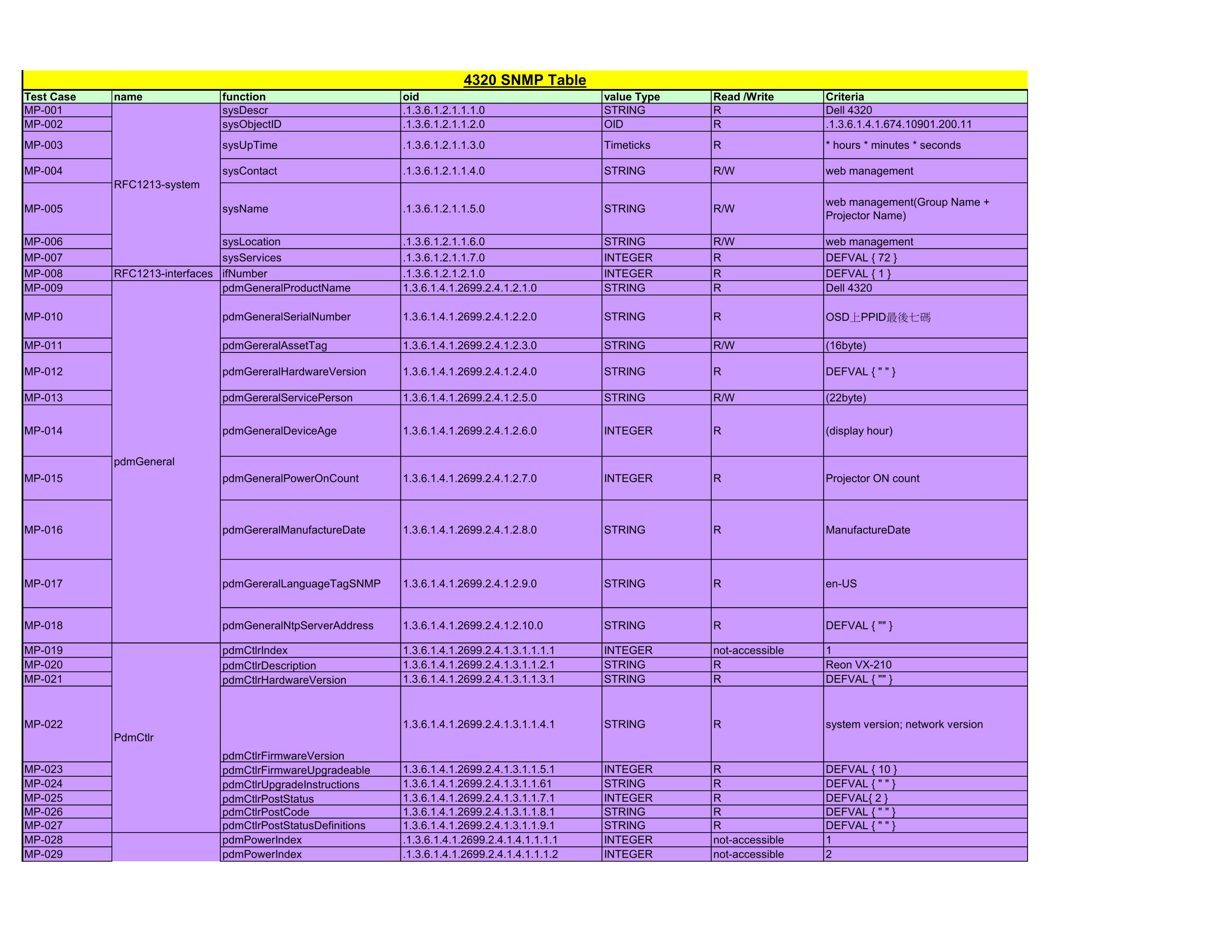
Page 1 Text Content
4320 SNMP Table
Test Case name function oid value Type Read /Write Criteria MP-001 sys Descr .1.3.6.1.2.1.1.1.0 STRING Dell 4320 MP-002 sys Object ID .1.3.6.1.2.1.1.2.0 OID .1.3.6.1.4.1.674.10901.200.11 MP-003 sys Up Time .1.3.6.1.2.1.1.3.0 Timeticks * hours * minutes * seconds
MP-004 sys Contact .1.3.6.1.2.1.1.4.0 STRING R/W web management
RFC1213-system
web management(Group Name +
MP-005 sys Name .1.3.6.1.2.1.1.5.0 STRING R/W
Projector Name)
MP-006 sys Location .1.3.6.1.2.1.1.6.0 STRING R/W web management MP-007 sys Services .1.3.6.1.2.1.1.7.0 INTEGER DEFVAL { 72 } MP-008 RFC1213-interfaces if Number .1.3.6.1.2.1.2.1.0 INTEGER DEFVAL { 1 } MP-009 pdm General Product Name 1.3.6.1.4.1.2699.2.4.1.2.1.0 STRING Dell 4320
MP-010 pdm General Serial Number 1.3.6.1.4.1.2699.2.4.1.2.2.0 STRING OSD上PPID最後七碼
MP-011 pdm Gereral Asset Tag 1.3.6.1.4.1.2699.2.4.1.2.3.0 STRING R/W (16byte)
MP-012 pdm Gereral Hardware Version 1.3.6.1.4.1.2699.2.4.1.2.4.0 STRING DEFVAL { " " }
MP-013 pdm Gereral Service Person 1.3.6.1.4.1.2699.2.4.1.2.5.0 STRING R/W (22byte)
MP-014 pdm General Device Age 1.3.6.1.4.1.2699.2.4.1.2.6.0 INTEGER (display hour)
pdm General
MP-015 pdm General Power On Count 1.3.6.1.4.1.2699.2.4.1.2.7.0 INTEGER Projector ON count
MP-016 pdm Gereral Manufacture Date 1.3.6.1.4.1.2699.2.4.1.2.8.0 STRING Manufacture Date
MP-017 pdm Gereral Language Tag SNMP 1.3.6.1.4.1.2699.2.4.1.2.9.0 STRING en-US
MP-018 pdm General Ntp Server Address 1.3.6.1.4.1.2699.2.4.1.2.10.0 STRING DEFVAL { "" }
MP-019 pdm Ctlr Index 1.3.6.1.4.1.2699.2.4.1.3.1.1.1.1 INTEGER not-accessible MP-020 pdm Ctlr Description 1.3.6.1.4.1.2699.2.4.1.3.1.1.2.1 STRING Reon VX-210 MP-021 pdm Ctlr Hardware Version 1.3.6.1.4.1.2699.2.4.1.3.1.1.3.1 STRING DEFVAL { "" }
MP-022 1.3.6.1.4.1.2699.2.4.1.3.1.1.4.1 STRING system version; network version
Pdm Ctlr
pdm Ctlr Firmware Version
MP-023 pdm Ctlr Firmware Upgradeable 1.3.6.1.4.1.2699.2.4.1.3.1.1.5.1 INTEGER DEFVAL { 10 } MP-024 pdm Ctlr Upgrade Instructions 1.3.6.1.4.1.2699.2.4.1.3.1.1.61 STRING DEFVAL { " " } MP-025 pdm Ctlr Post Status 1.3.6.1.4.1.2699.2.4.1.3.1.1.7.1 INTEGER DEFVAL{ 2 } MP-026 pdm Ctlr Post Code 1.3.6.1.4.1.2699.2.4.1.3.1.1.8.1 STRING DEFVAL { " " } MP-027 pdm Ctlr Post Status Definitions 1.3.6.1.4.1.2699.2.4.1.3.1.1.9.1 STRING DEFVAL { " " } MP-028 pdm Power Index .1.3.6.1.4.1.2699.2.4.1.4.1.1.1.1 INTEGER not-accessible MP-029 pdm Power Index .1.3.6.1.4.1.2699.2.4.1.4.1.1.1.2 INTEGER not-accessible
Pdm Power
Page Summary Contents For Dell 4320 Projector SNMP Command Set Document
Manual Details
| Brand | Dell |
|---|---|
| Pages | 7 |
| File Size | 391.18 KB |
| Published | June 26, 2026 |
Enter the captcha to get the download link:

Frequently Asked Questions
What OIDs identify the basic general product information?
The general details are queried using 'pdmGeneralProductName' and 'pdmGeneralSerialNumber' (MP-009 and MP-010).
How do I check historical operating data like runtime or power cycles?
You can monitor fields such as 'pdmGeneralDeviceAge' (display hour) and 'pdmGeneralPowerOnCount' (Projector ON count) using OIDs MP-014 and MP-015.
What SNMP OID tracks the current alert condition status?
The general alert condition is found at 'pdmAlertCondition...' which groups various failure types by type, group ID, and severity level.
Where can I find information regarding power operational descriptions?
Power states are described using multiple OIDs, including 'pdmPowerDescription' for common modes (On/Off/Cooling Down) and specific alerts like Overheating.