Dell Advanced Projector S560 RS232 Command Set Document
Summary
RS232 serial protocol specification for Dell S560, S560P, and S560T projectors, defining the communication interface at 19200 baud, 8 data bits, no parity, 1 stop bit, and no flow control. Documents the binary command syntax structure (Header be ef, Address Code 10, CRC16, Message ID 11 11), power on/off commands, projector response codes (0x00 success, 0x01 invalid, 0x02 error), system status queries, and lamp hour retrieval. RS232 pin 2-3 swap cable is not provided by Dell.
Page 1 Text Content
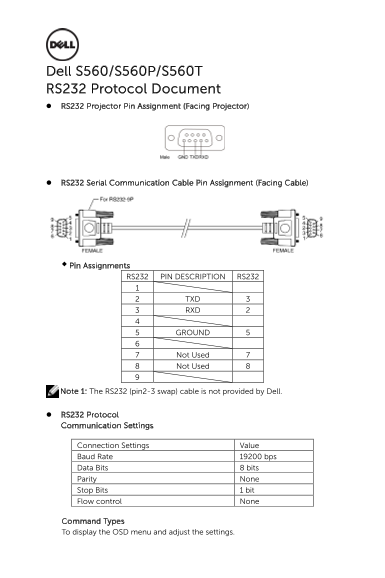
Dell S560/S560P/S560T RS232 Protocol Document RS232 Projector Pin Assignment (Facing Projector)
RS232 Serial Communication Cable Pin Assignment (Facing Cable)
Pin Assignments
RS232 PIN DESCRIPTION RS232
2 TXD 3 3 RXD 2
5 GROUND 5
7 Not Used 7 8 Not Used 8
Note 1: The RS232 (pin2-3 swap) cable is not provided by Dell.
RS232 Protocol Communication Settings
Connection Settings Value Baud Rate 19200 bps Data Bits 8 bits Parity None Stop Bits 1 bit Flow control None
Command Types To display the OSD menu and adjust the settings.
Page Summary Contents For Dell Advanced Projector S560 RS232 Command Set Document
Manual Details
| Brand | Dell |
|---|---|
| Pages | 6 |
| File Size | 257.14 KB |
| Published | June 15, 2026 |
Enter the captcha to get the download link:

Frequently Asked Questions
What are the default communication settings for RS232?
The required settings are a Baud Rate of 19200 bps, 8 Data Bits, None Parity, and 1 Stop Bit.
How do I determine if a command was successful?
A response starting with Byte 0x00 indicates success. For System Status, the return status byte is in Byte 2 of the three-byte message.
What happens if an unknown or invalid command is sent?
The projector will respond with a packet where Byte 0 indicates 'Invalid Command' (0x01) or 'Error Command' (0x02).
How can I query the current firmware version?
Send the control command of 'Firmware Version' (0xefbe, 0x10, 0x0005, 0x3e12, etc.); the response contains it in Bytes 2 through 7.