Page 1
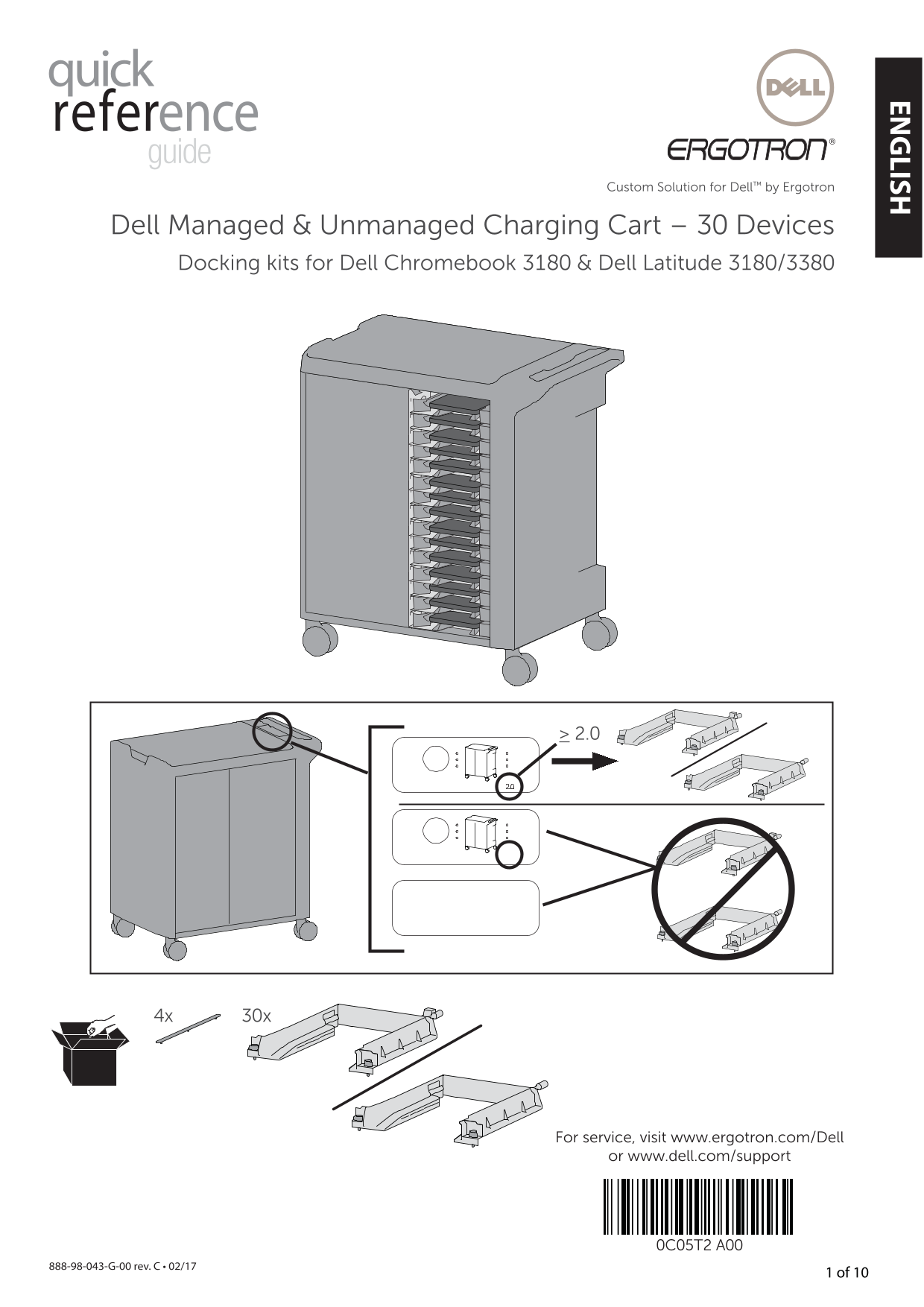
EN LISH Custom Solution for Dell™ by Ergotron Dell Managed & Unmanaged Charging Cart – 30 Devices Docking kits for Dell Chromebook 3180 & Dell Latitude 3180/3380 For service, visit www.ergotro...
Page 2
EN LI SH Remove all cables from wall jacks. Remove side panels. Remove power brick trays. Press tab to remove power brick tray. 888-98-043-W-00 rev. A • 02/17 G- v. C • 02/17 2 of 10
Page 3
EN LISH Remove Ethernet cable from shelves (clip confi guration A). 4a If you do not have ethernet cables on the trays, go to step 5. If your cable clips are in this confi guration, follow instruction...
Page 4
EN LI SH Remove Ethernet cable from shelves (clip confi guration B). If your cable clips are in this confi guration, follow 4b instructions below. If you do not have ethernet cables on the trays, go t...
Page 5
EN LISH Extend dongle support. Insert dock unit, top slot. 5 of 10888-98-043-W-00 rev. A • 02/17
Page 6
EN LI SH Insert remaining dock units. Connect Ethernet cables. 888-98-043-W-00 rev. A • 02/17 G- v. C • 02/17 6 of 10
Page 7
EN LISH Connect power plugs. 7 of 10888-98-043-W-00 rev. A • 02/17
Page 8
EN LI SH Insert devices (proper orientation). 888-98-043-W-00 rev. A • 02/17 G- v. C • 02/17 8 of 10
Page 9
EN LISH Reinstall side panels. 9 of 10888-98-043-W-00 rev. A • 02/17
Page 10
EN LI SH Safety, Environmental, and Regulatory Information Waste Electrical and Electronic Equipment Directive sur la mise au rebut des appareils Direttiva dwar Skart magħmul minn Tagħmir Direktiva o ...
Page 11
Custom Solution for Dell™ by Ergotron Dell Managed & Unmanaged Charging Cart – 30 Devices Docking kits for Dell Chromebook 3180 & Dell Latitude 3180/3380 Para asistencia técnica, visite www.er...
Page 12
ES PA Desconecte el sistema de alimentación de la fuente. Quite los paneles laterales. Extraiga las bandejas de bloques Presione la lengüeta para de alimentación. extraer la bandeja de bloques de alim...
Page 13
Quite el cable Ethernet de los estantes (confi guración de ganchos A). Si no tiene cables Ethernet en las bandejas, vaya al paso 5. Si sus ganchos de cable están en esta confi guración, siga las instr...
Page 14
ES PA Quite el cable Ethernet de los estantes (confi guración de ganchos B). Si sus ganchos de cable están en esta confi guración, 4b siga las instrucciones a continuación. Si no tiene cables Ethernet...
Page 15
Extienda el soporte del dongle. Inserte la unidad de fi jación, ranura superior. 5 of 10888-98-043-W-00 rev. A • 02/17
Page 16
ES PA Inserte las unidades de fi jación restantes. Conecte los cables Ethernet. 888-98-043-W-00 rev. A • 02/17 G- v. C • 02/17 6 of 10
Page 17
Conecte los enchufes de alimentación. 7 of 10888-98-043-W-00 rev. A • 02/17
Page 18
ES PA Inserte los dispositivos (orientación correcta). 888-98-043-W-00 rev. A • 02/17 G- v. C • 02/17 8 of 10
Page 19
Vuelva a instalar los paneles laterales. 9 of 10888-98-043-W-00 rev. A • 02/17
Page 20
ES PA Información de seguridad, medioambiental y normativa Waste Electrical and Electronic Equipment Directive sur la mise au rebut des appareils Direttiva dwar Skart magħmul minn Tagħmir Direktiva o ...
Page 21
FRA ÇA IS Custom Solution for Dell™ by Ergotron Dell Managed & Unmanaged Charging Cart – 30 Devices Docking kits for Dell Chromebook 3180 & Dell Latitude 3180/3380 Pour l’entretien, visitez ww...
Page 22
FR ÇA IS Déconnecter le système d'alimentation de la source de courant. Retirez les panneaux latéraux Retirez les plateaux pour bloc Appuyez sur la languette d’alimentation. pour retirer le plateau po...
Page 23
FRA ÇA IS Retirez le câble Ethernet des étagères (confi guration de clip A) Si vous n’avez pas de câbles Ethernet sur les plateaux, passez à l’étape 5. Si vos clips de câbles sont dans cette confi gur...
Page 24
FR ÇA IS Retirez le câble Ethernet des étagères (confi guration de clip B) Si vos clips de câbles sont dans cette 4b confi guration, suivez les instructions ci-dessous. Si vous n’avez pas de câbles Et...
Page 25
FRA ÇA IS Tendez le support de clé électronique. Insérez l’unité de station d’accueil dans la fente supérieure. 5 of 10888-98-043-W-00 rev. A • 02/17
Page 26
FR ÇA IS Insérez les autres unités de station d’accueil. Connectez les câbles Ethernet. 888-98-043-W-00 rev. A • 02/17 G- v. C • 02/17 6 of 10
Page 27
FRA ÇA IS Connectez les prises électriques. 7 of 10888-98-043-W-00 rev. A • 02/17
Page 28
FR ÇA IS Insérez les appareils (dans la bonne orientation). 888-98-043-W-00 rev. A • 02/17 G- v. C • 02/17 8 of 10
Page 29
FRA ÇA IS Réinstallez les panneaux latéraux. 9 of 10888-98-043-W-00 rev. A • 02/17
Page 30
FR ÇA IS Informations sur la sécurité, l’environnement et la Waste Electrical and Electronic Equipment régleme tation Directive sur la mise au rebut des appareils Direttiva dwar Skart magħmul minn Tag...