Dell LCD TV W3706MH RS232 Command Guide
Summary
This is the RS232 command guide for Dell W3202MH and W3706MH displays, documenting the serial communication protocol for controlling these monitors. The guide covers communication settings, protocol structure, command syntax, and status codes for remote display management. It is intended for AV system integrators and developers who need to control Dell displays programmatically via RS232 interface.
Page 1 Text Content
.d ll.c | s rt.d ll.c
RS232 Command Guide for W3202MH/W3706MH DAO 1. Introduction W3202MH and W3706MH are designed with control by wire capability via RS232. This
document describes the RS232 command protocol and command list.
2. RS232 Protocol 2.1 Communication Settings Connection Settings Value Baud Rate Data Bits
Parity None Stop Bits
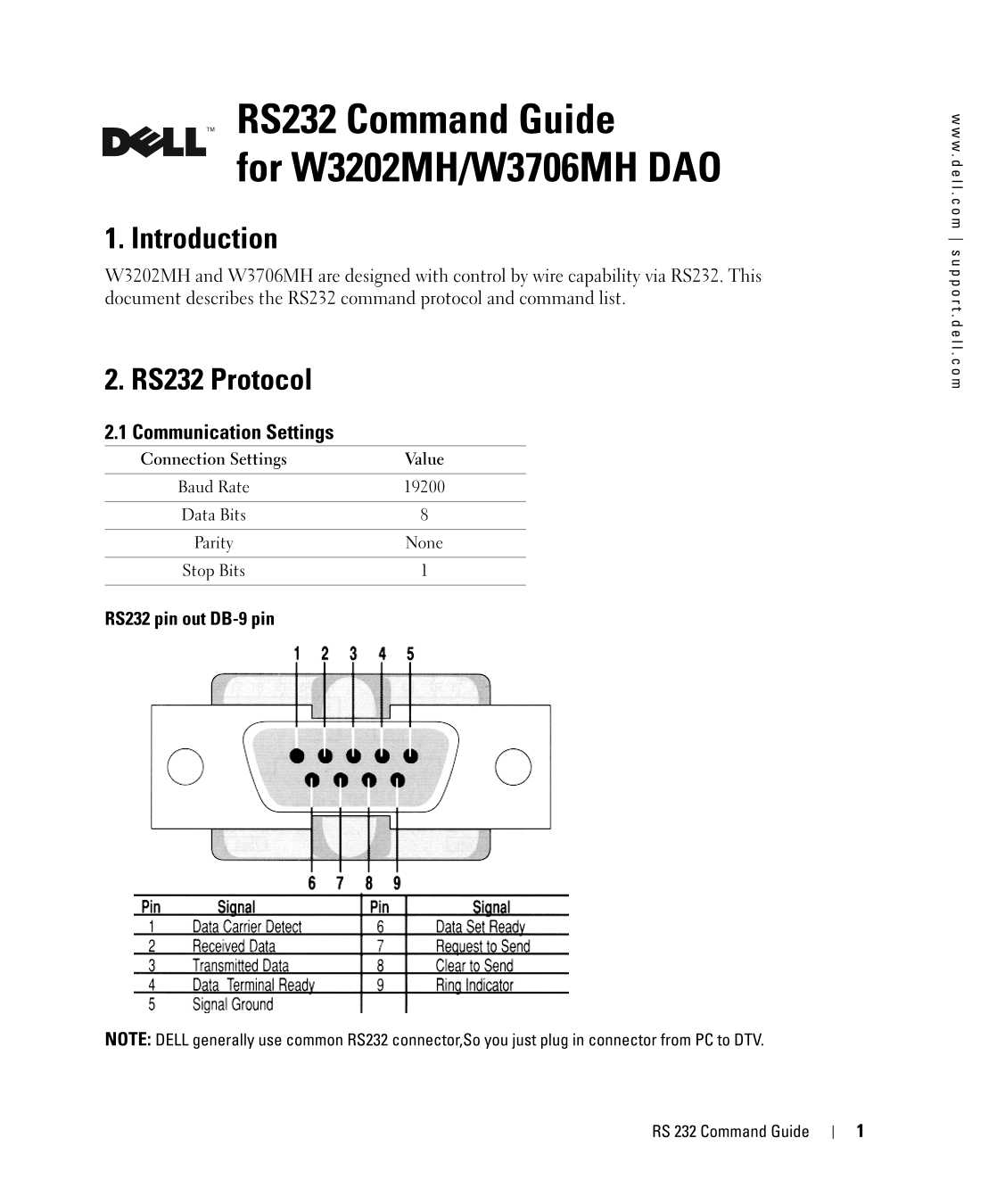
RS232 pin out DB-9 pin
NOTE: DELL generally use common RS232 connector,So you just plug in connector from PC to DTV.
RS 232 Command Guide
Page Summary Contents For Dell LCD TV W3706MH RS232 Command Guide
Manual Details
| Brand | Dell |
|---|---|
| Pages | 6 |
| File Size | 376.09 KB |
| Published | June 29, 2026 |
Enter the captcha to get the download link:

Frequently Asked Questions
What are the standard communication settings for the RS232 protocol?
The settings are: Baud Rate 19200, Data Bits 8, Parity None, and Stop Bits 1.
How do I reset all device settings using an RS232 command?
Use code EFBE1000032830111100012C for a Factory Reset.
Can the Omnivex tool manage the DTV functions?
Yes, Omnivex Control 4 allows managing device functions from a PC without proprietary hardware.
What values indicate a successful or failed command execution?
Success is indicated by 0X00. Failure can be signaled by multiple codes (e.g., 0X15 for INVALIDID, 0X01 for INVAILDCRC).