Toshiba IK-WB02A Quick User Guide
Summary
This guide provides comprehensive setup instructions for the IK-WB02A network camera. Learn how to establish secure connectivity whether linking via a main network or direct PC connection. The manual walks you through essential steps, including validating required software, configuring static IPs and DDNS services, optimizing power sequence, and enhancing system security by changing default administrator credentials and setting user access rights. Ideal for IT professionals or technical users needing quick, reliable installation of their new IP camera system.
Page 1 Text Content
STOP! BEFORE INSTALLING OR CONNECTING IK-WB02A TO
YOUR PC, READ THIS QUICK START GUIDE
THANK YOU
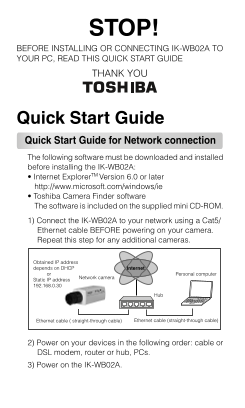
Quick Start Guide Quick Start Guide for Network connection The following software must be downloaded and installed before installing the IK-WB02A: • Internet Explorer TM Version 6.0 or later http://www.microsoft.com/windows/ie • Toshiba Camera Finder software The software is included on the supplied mini CD-ROM. 1) Connect the IK-WB02A to your network using a Cat5/ Ethernet cable BEFORE powering on your camera. Repeat this step for any additional cameras.
Obtained IP address depends on DHCP Internet or Personal computer
Network camera
Static IP address 192.168.0.30
Ethernet cable ( straight-through cable) Ethernet cable (straight-through cable)
2) Power on your devices in the following order: cable or DSL modem, router or hub, PCs. 3) Power on the IK-WB02A.
Page Summary Contents For Toshiba IK-WB02A Quick User Guide
Manual Details
| Brand | Toshiba |
|---|---|
| Pages | 4 |
| File Size | 344.98 KB |
| Published | May 28, 2026 |
Enter the captcha to get the download link:

Frequently Asked Questions
What software is required before setup?
You must download and install Internet Explorer Version 6.0 or later and Toshiba Camera Finder software.
What cables are needed for connecting the camera?
Use a Cat5/Ethernet cable for network connections, or a Cat5 Crossover cable for direct PC links.
How should I change the default login credentials?
Go to Configuration > Admin, enter the current ID (root) and password (ikwb), and set new credentials using the Change button.
How do I restrict access to modify camera settings?
In the Configuration menu, click User, set 'User authorization required' to ON, and provide administrator credentials.