SHARP FO-2081 Quick User Guide
Summary
The FO-2081 is a comprehensive Digital Multifunctional System and high-resolution flatbed scanner designed for professional imaging needs. This Start Guide provides essential instructions covering the initial setup, installation process, and important operational guidelines, ensuring seamless integration into your office environment. If you are an office professional or user setting up a reliable machine for document scanning and rapid copying, this manual walks you through all necessary steps to maximize your investment.
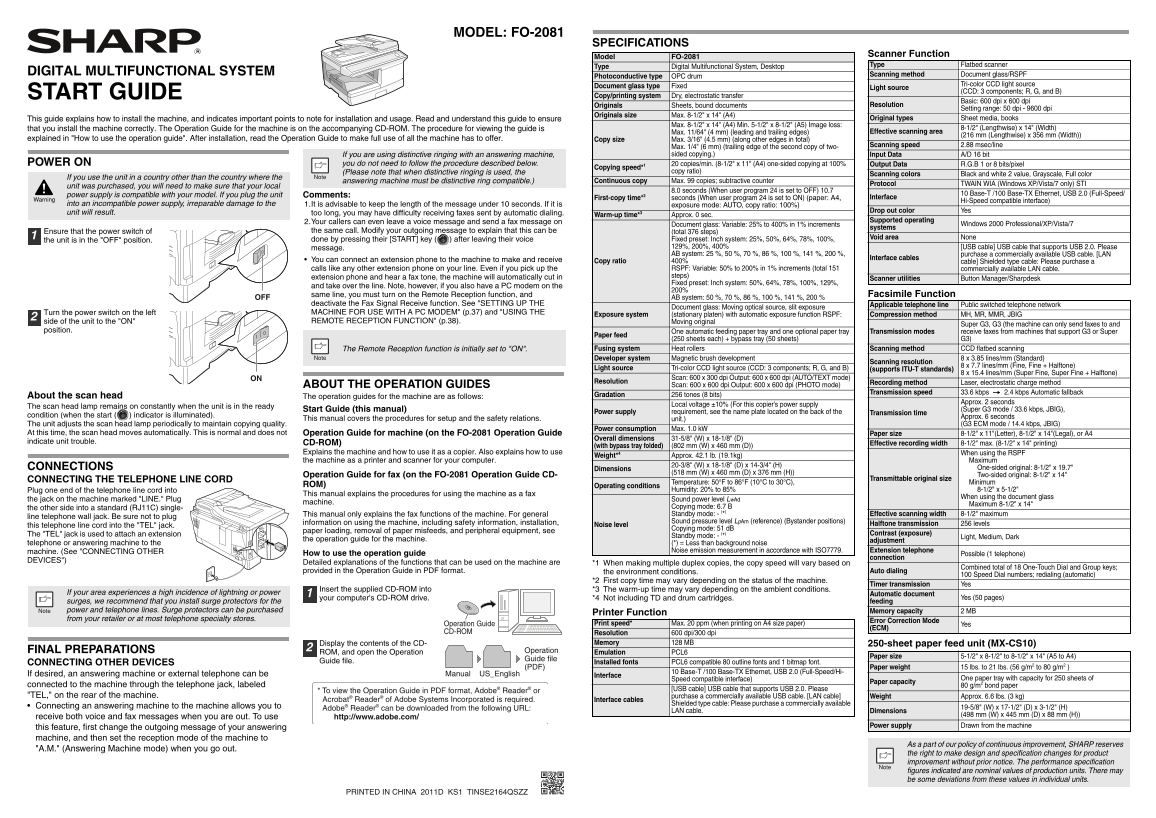
Page 1 Text Content
FO-2081_Start Guide_US.fm Page 4 Thursday, March 10, 2011 1:51 PM
MODEL: FO-2081
SPECIFICATIONS
Scanner Function
Model FO-2081
Type Digital Multifunctional System, Desktop Type Flatbed scanner
DIGITAL MULTIFUNCTIONAL SYSTEM Scanning method Document glass/RSPF
Photoconductive type OPC drum
Document glass type Fixed Tri-color CCD light source
Light source
START GUIDE (CCD: 3 components; R, G, and B)
Copy/printing system Dry, electrostatic transfer
Basic: 600 dpi x 600 dpi
Originals Sheets, bound documents Resolution
Setting range: 50 dpi - 9600 dpi
Originals size Max. 8-1/2" x 14" (A4)
This guide explains how to install the machine, and indicates important points to note for installation and usage. Read and understand this guide to ensure Original types Sheet media, books
Max. 8-1/2" x 14" (A4) Min. 5-1/2" x 8-1/2" (A5) Image loss:
that you install the machine correctly. The Operation Guide for the machine is on the accompanying CD-ROM. The procedure for viewing the guide is 8-1/2" (Lengthwise) x 14" (Width)
Max. 11/64" (4 mm) (leading and trailing edges) Effective scanning area
(216 mm (Lengthwise) x 356 mm (Width))
explained in "How to use the operation guide". After installation, read the Operation Guide to make full use of all the machine has to offer. Copy size Max. 3/16" (4.5 mm) (along other edges in total)
Max. 1/4" (6 mm) (trailing edge of the second copy of two- Scanning speed 2.88 msec/line
If you are using distinctive ringing with an answering machine, sided copying.) Input Data A/D 16 bit
POWER ON you do not need to follow the procedure described below. 20 copies/min. (8-1/2" x 11" (A4) one-sided copying at 100% Output Data R.G.B 1 or 8 bits/pixel
Copying speed*1
(Please note that when distinctive ringing is used, the copy ratio)
Scanning colors Black and white 2 value, Grayscale, Full color
If you use the unit in a country other than the country where the
answering machine must be distinctive ring compatible.) Continuous copy Max. 99 copies; subtractive counter
Protocol TWAIN WIA (Windows XP/Vista/7 only) STI
unit was purchased, you will need to make sure that your local
8.0 seconds (When user program 24 is set to OFF) 10.7
power supply is compatible with your model. If you plug the unit Comments: 10 Base-T /100 Base-TX Ethernet, USB 2.0 (Full-Speed/
First-copy time*2 seconds (When user program 24 is set to ON) (paper: A4, Interface
Hi-Speed compatible interface)
into an incompatible power supply, irreparable damage to the 1.It is advisable to keep the length of the message under 10 seconds. If it is exposure mode: AUTO, copy ratio: 100%)
Drop out color Yes
unit will result. too long, you may have difficulty receiving faxes sent by automatic dialing.
Warm-up time*3 Approx. 0 sec.
2.Your callers can even leave a voice message and send a fax message on Supported operating
Document glass: Variable: 25% to 400% in 1% increments Windows 2000 Professional/XP/Vista/7
systems
Ensure that the power switch of the same call. Modify your outgoing message to explain that this can be (total 376 steps)
Fixed preset: Inch system: 25%, 50%, 64%, 78%, 100%, Void area None
the unit is in the "OFF" position. done by pressing their [START] key ( ) after leaving their voice
message. 129%, 200%, 400% [USB cable] USB cable that supports USB 2.0. Please AB system: 25 %, 50 %, 70 %, 86 %, 100 %, 141 %, 200 %, purchase a commercially available USB cable. [LAN
You can connect an extension phone to the machine to make and receive Interface cables
Copy ratio 400% cable] Shielded type cable: Please purchase a
calls like any other extension phone on your line. Even if you pick up the RSPF: Variable: 50% to 200% in 1% increments (total 151 commercially available LAN cable. extension phone and hear a fax tone, the machine will automatically cut in steps)
Scanner utilities Button Manager/Sharpdesk
Fixed preset: Inch system: 50%, 64%, 78%, 100%, 129%,
and take over the line. Note, however, if you also have a PC modem on the
same line, you must turn on the Remote Reception function, and Facsimile Function
OFF AB system: 50 %, 70 %, 86 %, 100 %, 141 %, 200 %
deactivate the Fax Signal Receive function. See "SETTING UP THE Applicable telephone line Public switched telephone network
Document glass: Moving optical source, slit exposure
Turn the power switch on the left MACHINE FOR USE WITH A PC MODEM" (p.37) and "USING THE
Exposure system (stationary platen) with automatic exposure function RSPF: Compression method MH, MR, MMR, JBIG
side of the unit to the "ON" REMOTE RECEPTION FUNCTION" (p.38). Moving original
Super G3, G3 (the machine can only send faxes to and
position. One automatic feeding paper tray and one optional paper tray Transmission modes receive faxes from machines that support G3 or Super
Paper feed
(250 sheets each) + bypass tray (50 sheets) G3)
The Remote Reception function is initially set to "ON". Fusing system Heat rollers Scanning method CCD flatbed scanning Developer system Magnetic brush development 8 x 3.85 lines/mm (Standard)
Scanning resolution
8 x 7.7 lines/mm (Fine, Fine + Halftone)
Light source Tri-color CCD light source (CCD: 3 components; R, G, and B) (supports ITU-T standards)
8 x 15.4 lines/mm (Super Fine, Super Fine + Halftone)
ON Scan: 600 x 300 dpi Output: 600 x 600 dpi (AUTO/TEXT mode)
Resolution Recording method Laser, electrostatic charge method
ABOUT THE OPERATION GUIDES Scan: 600 x 600 dpi Output: 600 x 600 dpi (PHOTO mode)
Transmission speed 33.6 kbps 2.4 kbps Automatic fallback
About the scan head Gradation 256 tones (8 bits)
The operation guides for the machine are as follows:
Approx. 2 seconds
Local voltage ±10% (For this copier’s power supply
The scan head lamp remains on constantly when the unit is in the ready
Start Guide (this manual) (Super G3 mode / 33.6 kbps, JBIG),
Power supply requirement, see the name plate located on the back of the Transmission time
condition (when the start ( ) indicator is illuminated). Approx. 6 seconds
This manual covers the procedures for setup and the safety relations. unit.)
The unit adjusts the scan head lamp periodically to maintain copying quality. (G3 ECM mode / 14.4 kbps, JBIG)
Power consumption Max. 1.0 k W
At this time, the scan head moves automatically. This is normal and does not Operation Guide for machine (on the FO-2081 Operation Guide Paper size 8-1/2" x 11"(Letter), 8-1/2" x 14"(Legal), or A4
Overall dimensions 31-5/8" (W) x 18-1/8" (D)
indicate unit trouble. CD-ROM) Effective recording width 8-1/2" max. (8-1/2" x 14" printing)
(with bypass tray folded) (802 mm (W) x 460 mm (D))
Explains the machine and how to use it as a copier. Also explains how to use When using the RSPF
Weight*4 Approx. 42.1 lb. (19.1kg)
the machine as a printer and scanner for your computer. Maximum
CONNECTIONS 20-3/8" (W) x 18-1/8" (D) x 14-3/4" (H)
Dimensions One-sided original: 8-1/2" x 19.7"
(518 mm (W) x 460 mm (D) x 376 mm (H))
Operation Guide for fax (on the FO-2081 Operation Guide CD- Two-sided original: 8-1/2" x 14"
CONNECTING THE TELEPHONE LINE CORD Transmittable original size
Temperature: 50°F to 86°F (10°C to 30°C), Minimum
ROM) Operating conditions
Plug one end of the telephone line cord into Humidity: 20% to 85% 8-1/2" x 5-1/2"
This manual explains the procedures for using the machine as a fax
When using the document glass
the jack on the machine marked "LINE." Plug Sound power level Lw Ad
machine. Maximum 8-1/2" x 14"
the other side into a standard (RJ11C) single- Copying mode: 6.7 B This manual only explains the fax functions of the machine. For general Standby mode: - (*) Effective scanning width 8-1/2" maximum
line telephone wall jack. Be sure not to plug
information on using the machine, including safety information, installation, Sound pressure level Lp Am (reference) (Bystander positions)
this telephone line cord into the "TEL" jack. Noise level Halftone transmission 256 levels
TEL Copying mode: 51 d B
paper loading, removal of paper misfeeds, and peripheral equipment, see
The "TEL" jack is used to attach an extension Contrast (exposure)
Standby mode: - (*) Light, Medium, Dark
the operation guide for the machine. adjustment
telephone or answering machine to the (*) = Less than background noise
machine. (See "CONNECTING OTHER Noise emission measurement in accordance with ISO7779. Extension telephone
How to use the operation guide Possible (1 telephone)
connection
DEVICES")
Detailed explanations of the functions that can be used on the machine are *1 When making multiple duplex copies, the copy speed will vary based on
Combined total of 18 One-Touch Dial and Group keys;
provided in the Operation Guide in PDF format. the environment conditions. Auto dialing
100 Speed Dial numbers; redialing (automatic)
*2 First copy time may vary depending on the status of the machine.
Timer transmission Yes
Insert the supplied CD-ROM into *3 The warm-up time may vary depending on the ambient conditions.
If your area experiences a high incidence of lightning or power Automatic document
your computer's CD-ROM drive. *4 Not including TD and drum cartridges. Yes (50 pages)
surges, we recommend that you install surge protectors for the feeding power and telephone lines. Surge protectors can be purchased Memory capacity 2 MB
Printer Function
from your retailer or at most telephone specialty stores. Error Correction Mode
Operation Guide Print speed* Max. 20 ppm (when printing on A4 size paper) Yes
(ECM)
CD-ROM Resolution 600 dpi/300 dpi
Display the contents of the CD- Memory 128 MB 250-sheet paper feed unit (MX-CS10)
FINAL PREPARATIONS ROM, and open the Operation Operation Emulation PCL6
Paper size 5-1/2" x 8-1/2" to 8-1/2" x 14" (A5 to A4)
Guide file
CONNECTING OTHER DEVICES Guide file. Installed fonts PCL6 compatible 80 outline fonts and 1 bitmap font.
(PDF) Paper weight 15 lbs. to 21 lbs. (56 g/m2 to 80 g/m2 )
10 Base-T /100 Base-TX Ethernet, USB 2.0 (Full-Speed/Hi-
If desired, an answering machine or external telephone can be Manual US_English Interface
Speed compatible interface) One paper tray with capacity for 250 sheets of
Paper capacity
connected to the machine through the telephone jack, labeled g/m2 bond paper
[USB cable] USB cable that supports USB 2.0. Please
* To view the Operation Guide in PDF format, Adobe® Reader® or
"TEL," on the rear of the machine. purchase a commercially available USB cable. [LAN cable] Weight Approx. 6.6 lbs. (3 kg)
Acrobat® Reader® of Adobe Systems Incorporated is required. Interface cables
Shielded type cable: Please purchase a commercially available
Connecting an answering machine to the machine allows you to 19-5/8" (W) x 17-1/2" (D) x 3-1/2" (H)
Adobe® Reader® can be downloaded from the following URL:
LAN cable. Dimensions
(498 mm (W) x 445 mm (D) x 88 mm (H))
receive both voice and fax messages when you are out. To use http://www.adobe.com/
this feature, first change the outgoing message of your answering Power supply Drawn from the machine
machine, and then set the reception mode of the machine to
As a part of our policy of continuous improvement, SHARP reserves
"A.M." (Answering Machine mode) when you go out.
the right to make design and specification changes for product improvement without prior notice. The performance specification figures indicated are nominal values of production units. There may be some deviations from these values in individual units.
PRINTED IN CHINA 2011D KS1 TINSE2164QSZZ
Page Summary Contents For SHARP FO-2081 Quick User Guide
Manual Details
| Brand | Sharp |
|---|---|
| Pages | 2 |
| File Size | 222.15 KB |
| Published | June 06, 2026 |
Enter the captcha to get the download link:

Frequently Asked Questions
What are the initial scanning specifications?
The basic resolution is 600 dpi x 600 dpi, and the setting range goes from 50 dpi to 9600 dpi.
How can I connect a PC modem or an extension phone?
You must use shielded type cables when connecting for these functions. For LAN connections, purchase commercially available shielded cable.
Are there size restrictions for original documents?
Original dimensions must be between a minimum of 5-1/2" x 8-1/2" (A5) and a maximum of 8-1/2" x 14" (A4).
What is the typical copying speed?
The manual states that one-sided copying at 100% ratio is approximately 20 copies per minute.