SHARP CDSW200 Quick Guide
Summary
This versatile mini component system delivers rich, multi-format audio entertainment in a compact design. Enjoy crystal-clear sound from CDs, FM radio broadcasting, and classic cassette tapes alike. This manual provides comprehensive guidance on setup, including remote battery installation and speaker connections, alongside step-by-step instructions for optimal use of all stereo functions. Ideal for users seeking a reliable, feature-rich centerpiece for their home audio setup.
Page 1 Text Content
CD-SW200
MINI COMPONENT SYSTEM SISTEMA MINI
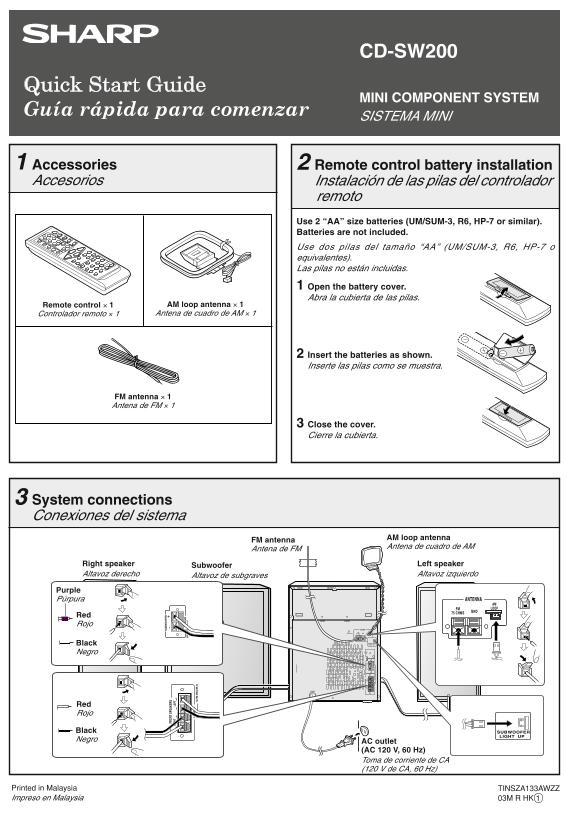
Accessories Remote control battery installation Accesorios Instalación de las pilas del controlador
remoto Use 2 “AA” size batteries (UM/SUM-3, R6, HP-7 or similar). Batteries are not included. Use dos pilas del tamaño “AA” (UM/SUM-3, R6, HP-7 o equivalentes). Las pilas no están incluidas. Open the battery cover. Abra la cubierta de las pilas.
Remote control × 1 AM loop antenna × 1 Controlador remoto × 1 Antena de cuadro de AM × 1
Insert the batteries as shown. Inserte las pilas como se muestra.
FM antenna × 1 Antena de FM × 1
Close the cover. Cierre la cubierta.
System connections Conexiones del sistema
AM loop antenna
FM antenna
Antena de cuadro de AM
Antena de FM
Right speaker Subwoofer Left speaker Altavoz derecho Altavoz de subgraves Altavoz izquierdo
Purple Púrpura
Red Rojo
Black Negro
Red Rojo
Black Negro
AC outlet (AC 120 V, 60 Hz) Toma de corriente de CA (120 V de CA, 60 Hz)
Printed in Malaysia TINSZA133AWZZ Impreso en Malaysia 03M R HK 1
CD-SW200 QG 11/25/04, 5:12 PM1
Page Summary Contents For SHARP CDSW200 Quick Guide
Manual Details
| Brand | Sharp |
|---|---|
| Pages | 2 |
| File Size | 479.86 KB |
| Published | June 02, 2026 |
Enter the captcha to get the download link:

Frequently Asked Questions
How do I prepare the remote control?
Insert two "AA" size batteries (UM/SUM-3, R6, HP-7 or similar). Batteries are not included.
What is the required power outlet connection?
It requires an AC outlet rated for 120 V, 60 Hz.
How do I start playing a CD disc?
Press X-BASS/DEMO, then CD, followed by ON/STAND-BY. Then press the '1' button and within 5 seconds, press OPEN/CLOSE, place the disc, and finally press OPERATE to start.
How do I tune into a radio station?
Press TUNER (BAND) to select FM or AM. Press TUNING to set the desired station. Load cassette tapes manually or allow automatic scanning via TAPE 1 or TAPE 2.