SHARP CDBA300 Quick User Guide
Summary
This Quick Guide provides comprehensive instructions for setting up and operating your CD-BA300 Mini Component System. This multi-functional unit delivers enjoyable home entertainment by playing CDs, tuning AM/FM radio stations, and handling cassette tapes. The manual covers everything from initial system connections and accessory setup to detailed operation techniques for all three media formats, ideal for users seeking reliable, versatile audio performance in a compact design.
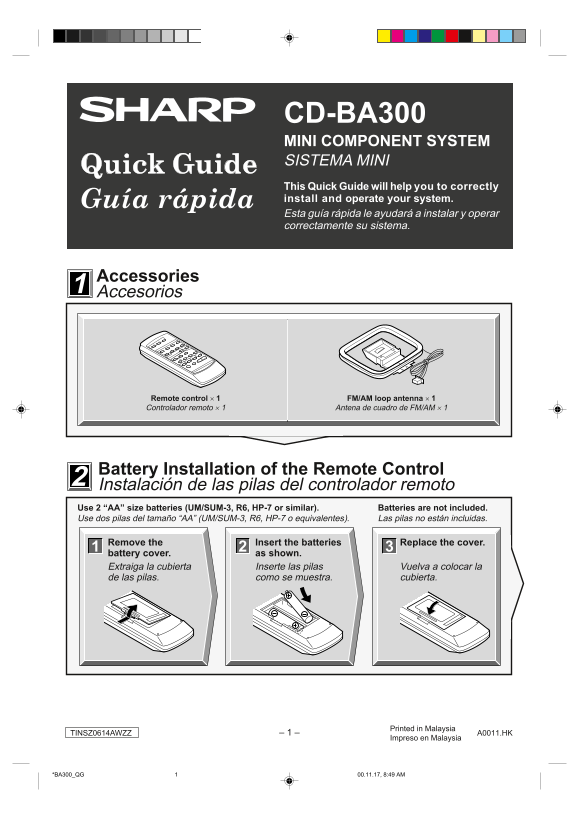
Page 1 Text Content
CD-BA300 MINI COMPONENT SYSTEM SISTEMA MINI This Quick Guide will help you to correctly install and operate your system. Esta guía rápida le ayudará a instalar y operar correctamente su sistema.
Accessories Accesorios
Remote control × 1 FM/AM loop antenna × 1 Controlador remoto × 1 Antena de cuadro de FM/AM × 1
Battery Installation of the Remote Control Instalación de las pilas del controlador remoto Use 2 “AA” size batteries (UM/SUM-3, R6, HP-7 or similar). Batteries are not included. Use dos pilas del tamaño “AA” (UM/SUM-3, R6, HP-7 o equivalentes). Las pilas no están incluidas.
Remove the Insert the batteries Replace the cover.
battery cover. as shown.
Extraiga la cubierta Inserte las pilas Vuelva a colocar la de las pilas. como se muestra. cubierta.
Printed in Malaysia
TINSZ0614AWZZ – 1 – A0011.HK
Impreso en Malaysia
*BA300_QG 00.11.17, 8:49 AM1
Page Summary Contents For SHARP CDBA300 Quick User Guide
Manual Details
| Brand | Sharp |
|---|---|
| Pages | 4 |
| File Size | 234.98 KB |
| Published | June 02, 2026 |
Enter the captcha to get the download link:

Frequently Asked Questions
How do I prepare the unit for first use?
The first time it is plugged in, press the X-BASS/DEMO STAND-BY button to enter demonstration mode.
What are the required batteries?
You need two “AA” size batteries (UM/SUM-3, R6, HP-7 or similar). Batteries are not included.
How do I begin playing a CD?
Press the CD button, use OPEN/CLOSE to open the tray, place the CD side up, and then press one of the 1-5 buttons followed by the 0/R button.
How can I tune into an FM stereo station?
Repeatedly press the TUNER (BAND) button until the “ST” indicator lights up. Scanning starts automatically if you hold the button for over 0.5 seconds.