SHARP EL-510R User's Guide Manual
Summary
Master your studies with this robust scientific and statistical calculator. This essential guide provides comprehensive instructions on initial setup, advanced numerical functions, complex statistics, and unit conversions. Whether you are a student or engineer requiring precision for arithmetic, trigonometric calculations, or detailed data analysis, the manual ensures seamless operation and mastery of every feature.
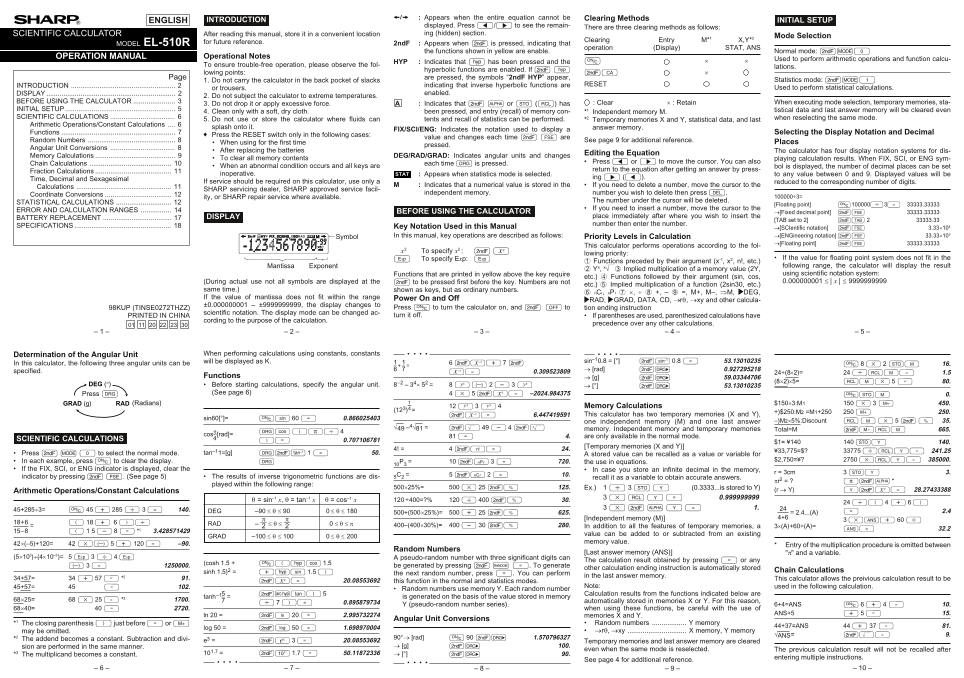
Page 1 Text Content
Appears when the entire equation cannot be Clearing Methods
ENGLISH INTRODUCTION INITIAL SETUP
displayed. Press </> to see the remain- There are three clearing methods as follows: SCIENTIFIC CALCULATOR After reading this manual, store it in a convenient location ing (hidden) section.
Mode Selection
Clearing Entry M*1 X,Y*2
MODEL EL-510R for future reference. 2nd F Appears when @ is pressed, indicating that
operation (Display) STAT, ANS
the functions shown in yellow are enable. Normal mode: @m0
OPERATION MANUAL Operational Notes
Used to perform arithmetic operations and function calcu-
HYP Indicates that h has been pressed and the
To ensure trouble-free operation, please observe the fol-
lations.
hyperbolic functions are enabled. If @ Á
lowing points: @c
Page are pressed, the symbols “2nd F HYP” appear,
1. Do not carry the calculator in the back pocket of slacks Statistics mode: @m1
INTRODUCTION indicating that inverse hyperbolic functions are RESET
or trousers. Used to perform statistical calculations.
DISPLAY enabled.
2. Do not subject the calculator to extreme temperatures.
BEFORE USING THE CALCULATOR : Clear × : Retain When executing mode selection, temporary memories, sta-
3. Do not drop it or apply excessive force. Indicates that @ K or O (R) has
INITIAL SETUP tistical data and last answer memory will be cleared even
4. Clean only with a soft, dry cloth. been pressed, and entry (recall) of memory con- *1 Independent memory M.
SCIENTIFIC CALCULATIONS when reselecting the same mode.
5. Do not use or store the calculator where fluids can tents and recall of statistics can be performed. *2 Temporary memories X and Y, statistical data, and last
Arithmetic Operations/Constant Calculations
splash onto it. answer memory.
FIX/SCI/ENG: Indicates the notation used to display a
Functions Selecting the Display Notation and Decimal
Press the RESET switch only in the following cases:
value and changes each time @ f are
Random Numbers See page 9 for additional reference.
When using for the first time Places
pressed.
Angular Unit Conversions
After replacing the batteries The calculator has four display notation systems for dis-
Editing the Equation
Memory Calculations DEG/RAD/GRAD: Indicates angular units and changes
To clear all memory contents playing calculation results. When FIX, SCI, or ENG sym-
Press < or > to move the cursor. You can also
Chain Calculations each time G is pressed.
When an abnormal condition occurs and all keys are bol is displayed, the number of decimal places can be set
return to the equation after getting an answer by press-
Fraction Calculations
inoperative. STAT Appears when statistics mode is selected. to any value between 0 and 9. Displayed values will be
ing > (<).
Time, Decimal and Sexagesimal
If service should be required on this calculator, use only a reduced to the corresponding number of digits.
Indicates that a numerical value is stored in the If you need to delete a number, move the cursor to the
Calculations
SHARP servicing dealer, SHARP approved service facil-
independent memory. number you wish to delete then press d.
Coordinate Conversions 100000÷3=
ity, or SHARP repair service where available.
The number under the cursor will be deleted.
STATISTICAL CALCULATIONS [Floating point] N100000/3= 33333.33333
If you need to insert a number, move the cursor to the
ERROR AND CALCULATION RANGES BEFORE USING THE CALCULATOR →[Fixed decimal point] @f 33333.33333
DISPLAY place immediately after where you wish to insert the
BATTERY REPLACEMENT [TAB set to 2] @i 2 33333.33
number then enter the number.
SPECIFICATIONS Key Notation Used in this Manual →[SCIentific notation] @f 3.33×10⁴
Symbol In this manual, key operations are described as follows: Priority Levels in Calculation →[ENGineering notation]@f 33.33×10³
→[Floating point] @f 33333.33333
This calculator performs operations according to the fol-
x2 To specify x2 : @ L
lowing priority:
To specify Exp: If the value for floating point system does not fit in the
1 Functions preceded by their argument (x-1, x2, n!, etc.)
Mantissa Exponent following range, the calculator will display the result
2 Yx, x¿ 3 Implied multiplication of a memory value (2Y,
Functions that are printed in yellow above the key require using scientific notation system:
etc.) 4 Functions followed by their argument (sin, cos,
(During actual use not all symbols are displayed at the @ to be pressed first before the key. Numbers are not 0.000000001 ≤ | x | ≤ 9999999999
etc.) 5 Implied multiplication of a function (2sin30, etc.)
same time.) shown as keys, but as ordinary numbers.
6 n Cr, n Pr 7 ×, ÷ 8 +, – 9 =, M+, M–, ⇒M, |DEG,
If the value of mantissa does not fit within the range Power On and Off
|RAD, |GRAD, DATA, CD, →rθ, →xy and other calcula-
±0.000000001 – ±9999999999, the display changes to
98KUP (TINSE0272THZZ) Press N to turn the calculator on, and @ F to tion ending instruction
scientific notation. The display mode can be changed ac-
PRINTED IN CHINA turn it off. If parentheses are used, parenthesized calculations have
cording to the purpose of the calculation.
precedence over any other calculations.
Determination of the Angular Unit When performing calculations using constants, constants
will be displayed as K. sin–10.8 = [°] @S 0.8 = 53.13010235
In this calculator, the following three angular units can be 6 @•+ 7 @ N 8 * 2 OM 16.
→ [rad] @g 0.927295218
specified. •= 0.309523809 24÷(8×2)= 24 /RM= 1.5
Functions → [g] @g 59.03344706
(8×2)×5= RM* 5 = 80.
DEG (°) Before starting calculations, specify the angular unit. 8–2 – 34× 52 = 8 ™ – 2 - 3 ™ → [°] @g 53.13010235
Press G (See page 6) 4 * 5 @L= –2024.984375 NOM 0.
GRAD (g) RAD (Radians) $150×3:M1 150 * 3 ; 450.
12 ™ 3 ™ 4 Memory Calculations
@•= 6.447419591 This calculator has two temporary memories (X and Y),
sin60[°]= Ns 60 = 0.866025403
one independent memory (M) and one last answer –)M2×5%:Discount R M * 5 @ % 35.
√49 –4√81 = @⁄ 49 - 4 @$ memory. Independent memory and temporary memories
Total=M @:RM 665.
Gu (V/ 4cos–[rad]=
81 = 4. are only available in the normal mode.
SCIENTIFIC CALCULATIONS 0.707106781
$1= ¥140 140 OY 140.
[Temporary memories (X and Y)]
¥33,775=$? 33775 /RY= 241.25
Press @ m 0 to select the normal mode. tan–11=[g] G@T 1 = 50. A stored value can be recalled as a value or variable for
In each example, press N to clear the display. $2,750=¥? 2750 *RY= 385000.
10 @q 3 = 720. the use in equations.
If the FIX, SCI, or ENG indicator is displayed, clear the In case you store an infinite decimal in the memory,
r = 3cm 3 OY 3.
indicator by pressing @ f. (See page 5) The results of inverse trigonometric functions are dis- 5C2 = recall it as a variable to obtain accurate answers.
played within the following range:
500×25%= 500 * 25 @% 125. Ex.) 1 / 3 O Y (0.3333...is stored to Y)
Arithmetic Operations/Constant Calculations (r → Y) Y@L= 28.27433388
θ = sin–1 x, θ = tan–1 x θ = cos–1 x 120÷400=?% 120 / 400 @% 30.
45+285÷3= N 45 + 285 / 3 = 140. DEG –90 ≤ θ ≤ 90 0 ≤ θ ≤ 180 24 = 2.4...(A) 2.4
[Independent memory (M)] 4+6 3 *?+ 60 /
18+6 ( 18 + 6 )/ RAD – — ≤ θ ≤ — 0 ≤ θ ≤ π
400–(400×30%)= 400 - 30 @% 280. In addition to all the features of temporary memories, a 3×(A)+60÷(A)=
value can be added to or subtracted from an existing
GRAD –100 ≤ θ ≤ 100 0 ≤ θ ≤ 200
42×(–5)+120= 42 *– 5 + 120 = –90. memory value.
Entry of the multiplication procedure is omitted between
Random Numbers
[Last answer memory (ANS)] "π" and a variable.
(5×10³)÷(4×10⁻³)= 5 E 3 / 4 E A pseudo-random number with three significant digits can
The calculation result obtained by pressing = or any
(cosh 1.5 + N(hu 1.5
– 3 = 1250000. be generated by pressing @ ` =. To generate
other calculation ending instruction is automatically stored
sinh 1.5)2 = +hs 1.5 ) Chain Calculations
the next random number, press =. You can perform
in the last answer memory.
34+57= 34 + 57 = *2 91. This calculator allows the preivious calculation result to be
@L= 20.08553692 this function in the normal and statistics modes.
45+57= 45 = 102. Note: used in the following calculation.
Random numbers use memory Y. Each random number
@Ht( 5tanh–1– = Calculation results from the functions indicated below are
is generated on the basis of the value stored in memory
68×25= 68 * 25 = *3 1700. automatically stored in memories X or Y. For this reason,
Y (pseudo-random number series). 6+4=ANS N 6 + 4 = 10.
68×40= 40 = 2720. when using these functions, be careful with the use of
ANS+5 + 5 = 15.
ln 20 = @I 20 = 2.995732274 memories X and Y.
Angular Unit Conversions
*1 The closing parenthesis ) just before = or ; Random numbers Y memory
44+37=ANS 44 + 37 = 81.
log 50 = @l 50 = 1.698970004
may be omitted. →rθ, →xy X memory, Y memory
√ANS= @⁄= 9.
*2 The addend becomes a constant. Subtraction and divi- 90°→ [rad] N 90 @g 1.570796327
e3 = @e 3 = 20.08553692 Temporary memories and last answer memory are cleared
sion are performed in the same manner. → [g] @g 100.
even when the same mode is reselected. The previous calculation result will not be recalled after
*3 The multiplicand becomes a constant. 101.7 = @¡ 1.7 = 50.11872336 → [°] @g 90.
entering multiple instructions.
See page 4 for additional reference.
Page Summary Contents For SHARP EL-510R User's Guide Manual
Manual Details
| Brand | Sharp |
|---|---|
| Pages | 2 |
| File Size | 225.51 KB |
| Published | June 06, 2026 |
Enter the captcha to get the download link:

Frequently Asked Questions
What must I do if no clearer result is displayed?
Press < or > on the 'Display' screen to view remaining parts of the equation.
How do I clear all memory and computational history?
Press the RESET switch, but only when you are sure you want to delete everything.
What are common precautions for using this calculator?
Do not expose it to extreme temperatures, fluid spills, or drop it; clean it with a soft, dry cloth.
What is the recommended procedure after changing batteries?
Use two fresh LR44 batteries with positive sides (+) facing up.