Samsung GT-C3322 User Guide
Summary
This safety and precautions guide for the Samsung GT-C3322 mobile phone outlines essential safety information including battery handling and charging precautions, guidelines for safe use while driving, warnings about medical equipment interference, device care instructions, and regulatory compliance information to ensure safe and proper device usage.
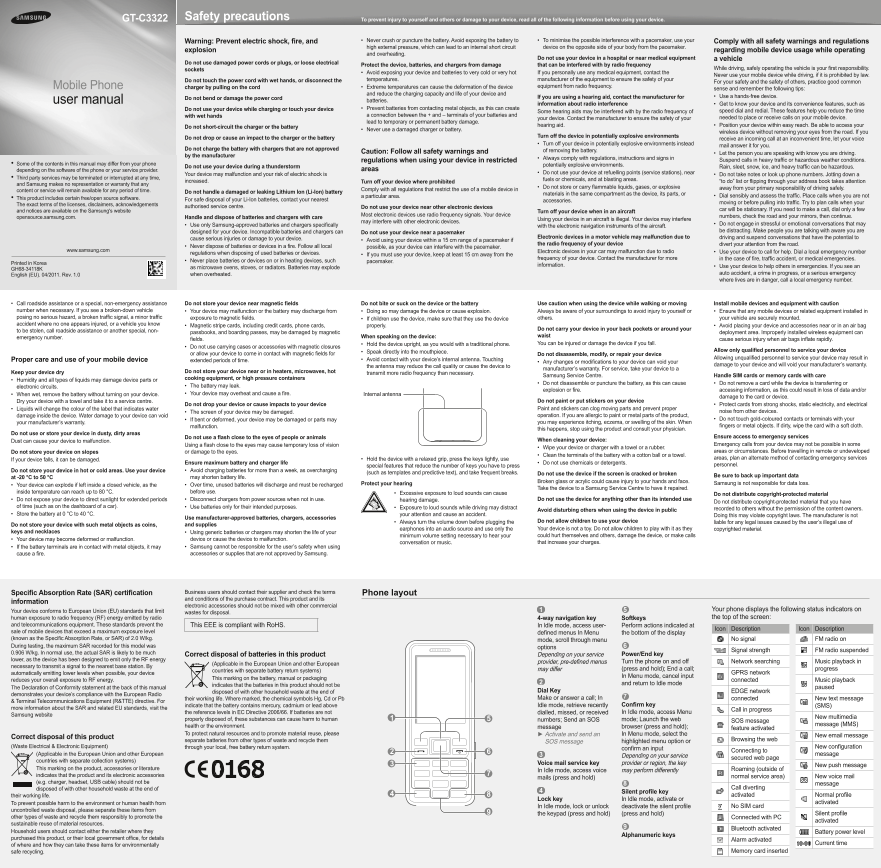
Page 1 Text Content
GT-C3322 Safety precautions To prevent injury to yourself and others or damage to your device, read all of the following information before using your device.
Warning: Prevent electric shock, fire, and Never crush or puncture the battery. Avoid exposing the battery to • To minimise the possible interference with a pacemaker, use your • Comply with all safety warnings and regulations high external pressure, which can lead to an internal short circuit device on the opposite side of your body from the pacemaker.
explosion regarding mobile device usage while operating
and overheating.
Do not use your device in a hospital or near medical equipment a vehicle
Do not use damaged power cords or plugs, or loose electrical
Protect the device, batteries, and chargers from damage that can be interfered with by radio frequency
sockets While driving, safely operating the vehicle is your first responsibility.
Avoid exposing your device and batteries to very cold or very hot • If you personally use any medical equipment, contact the
Never use your mobile device while driving, if it is prohibited by law.
Do not touch the power cord with wet hands, or disconnect the temperatures. manufacturer of the equipment to ensure the safety of your
For your safety and the safety of others, practice good common
Mobile Phone charger by pulling on the cord Extreme temperatures can cause the deformation of the device • equipment from radio frequency.
sense and remember the following tips:
and reduce the charging capacity and life of your device and
If you are using a hearing aid, contact the manufacturer for Use a hands-free device.•
Do not bend or damage the power cord
user manual batteries.
information about radio interference Get to know your device and its convenience features, such as •
Do not use your device while charging or touch your device Prevent batteries from contacting metal objects, as this can create •
Some hearing aids may be interfered with by the radio frequency of speed dial and redial. These features help you reduce the time
with wet hands a connection between the + and – terminals of your batteries and
your device. Contact the manufacturer to ensure the safety of your needed to place or receive calls on your mobile device.
lead to temporary or permanent battery damage.
Do not short-circuit the charger or the battery hearing aid. Position your device within easy reach. Be able to access your •
Never use a damaged charger or battery.•
wireless device without removing your eyes from the road. If you
Do not drop or cause an impact to the charger or the battery Turn off the device in potentially explosive environments
receive an incoming call at an inconvenient time, let your voice
Turn off your device in potentially explosive environments instead • mail answer it for you.
Do not charge the battery with chargers that are not approved of removing the battery.
Caution: Follow all safety warnings and Let the person you are speaking with know you are driving. •
by the manufacturer
Always comply with regulations, instructions and signs in • Suspend calls in heavy traffic or hazardous weather conditions.
regulations when using your device in restricted
Some of the contents in this manual may differ from your phone • potentially explosive environments.
Do not use your device during a thunderstorm Rain, sleet, snow, ice, and heavy traffic can be hazardous.
depending on the software of the phone or your service provider. areas
Your device may malfunction and your risk of electric shock is Do not use your device at refuelling points (service stations), near • Do not take notes or look up phone numbers. Jotting down a •
Third party services may be terminated or interrupted at any time, • fuels or chemicals, and at blasting areas.
increased. Turn off your device where prohibited “to do” list or flipping through your address book takes attention
and Samsung makes no representation or warranty that any
Do not store or carry flammable liquids, gases, or explosive • away from your primary responsibility of driving safely.
content or service will remain available for any period of time. Comply with all regulations that restrict the use of a mobile device in
Do not handle a damaged or leaking Lithium Ion (Li-Ion) battery materials in the same compartment as the device, its parts, or
a particular area. Dial sensibly and assess the traffic. Place calls when you are not •
This product includes certain free/open source software. • For safe disposal of your Li-Ion batteries, contact your nearest
accessories. moving or before pulling into traffic. Try to plan calls when your
The exact terms of the licenses, disclaimers, acknowledgements
authorised service centre. Do not use your device near other electronic devices
and notices are available on the Samsung's website car will be stationary. If you need to make a call, dial only a few
Turn off your device when in an aircraft
Most electronic devices use radio frequency signals. Your device numbers, check the road and your mirrors, then continue.
opensource.samsung.com. Handle and dispose of batteries and chargers with care
Using your device in an aircraft is illegal. Your device may interfere
may interfere with other electronic devices.
Use only Samsung-approved batteries and chargers specifically • Do not engage in stressful or emotional conversations that may •
with the electronic navigation instruments of the aircraft.
designed for your device. Incompatible batteries and chargers can be distracting. Make people you are talking with aware you are
Do not use your device near a pacemaker
cause serious injuries or damage to your device. Electronic devices in a motor vehicle may malfunction due to driving and suspend conversations that have the potential to
Avoid using your device within a 15 cm range of a pacemaker if •
the radio frequency of your device divert your attention from the road.
Never dispose of batteries or devices in a fire. Follow all local • possible, as your device can interfere with the pacemaker.
www.samsung.com Electronic devices in your car may malfunction due to radio Use your device to call for help. Dial a local emergency number •
regulations when disposing of used batteries or devices. If you must use your device, keep at least 15 cm away from the •
frequency of your device. Contact the manufacturer for more in the case of fire, traffic accident, or medical emergencies.
Never place batteries or devices on or in heating devices, such • pacemaker.
Printed in Korea information.
as microwave ovens, stoves, or radiators. Batteries may explode Use your device to help others in emergencies. If you see an •
GH68-34118K
English (EU). 04/2011. Rev. 1.0 when overheated. auto accident, a crime in progress, or a serious emergency where lives are in danger, call a local emergency number.
Call roadside assistance or a special, non-emergency assistance • Do not store your device near magnetic fields Do not bite or suck on the device or the battery Use caution when using the device while walking or moving Install mobile devices and equipment with caution
number when necessary. If you see a broken-down vehicle Your device may malfunction or the battery may discharge from • Doing so may damage the device or cause explosion.• Always be aware of your surroundings to avoid injury to yourself or Ensure that any mobile devices or related equipment installed in • posing no serious hazard, a broken traffic signal, a minor traffic exposure to magnetic fields. If children use the device, make sure that they use the device • others. your vehicle are securely mounted. accident where no one appears injured, or a vehicle you know Magnetic stripe cards, including credit cards, phone cards, • properly. Avoid placing your device and accessories near or in an air bag •
to be stolen, call roadside assistance or another special, non- Do not carry your device in your back pockets or around your
passbooks, and boarding passes, may be damaged by magnetic deployment area. Improperly installed wireless equipment can
emergency number. When speaking on the device: waist
fields. cause serious injury when air bags inflate rapidly.
Hold the device upright, as you would with a traditional phone.• You can be injured or damage the device if you fall.
Do not use carrying cases or accessories with magnetic closures •
Speak directly into the mouthpiece.• Allow only qualified personnel to service your device
or allow your device to come in contact with magnetic fields for Do not disassemble, modify, or repair your device
Avoid contact with your device’s internal antenna. Touching • Allowing unqualified personnel to service your device may result in
Proper care and use of your mobile device extended periods of time. Any changes or modifications to your device can void your •
the antenna may reduce the call quality or cause the device to damage to your device and will void your manufacturer’s warranty.
manufacturer’s warranty. For service, take your device to a
Keep your device dry Do not store your device near or in heaters, microwaves, hot transmit more radio frequency than necessary.
Samsung Service Centre. Handle SIM cards or memory cards with care
Humidity and all types of liquids may damage device parts or • cooking equipment, or high pressure containers
Do not disassemble or puncture the battery, as this can cause • Do not remove a card while the device is transferring or •
electronic circuits. The battery may leak.•
explosion or fire. accessing information, as this could result in loss of data and/or
When wet, remove the battery without turning on your device. • Your device may overheat and cause a fire.• Internal antenna
damage to the card or device.
Dry your device with a towel and take it to a service centre. Do not paint or put stickers on your device
Do not drop your device or cause impacts to your device Protect cards from strong shocks, static electricity, and electrical •
Liquids will change the colour of the label that indicates water • Paint and stickers can clog moving parts and prevent proper
The screen of your device may be damaged.• noise from other devices.
damage inside the device. Water damage to your device can void operation. If you are allergic to paint or metal parts of the product,
If bent or deformed, your device may be damaged or parts may • Do not touch gold-coloured contacts or terminals with your •
your manufacturer’s warranty. you may experience itching, eczema, or swelling of the skin. When
malfunction. fingers or metal objects. If dirty, wipe the card with a soft cloth.
this happens, stop using the product and consult your physician.
Do not use or store your device in dusty, dirty areas
Do not use a flash close to the eyes of people or animals Ensure access to emergency services
Dust can cause your device to malfunction. When cleaning your device:
Using a flash close to the eyes may cause temporary loss of vision Emergency calls from your device may not be possible in some
Wipe your device or charger with a towel or a rubber.•
Do not store your device on slopes or damage to the eyes. areas or circumstances. Before travelling in remote or undeveloped
Clean the terminals of the battery with a cotton ball or a towel.•
If your device falls, it can be damaged. Hold the device with a relaxed grip, press the keys lightly, use • areas, plan an alternate method of contacting emergency services
Ensure maximum battery and charger life Do not use chemicals or detergents.• personnel.
special features that reduce the number of keys you have to press
Do not store your device in hot or cold areas. Use your device Avoid charging batteries for more than a week, as overcharging •
(such as templates and predictive text), and take frequent breaks. Do not use the device if the screen is cracked or broken
at -20 °C to 50 °C may shorten battery life. Be sure to back up important data
Broken glass or acrylic could cause injury to your hands and face. Samsung is not responsible for data loss.
Your device can explode if left inside a closed vehicle, as the • Over time, unused batteries will discharge and must be recharged • Protect your hearing
Take the device to a Samsung Service Centre to have it repaired.
inside temperature can reach up to 80 °C. before use. Excessive exposure to loud sounds can cause •
Do not distribute copyright-protected material
Do not expose your device to direct sunlight for extended periods • Disconnect chargers from power sources when not in use.• hearing damage. Do not use the device for anything other than its intended use
Do not distribute copyright-protected material that you have
of time (such as on the dashboard of a car). Use batteries only for their intended purposes.• Exposure to loud sounds while driving may distract •
Avoid disturbing others when using the device in public recorded to others without the permission of the content owners.
Store the battery at 0 °C to 40 °C.• your attention and cause an accident. Doing this may violate copyright laws. The manufacturer is not
Use manufacturer-approved batteries, chargers, accessories
Always turn the volume down before plugging the • Do not allow children to use your device liable for any legal issues caused by the user’s illegal use of
Do not store your device with such metal objects as coins, and supplies
earphones into an audio source and use only the Your device is not a toy. Do not allow children to play with it as they copyrighted material.
keys and necklaces Using generic batteries or chargers may shorten the life of your •
minimum volume setting necessary to hear your could hurt themselves and others, damage the device, or make calls
Your device may become deformed or malfunction.• device or cause the device to malfunction.
conversation or music. that increase your charges.
If the battery terminals are in contact with metal objects, it may • Samsung cannot be responsible for the user’s safety when using • cause a fire. accessories or supplies that are not approved by Samsung.
Specific Absorption Rate (SAR) certification Business users should contact their supplier and check the terms Phone layout and conditions of the purchase contract. This product and its
information
electronic accessories should not be mixed with other commercial
Your device conforms to European Union (EU) standards that limit Your phone displays the following status indicators on
wastes for disposal.
human exposure to radio frequency (RF) energy emitted by radio 4-way navigation key Softkeys the top of the screen:
and telecommunications equipment. These standards prevent the This EEE is compliant with Ro HS. In ldle mode, access user- Perform actions indicated at
Icon Description Icon Description
sale of mobile devices that exceed a maximum exposure level defined menus In Menu the bottom of the display (known as the Specific Absorption Rate, or SAR) of 2.0 W/kg. mode, scroll through menu No signal FM radio on During testing, the maximum SAR recorded for this model was options
Signal strength FM radio suspended
0.906 W/kg. In normal use, the actual SAR is likely to be much Power/End key
Correct disposal of batteries in this product Depending on your service
lower, as the device has been designed to emit only the RF energy
provider, pre-defined menus Turn the phone on and off Network searching Music playback in
(Applicable in the European Union and other European
necessary to transmit a signal to the nearest base station. By
countries with separate battery return systems) may differ (press and hold); End a call; progress
automatically emitting lower levels when possible, your device GPRS network
In Menu mode, cancel input
reduces your overall exposure to RF energy. This marking on the battery, manual or packaging connected Music playback
indicates that the batteries in this product should not be and return to Idle mode
The Declaration of Conformity statement at the back of this manual paused
disposed of with other household waste at the end of Dial Key EDGE network
demonstrates your device’s compliance with the European Radio
their working life. Where marked, the chemical symbols Hg, Cd or Pb Make or answer a call; In connected New text message
& Terminal Telecommunications Equipment (R&TTE) directive. For
indicate that the battery contains mercury, cadmium or lead above Idle mode, retrieve recently Confirm key (SMS)
more information about the SAR and related EU standards, visit the Call in progress
the reference levels in EC Directive 2006/66. If batteries are not dialled, missed, or received In Idle mode, access Menu
Samsung website
New multimedia
properly disposed of, these substances can cause harm to human numbers; Send an SOS mode; Launch the web SOS message
health or the environment. message (MMS)
message browser (press and hold); feature activated
To protect natural resources and to promote material reuse, please ► Activate and send an In Menu mode, select the
Correct disposal of this product New email message
separate batteries from other types of waste and recycle them highlighted menu option or Browsing the web
SOS message
(Waste Electrical & Electronic Equipment) through your local, free battery return system. New configuration
confirm an input
Connecting to
(Applicable in the European Union and other European Depending on your service message
secured web page
countries with separate collection systems)
Voice mail service key provider or region, the key
New push message
This marking on the product, accessories or literature Roaming (outside of
In Idle mode, access voice may perform differently
indicates that the product and its electronic accessories normal service area) New voice mail
mails (press and hold)
(e.g. charger, headset, USB cable) should not be message
disposed of with other household waste at the end of Call diverting
Silent profile key
their working life. activated Normal profile
Lock key In ldle mode, activate or
To prevent possible harm to the environment or human health from activated
In Idle mode, lock or unlock deactivate the silent profile No SIM card
uncontrolled waste disposal, please separate these items from
the keypad (press and hold) (press and hold) Silent profile
other types of waste and recycle them responsibly to promote the Connected with PC
activated
sustainable reuse of material resources.
Bluetooth activated
Household users should contact either the retailer where they Battery power level
Alphanumeric keys
purchased this product, or their local government office, for details Alarm activated
of where and how they can take these items for environmentally Current time
safe recycling. Memory card inserted
Page Summary Contents For Samsung GT-C3322 User Guide
Manual Details
| Brand | Samsung |
|---|---|
| Pages | 2 |
| File Size | 1.79 MB |
| Published | June 16, 2026 |
Enter the captcha to get the download link:

Frequently Asked Questions
Where should I avoid using my device due to potential interference?
Do not use your device in a hospital or near medical equipment like pacemakers.
What are the safety guidelines when operating the device while driving?
Never use your mobile device while driving. You must use a hands-free device and wait until you are stationary before making calls.
How should I handle batteries to prevent damage?
Never puncture or crush the lithium ion battery, keep them away from metal objects, and never use damaged chargers or batteries.
What is the process for sending an SOS message?
In Menu mode, select Messages → Create Message. Enter preset numbers, text, add multimedia if needed, and press Confirm to send.