Rollei Brief Camera User's Manual
Summary
Discover professional photography with this advanced digital camera system. This comprehensive user guide provides step-by-step instructions for operating the device, setting up diverse shooting modes (including flash control and night mode), selecting optimal image quality, and mastering all customizable settings. The manual also details how to install required software and easily transfer your high-resolution pictures and videos to your computer via USB or mini-USB cable. Perfect for both photography enthusiasts seeking advanced features and new users needing a complete operational walkthrough.
Page 1 Text Content
Brief Instructions for Digital Camera These brief instructions will help you to take pictures with camera up with your computer. For detailed information, see your digital camera, install the software supplied and link the the CD-ROM supplied with the camera.
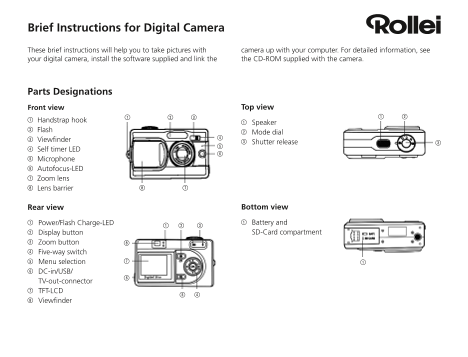
Parts Designations
Front view Top view
1 Handstrap hook
1 Speaker
2 Flash
2 Mode dial
3 Viewfi nder
3 Shutter release
4 Self timer LED 5 Microphone 6 Autofocus-LED 7 Zoom lens 8 Lens barrier
Rear view Bottom view 1 Power/Flash Charge-LED 1 Battery and 2 Display button SD-Card compartment
3 Zoom button 4 Five-way switch 5 Menu selection 6 DC-in/USB/ TV-out-connector 7 TFT-LCD 8 Viewfi nder
Page Summary Contents For Rollei Brief Camera User's Manual
Manual Details
| Brand | Rollei |
|---|---|
| Pages | 4 |
| File Size | 184.52 KB |
| Published | May 27, 2026 |
Enter the captcha to get the download link:

Frequently Asked Questions
What steps are needed to load the battery and memory card?
Open the compartment, insert the charged Li-Ion battery (correctly oriented), and then insert the SD/MM card with its cut-off corner opposite the camera's front.
How do I connect my picture files to my computer?
Use the mini-USB cable. Connect the camera, switch it on, and your photos will appear as a data medium labeled '400_CAMERA' on the desktop or inside a folder on the CD-ROM.
What is the best way to download pictures for editing and sharing?
Use the provided software (e.g., PhotoImpression). Download pictures to your PC, then save them in various formats like JPEG, WAV, and HTML (recommended for adding voice memos).