PHILIPS PhotoFrame SPF4612 Quick User Guide
Summary
Discover essential guidance for your digital PhotoFrame. This comprehensive manual provides new users with detailed instructions on operating the device's various modes—including slideshow, clock, and calendar functions—and mastering all controls. Furthermore, it includes critical safety precautions for use and environmental guidelines, ensuring proper handling and responsible disposal of old electronics in compliance with local regulations. Ideal for any owner who wants to ensure safe setup, optimal performance, and sustainability when using their new PhotoFrame.
Page 1 Text Content
Register your product and get support at
Photo Frame
www.philips.com/welcome
SPF4612
BACK HOME BACK HOME BACK HOME
BACK HOME
BACK HOME
EN User Manual ZH-CN 用户手册 BACK HOMEBACK HOME BACK HOME BACK HOME
BACK HOME
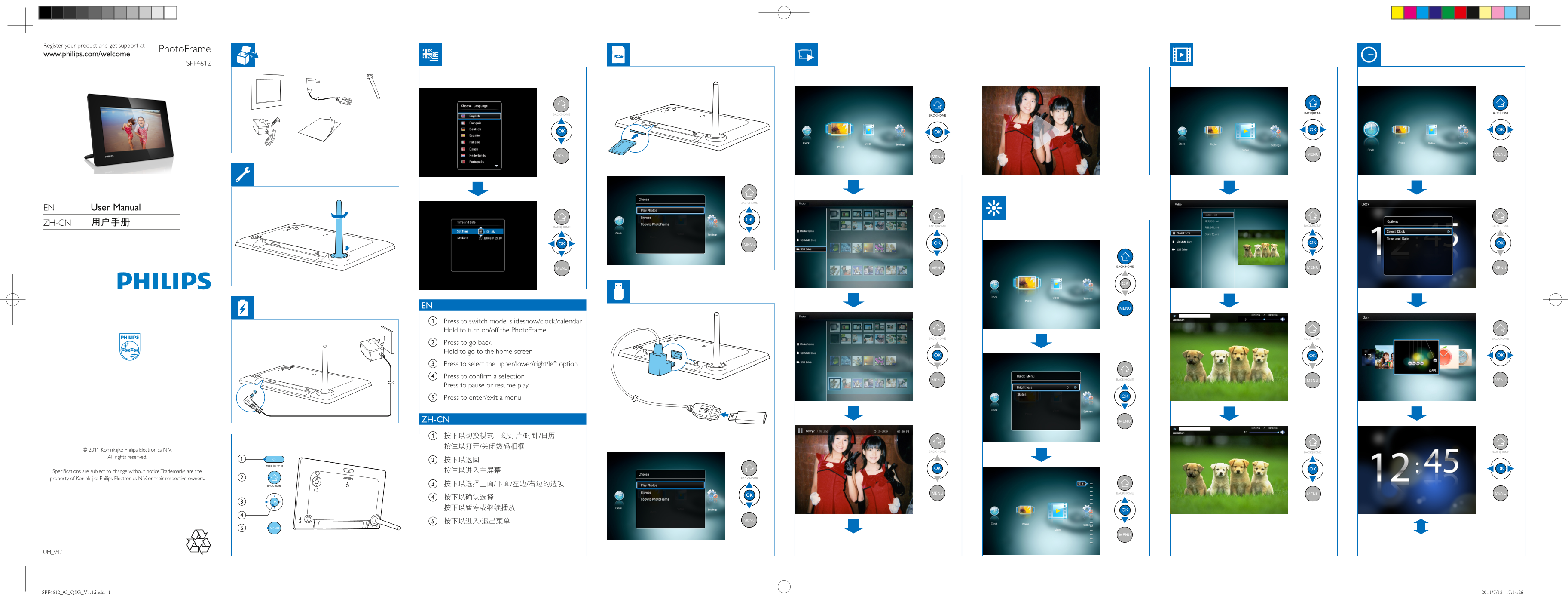
EN a Press to switch mode: slideshow/clock/calendar Hold to turn on/off the Photo Frame
BACK HOME BACK HOME BACK HOME
b Press to go back Hold to go to the home screen c Press to select the upper/lower/right/left option d Press to confirm a selection
BACK HOME
Press to pause or resume play e Press to enter/exit a menu
ZH-CN a 按下以切换模式:幻灯片/时钟/日历 按住以打开/关闭数码相框
© 2011 Koninklijke Philips Electronics N.V. BACK HOME BACK HOME
BACK HOME
All rights reserved.
MODE POWER
Specifications are subject to change without notice.Trademarks are the 按住以进入主屏幕
property of Koninklijke Philips Electronics N.V. or their respective owners. BACK HOME
BACK HOME c 按下以选择上面/下面/左边/右边的选项
BACK HOME
UM_V1.1
SPF4612_93_QSG_V1.1.indd 1 2011/7/12 17:14:26
Page Summary Contents For PHILIPS PhotoFrame SPF4612 Quick User Guide
Manual Details
| Brand | Philips |
|---|---|
| Pages | 2 |
| File Size | 5.12 MB |
| Published | July 15, 2026 |
Enter the captcha to get the download link:

Frequently Asked Questions
How should I clean the LCD screen?
Only use a soft, damp cloth for cleaning; never use alcohol or household cleaners.
What precautions must I take when storing the product long-term?
If not in use for a long time, unplug and remove the power cord.
What are the device's electrical input and output specifications?
Input: AC 100-240V ~ 50-60Hz 0.3A; Output: DC 9 V 1000mA.
How do I properly dispose of old or used products?
Follow local and state regulations, contacting a Philips dealer or using programs like NERC.