PHILIPS PhotoFrame SPF1428 Quick User Guide
Summary
Discover effortless ways to display cherished memories with this digital PhotoFrame. This comprehensive user manual guides you through initial setup, offering detailed instructions on essential features like customizing brightness, setting dates, and adjusting slideshow intervals for the perfect viewing experience. It provides critical operational tips, safety warnings for proper maintenance (including cleaning procedures), and guidance on responsible product disposal, making it an indispensable resource for all PhotoFrame owners.
Page 1 Text Content
Register your product and get support at
Photo Frame ZH
www.philips.com/welcome
SPF1428
Register your product and get support at www.philips.com/welcome Photo Frame
User Manual
EN User manual ZH-CN
3 BACK|POWER
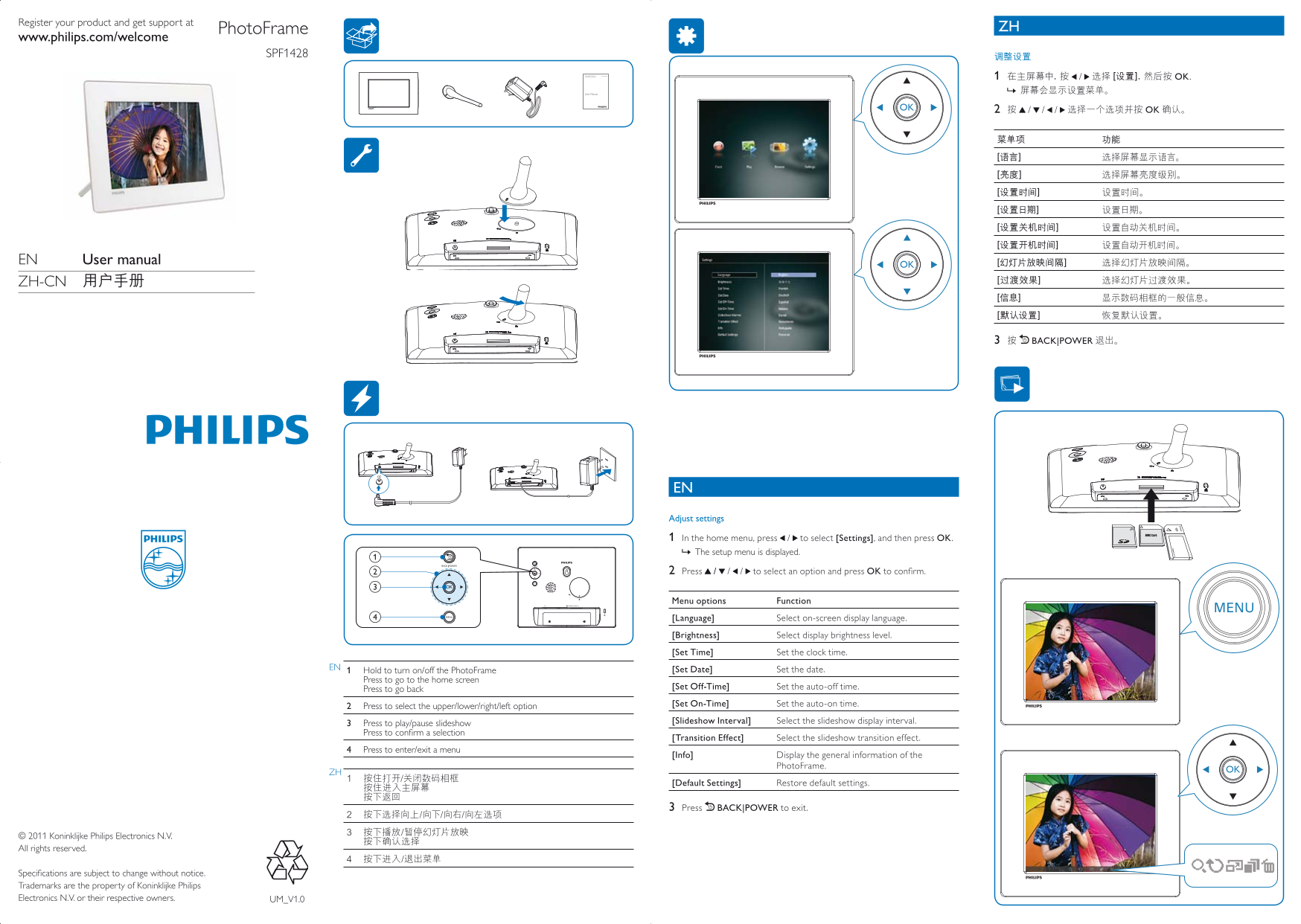
EN Adjust settings 1 In the home menu, press / to select [Settings], and then press OK The setup menu is displayed. » 2 Press / / / to select an option and press OK to confirm.
/MS/MS Pro Menu options Function
[Language] Select on-screen display language. [Brightness] Select display brightness level. [Set Time] Set the clock time.
EN [Set Date] Set the date. Hold to turn on/off the Photo Frame Press to go to the home screen
Press to go back [Set Off-Time] Set the auto-off time. Press to select the upper/lower/right/left option [Set On-Time] Set the auto-on time. Press to play/pause slideshow [Slideshow Interval] Select the slideshow display interval.
Press to confirm a selection
[Transition Effect] Select the slideshow transition effect.
4 Press to enter/exit a menu
[Info] Display the general information of the
Photo Frame.
[Default Settings] Restore default settings.
3 Press BACK|POWER to exit.
© 2011 Koninklijke Philips Electronics N.V. All rights reserved.
Specifications are subject to change without notice. Trademarks are the property of Koninklijke Philips Electronics N.V. or their respective owners. UM_V1.0
Page Summary Contents For PHILIPS PhotoFrame SPF1428 Quick User Guide
Manual Details
| Brand | Philips |
|---|---|
| Pages | 2 |
| File Size | 706.19 KB |
| Published | July 15, 2026 |
Enter the captcha to get the download link:

Frequently Asked Questions
How do I change the display language or brightness?
Navigate to [Settings] in the home menu, and use the directional controls to select options like [Language] or [Brightness].
What should I use to clean the PhotoFrame screen?
Before cleaning, unplug the power cord. Only use a soft, water-damp cloth; never use alcohol, chemicals, or household cleaners.
How can I restore all settings to their original state?
In the setup menu, select [Default Settings] to restore all options and configurations of the PhotoFrame.
What is the recommended procedure for disposing of the product?
Never dispose of it with other household waste. Check local regulations or consult Philips dealers/websites like www.eia.org.