Panasonic RF-SW100 User Guide
Summary
Explore core wireless audio enjoyment with this portable radio system. This comprehensive manual provides users with detailed instructions on tuning AM/FM stations, adjusting volume, and safely connecting accessories like headphones and arm belts. It covers basic operation, proactive troubleshooting tips, proper battery maintenance, and full warranty information, ensuring a smooth setup experience for every new owner.
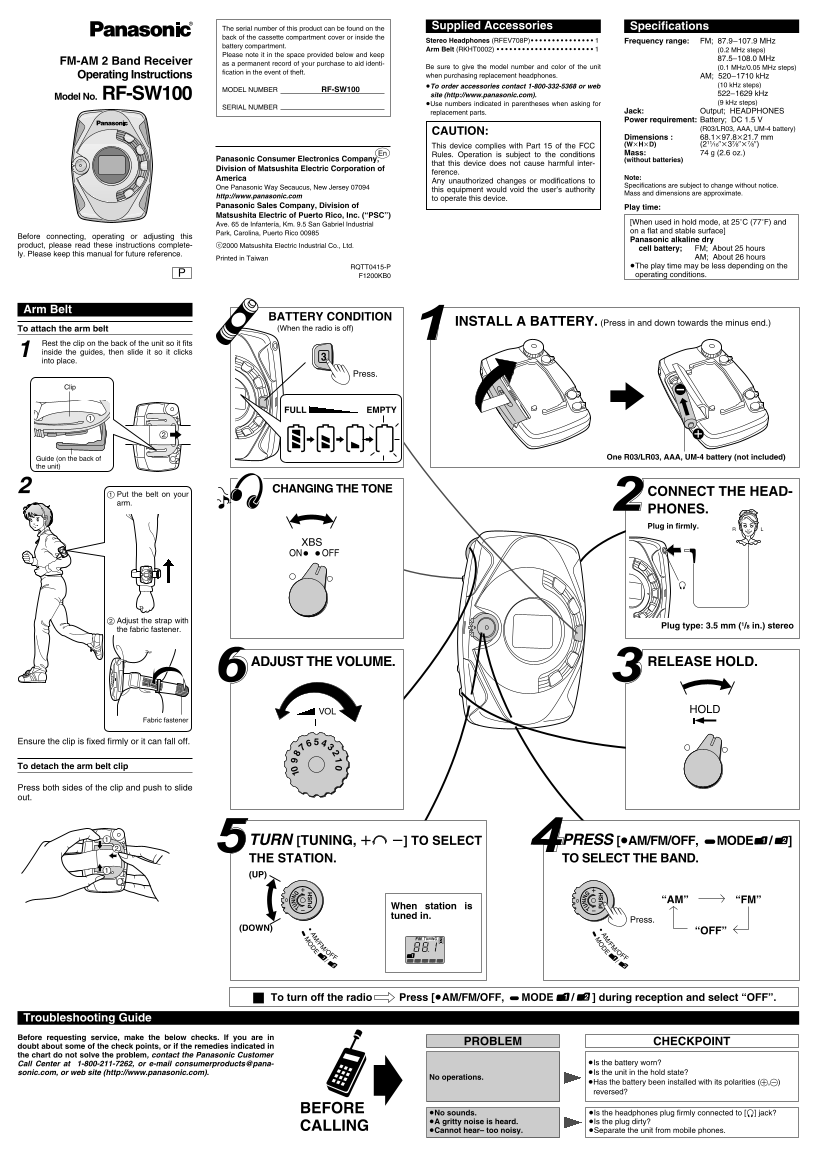
Page 1 Text Content
The serial number of this product can be found on the Supplied Accessories Specifications
back of the cassette compartment cover or inside the
Stereo Headphones (RFEV708P)• • • • • • • • • • • • • • • 1 Frequency range: FM; 87.9–107.9 MHz
battery compartment.
Arm Belt (RKHT0002) • • • • • • • • • • • • • • • • • • • • • • • 1 (0.2 MHz steps)
Please note it in the space provided below and keep
87.5–108.0 MHz
FM-AM 2 Band Receiver as a permanent record of your purchase to aid identi-
Be sure to give the model number and color of the unit (0.1 MHz/0.05 MHz steps)
fication in the event of theft.
Operating Instructions when purchasing replacement headphones. AM; 520–1710 k Hz
≥To order accessories contact 1-800-332-5368 or web (10 k Hz steps)
MODEL NUMBER RF-SW100
RF-SW100 site (http://www.panasonic.com). 522–1629 k Hz
Model No.
≥Use numbers indicated in parentheses when asking for (9 k Hz steps)
SERIAL NUMBER
replacement parts. Jack: Output; HEADPHONES Power requirement: Battery; DC 1.5 V
(R03/LR03, AAA, UM-4 battery)
CAUTION:
Dimensions : 68.1k97.8k21.7 mm This device complies with Part 15 of the FCC (Wk Hk D) (211⁄16qk37⁄8qk7⁄8q) Rules. Operation is subject to the conditions Mass: 74 g (2.6 oz.)
Panasonic Consumer Electronics Company, (without batteries)
that this device does not cause harmful inter-
Division of Matsushita Electric Corporation of
ference.
America Note:
Any unauthorized changes or modifications to
One Panasonic Way Secaucus, New Jersey 07094 Specifications are subject to change without notice.
this equipment would void the user’s authority
Mass and dimensions are approximate.
http://www.panasonic.com
to operate this device.
Panasonic Sales Company, Division of Play time:
Matsushita Electric of Puerto Rico, Inc. (“PSC”)
[When used in hold mode, at 25e C (77e F) and
Ave. 65 de Infantería, Km. 9.5 San Gabriel Industrial
Park, Carolina, Puerto Rico 00985 on a flat and stable surface]
Before connecting, operating or adjusting this
Panasonic alkaline dry
product, please read these instructions complete- c2000 Matsushita Electric Industrial Co., Ltd. TUN TUN cell battery; FM; About 25 hours
ly. Please keep this manual for future reference.
Printed in Taiwan AM; About 26 hours
RQTT0415-P ≥The play time may be less depending on the F1200KB0 operating conditions.
Arm Belt
BATTERY CONDITION
INSTALL A BATTERY. (Press in and down towards the minus end.)
To attach the arm belt (When the radio is off)
Rest the clip on the back of the unit so it fits inside the guides, then slide it so it clicks into place.
Press.
FULL EMPTY
Guide (on the back of One R03/LR03, AAA, UM-4 battery (not included)
the unit)
CHANGING THE TONE CONNECT THE HEAD-
Put the belt on your
PHONES. Plug in firmly.
XBS ON OFF
Adjust the strap with
Plug type: 3.5 mm (1/8 in.) stereo
the fabric fastener.
RELEASE HOLD.ADJUST THE VOLUME.
VOL HOLD
Fabric fastener
Ensure the clip is fixed firmly or it can fall off.
To detach the arm belt clip
Press both sides of the clip and push to slide out.
TURN [TUNING, r s] TO SELECT PRESS [≥AM/FM/OFF, %MODE / ] THE STATION. TO SELECT THE BAND. (UP)
“AM” “FM”
When station is tuned in.
Press.
(DOWN)
“OFF”
FM TUNING
/OFF /OFF
To turn off the radio Press [≥AM/FM/OFF, %MODE / ] during reception and select “OFF”.
Troubleshooting Guide Before requesting service, make the below checks. If you are in
PROBLEM CHECKPOINT
doubt about some of the check points, or if the remedies indicated in the chart do not solve the problem, contact the Panasonic Customer
Call Center at 1-800-211-7262, or e-mail consumerproducts@pana- ≥Is the battery worn? sonic.com, or web site (http://www.panasonic.com). ≥Is the unit in the hold state?
No operations.
≥Has the battery been installed with its polarities (+,-) reversed?
BEFORE
≥No sounds. ≥Is the headphones plug firmly connected to [Ë] jack? ≥A gritty noise is heard. ≥Is the plug dirty?
CALLING
≥Cannot hear– too noisy. ≥Separate the unit from mobile phones.
Page Summary Contents For Panasonic RF-SW100 User Guide
Manual Details
| Brand | Panasonic |
|---|---|
| Pages | 2 |
| File Size | 224.39 KB |
| Published | May 27, 2026 |
Enter the captcha to get the download link:

Frequently Asked Questions
Where can I find the serial number of this product?
The serial number is located on the back of the cassette compartment cover or inside the Stereo Headphones.
What are the frequency ranges for FM and AM bands?
FM covers 87.9–107.9 MHz, while AM spans from 520–1710 kHz.
How long does the device typically last on a single battery charge?
It offers about 25 hours on batteries for FM and around 26 hours for AM.
What should I do if I hear a gritty noise or cannot hear anything?
Ensure the plug is clean, separate the unit from mobile phones, or consult the troubleshooting guide if the issue persists.