Panasonic RF-SW250 User Manual and Specifications
Summary
A robust, portable Panasonic radio unit capable of AM/FM stereo reception, plus advanced stopwatch and timer functions. This manual provides comprehensive operating instructions, covering everything from connecting headphones to setting up detailed tracking modes for jogging or timing events. Ideal for outdoor enthusiasts and students needing reliable, multi-functional audio equipment on the go.
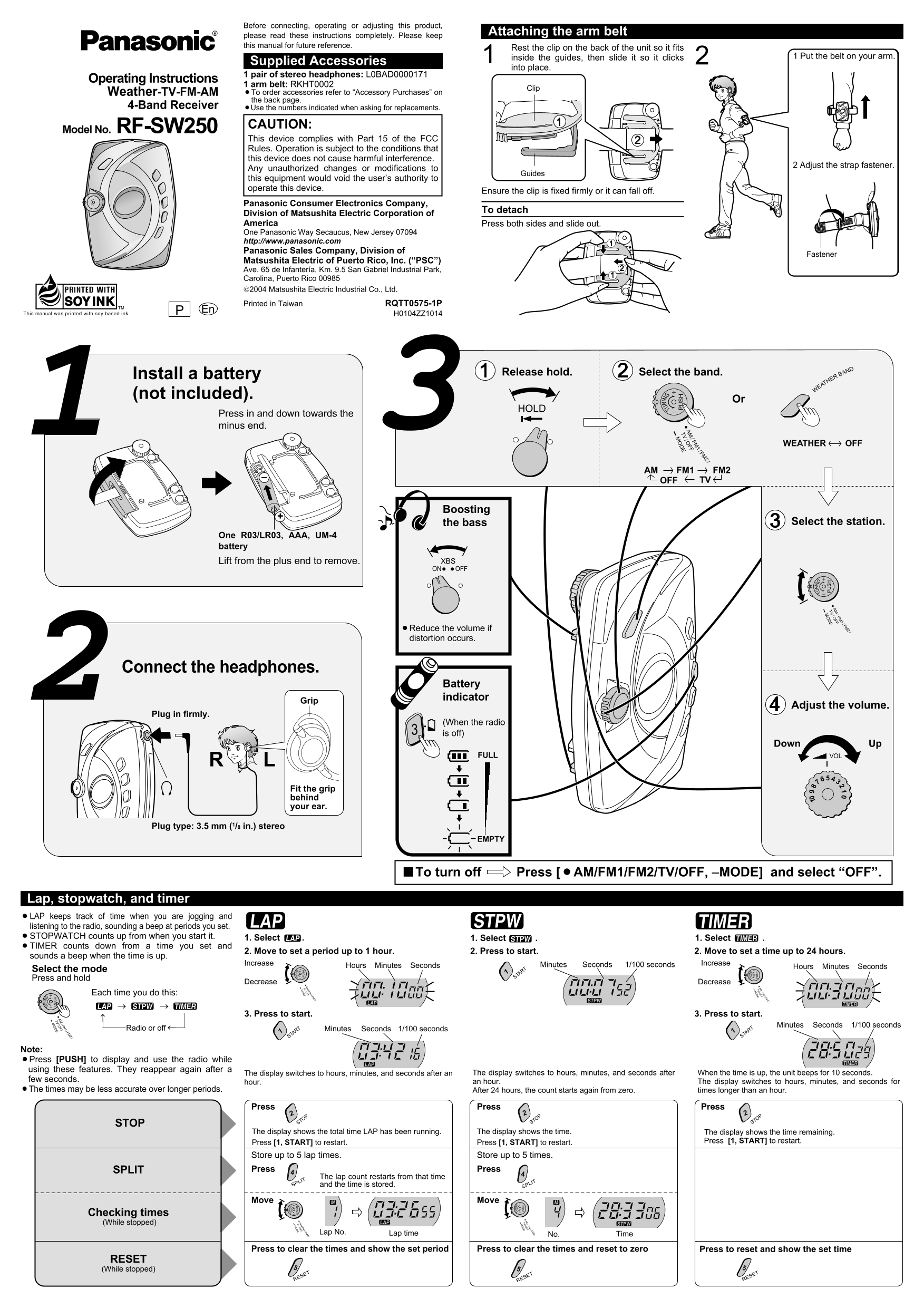
Page 1 Text Content
RF-SW250-P (RQTT0575-P) 04.1.28 5:32 PM y
Before connecting, operating or adjusting this product,
Attaching the arm belt
please read these instructions completely. Please keep
this manual for future reference. IN
Rest the clip on the back of the unit so it fits
inside the guides, then slide it so it clicks 1 Put the belt on your arm.
Supplied Accessories
into place.
1 pair of stereo headphones: L0BAD0000171
Operating Instructions /FM
1 arm belt: RKHT0002 /FM
Clip FF Weather-TV-FM-AM ¡To order accessories refer to “Accessory Purchases” on /O TUN TUN
the back page.
4-Band Receiver ¡Use the numbers indicated when asking for replacements.
RF-SW250 CAUTION:
Model No.
This device complies with Part 15 of the FCC Rules. Operation is subject to the conditions that
this device does not cause harmful interference. /FM /FN FF 2 Adjust the strap fastener. /O
Any unauthorized changes or modifications to
Guides
this equipment would void the user’s authority to operate this device.
Ensure the clip is fixed firmly or it can fall off.
Panasonic Consumer Electronics Company,
To detach
Division of Matsushita Electric Corporation of America /FM Press both sides and slide out.
One Panasonic Way Secaucus, New Jersey 07094 /FM FF /O
http://www.panasonic.com Panasonic Sales Company, Division of
Fastener
Matsushita Electric of Puerto Rico, Inc. (“PSC”) Ave. 65 de Infantería, Km. 9.5 San Gabriel Industrial Park, Carolina, Puerto Rico 00985
IN 2004 Matsushita Electric Industrial Co., Ltd.
Printed in Taiwan RQTT0575-1P
H0104ZZ1014
TUN TUN
Install a battery Release hold. Select the band. BAND
EATHER
/FM (not included). /FN FF Or /O
Press in and down towards the minus end.
WEATHER OFF
AM FM1 FM2
TVOFF
Boosting
the bass Select the station.
One R03/LR03, AAA, UM-4 battery
Lift from the plus end to remove. XBS ON OFF
/FM /FN FF /O /FM
/FN FF /O
¡Reduce the volume if distortion occurs.
Connect the headphones.
Battery indicator
Adjust the volume.
TUN Plug in firmly.
(When the radio is off)
Down Up
FULL VOL
Fit the grip behind your ear.
Plug type: 3.5 mm (1/8 in.) stereo
EMPTY
/FM /FN FF /O
■To turn off Press [¡AM/FM1/FM2/TV/OFF, –MODE] and select “OFF”.
Lap, stopwatch, and timer ¡LAP keeps track of time when you are jogging and listening to the radio, sounding a beep at periods you set. ¡STOPWATCH counts up from when you start it. 1. Select . 1. Select . 1. Select . ¡TIMER counts down from a time you set and
2. Move to set a period up to 1 hour. 2. Press to start. 2. Move to set a time up to 24 hours.
sounds a beep when the time is up.
Increase Minutes 1/100 seconds Seconds Increase
Hours Minutes Seconds Hours Minutes Seconds
Select the mode RT
Press and hold STA
Decrease Decrease
Each time you do this:
3. Press to start. 3. Press to start.
Minutes 1/100 seconds Seconds
Radio or off RT Minutes Seconds 1/100 seconds RT
STA STA
Note: ¡Press [PUSH] to display and use the radio while using these features. They reappear again after a
The display switches to hours, minutes, and seconds after an The display switches to hours, minutes, and seconds after When the time is up, the unit beeps for 10 seconds.
few seconds. an hour. The display switches to hours, minutes, and seconds for
hour.
¡The times may be less accurate over longer periods. After 24 hours, the count starts again from zero. times longer than an hour.
Press Press Press
STOP STOP STOP STOP
The display shows the total time LAP has been running. The display shows the time. The display shows the time remaining.
Press [1, START] to restart. Press [1, START] to restart. Press [1, START] to restart.
Store up to 5 lap times. Store up to 5 times.
SPLIT Press Press
The lap count restarts from that time SPLIT and the time is stored. SPLIT
Move Move
Checking times (While stopped)
Lap No. Lap time Time
Press to clear the times and show the set period Press to clear the times and reset to zero Press to reset and show the set time
RESET (While stopped)
RESET RESET RESET
Page Summary Contents For Panasonic RF-SW250 User Manual and Specifications
Manual Details
| Brand | Panasonic |
|---|---|
| Pages | 2 |
| File Size | 259.77 KB |
| Published | June 22, 2026 |
Enter the captcha to get the download link:

Frequently Asked Questions
What steps should I take if there is no sound coming from the unit?
First, replace the battery to ensure correct polarization (+ and –), then release HOLD.
How can I use the specialized timing functions on this receiver?
It includes a stopwatch, countdown timer (up to 24 hours), and lap counter capable of storing up to 5 times.
What type of batteries are required for the RF-SW250 unit?
The device operates using AAA or UM-4 size batteries.
Are there any safety precautions I must follow when operating the unit?
Avoid placing it in direct sunlight or high heat while HOLD is activated, and remember that the model complies with FCC Part 15.