Panasonic KX-MB2030CX KX-MB2025CX KX-MB2010CX User Manual and Specifications
Summary
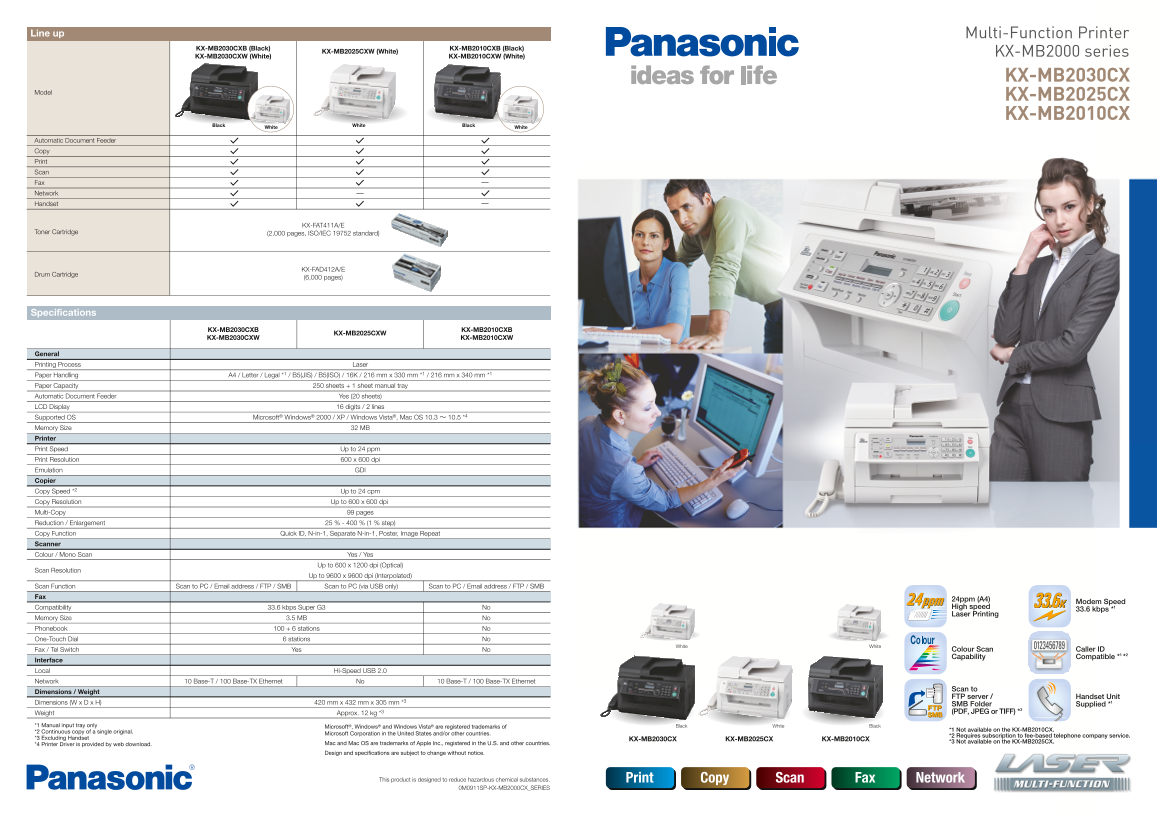
Discover the Panasonic KX-MB2000 Series, an advanced, compact all-in-one multi-function printer designed for small offices and remote work environments. This high-speed unit combines printing, scanning (up to 9600 dpi), copying, faxing, and network capabilities. The manual provides comprehensive instructions covering configuration, utilizing powerful features like Easy Print Utility, professional document merging, and detailed maintenance guides, ensuring seamless reliable operation for your business needs.
Page 1 Text Content
Line up Multi-Function Printer
KX-MB2030CXB (Black) KX-MB2010CXB (Black)
KX-MB2025CXW (White) KX-MB2000 series
KX-MB2030CXW (White) KX-MB2010CXW (White)
KX-MB2030CX
Model
KX-MB2025CX KX-MB2010CX
Black White White Black White
Automatic Document Feeder Copy Print Scan Fax Network Handset
KX-FAT411A/E
Toner Cartridge (2,000 pages, ISO/IEC 19752 standard)
KX-FAD412A/E
Drum Cartridge
(6,000 pages)
Specifications
KX-MB2030CXB KX-MB2010CXB
KX-MB2025CXW
KX-MB2030CXW KX-MB2010CXW
General Printing Process Laser Paper Handling A4 / Letter / Legal *1 / B5(JIS) / B5(ISO) / 16K / 216 mm x 330 mm *1 / 216 mm x 340 mm *1 Paper Capacity 250 sheets + 1 sheet manual tray Automatic Document Feeder Yes (20 sheets) LCD Display 16 digits / 2 lines Supported OS Microsoft® Windows® 2000 / XP / Windows Vista®, Mac OS 10.3 ~ 10.5 *4 Memory Size 32 MB Printer Print Speed Up to 24 ppm Print Resolution 600 x 600 dpi Emulation GDI Copier Copy Speed *2 Up to 24 cpm
Copy Resolution Up to 600 x 600 dpi Multi-Copy 99 pages
Reduction / Enlargement 25 % - 400 % (1 % step)
Copy Function Quick ID, N-in-1, Separate N-in-1, Poster, Image Repeat
Scanner Colour / Mono Scan Yes / Yes
Up to 600 x 1200 dpi (Optical)
Scan Resolution
Up to 9600 x 9600 dpi (Interpolated) Scan Function Scan to PC / Email address / FTP / SMB Scan to PC (via USB only) Scan to PC / Email address / FTP / SMB
24ppm (A4)
Modem Speed
Compatibility 33.6 kbps Super G3 No High speed
33.6 kbps *1
Laser Printing
Memory Size 3.5 MB No Phonebook 100 + 6 stations No One-Touch Dial 6 stations No
White White
Fax / Tel Switch Yes No Colour Scan Caller ID Capability Compatible *1 *2
Interface Local Hi-Speed USB 2.0 Network 10 Base-T / 100 Base-TX Ethernet No 10 Base-T / 100 Base-TX Ethernet
Scan to
Dimensions / Weight
FTP server / Handset Unit
Dimensions (W x D x H) 420 mm x 432 mm x 305 mm *3 SMB Folder Supplied *1
Weight Approx. 12 kg *3 (PDF, JPEG or TIFF) *3
*1 Manual input tray only Microsoft®, Windows® and Windows Vista® are registered trademarks of Black White Black
*2 Continuous copy of a single original. *1 Not available on the KX-MB2010CX.
Microsoft Corporation in the United States and/or other countries.
*2 Requires subscription to fee-based telephone company service.
*3 Excluding Handset KX-MB2030CX KX-MB2025CX KX-MB2010CX
Mac and Mac OS are trademarks of Apple Inc., registered in the U.S. and other countries. *3 Not available on the KX-MB2025CX.
*4 Printer Driver is provided by web download.
Design and specifications are subject to change without notice.
This product is designed to reduce hazardous chemical substances. Print Copy Scan Fax Network
0M0911SP-KX-MB2000CX_SERIES
Page Summary Contents For Panasonic KX-MB2030CX KX-MB2025CX KX-MB2010CX User Manual and Specifications
Manual Details
| Brand | Panasonic |
|---|---|
| Pages | 2 |
| File Size | 3.75 MB |
| Published | May 31, 2026 |
Enter the captcha to get the download link:

Frequently Asked Questions
What is the maximum scan resolution available?
The scanner has a high resolution, reaching up to 9600 x 9600 dpi when interpolated.
Which operating systems are compatible with this series of printers?
Supported operating systems include Microsoft Windows (2000/XP/Vista) and Mac OS (10.3 through 10.5).
What features help reduce wasted printing or paper usage?
The Easy Print Utility allows for merging files and enabling functions like 16-in-1 formatting and fax web previewing to minimize wasteful prints.
How is the device designed for maintenance ease?
Replacing consumables and replenishing paper can be done at the front side of the unit, simplifying maintenance for users.