# A B C D E F G H I J K L M N O P Q R S T U V W X Y Z

Panasonic MW-10 User Manual

Summary

This comprehensive operating guide for the Multimedia Audio System details everything you need to know for optimal performance and safety. Discover how to connect antennas and power, enjoy various media—including CDs, iPods, and radio signals—and view photo collections. The manual provides step-by-step instructions on sound quality settings, using advanced menus, setting timers, and connecting to PCs. Furthermore, it covers crucial safety warnings, troubleshooting tips, cleaning/maintenance guidelines, and warranty information for safe and hassle-free use.
📄 Preview 📖 Table of Contents Contents PAGE OF 24

Page 1 Text Content

Operating Instructions

Multimedia Audio System

Model No. MW-10

Table of contents

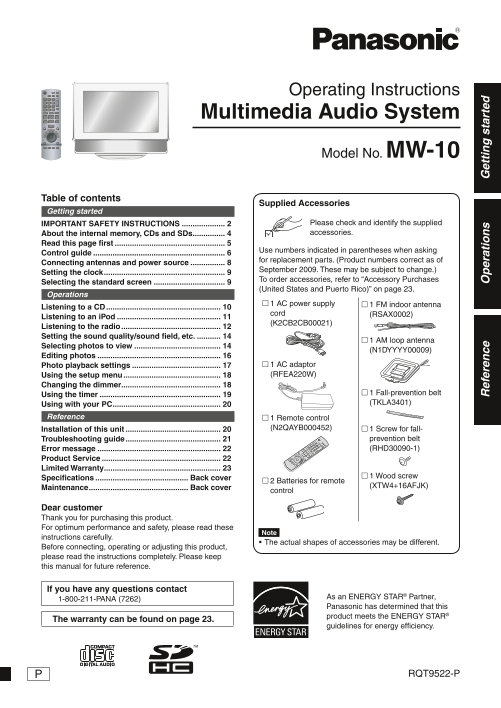
Supplied Accessories

Getting started

IMPORTANT SAFETY INSTRUCTIONS .................... Please check and identify the supplied About the internal memory, CDs and SDs ............... accessories.

Read this page fi rst ...................................................

Use numbers indicated in parentheses when asking

Control guide .............................................................

for replacement parts. (Product numbers correct as of

Connecting antennas and power source ................

September 2009. These may be subject to change.)

Setting the clock ........................................................

To order accessories, refer to “Accessory Purchases

Selecting the standard screen .................................

(United States and Puerto Rico)” on page 23.

Operations

1 AC power supply 1 FM indoor antenna

Listening to a CD .....................................................

cord (RSAX0002)

Listening to an i Pod ................................................

(K2CB2CB00021)

Listening to the radio .............................................. Setting the sound quality/sound fi eld, etc. ...........

1 AM loop antenna

Selecting photos to view ........................................

(N1DYYYY00009)

Editing photos .........................................................

Photo playback settings ......................................... 1 AC adaptor Using the setup menu ............................................. (RFEA220W)

Changing the dimmer ..............................................

Using the timer ........................................................ 1 Fall-prevention belt Using with your PC .................................................. (TKLA3401)

Reference 1 Remote control

Installation of this unit ............................................ (N2QAYB000452) 1 Screw for fall-

Troubleshooting guide ............................................ prevention belt Error message ......................................................... (RHD30090-1)

Product Service ....................................................... Limited Warranty ......................................................

1 Wood screw

Specifi cations ........................................... Back cover

2 Batteries for remote

ef er en ce (XTW4+16AFJK) er at io et ti ta rt ed

Maintenance .............................................. Back cover

control

Dear customer Thank you for purchasing this product. For optimum performance and safety, please read these

instructions carefully.

The actual shapes of accessories may be different.•

Before connecting, operating or adjusting this product, please read the instructions completely. Please keep this manual for future reference.

If you have any questions contact

As an ENERGY STAR® Partner,

1-800-211-PANA (7262)

Panasonic has determined that this product meets the ENERGY STAR®

The warranty can be found on page 23.

guidelines for energy efficiency.

RQT9522-P

RQT9522-P_MW-10_P.indd 1 2009/08/28 19:13:02

Page Summary Contents For Panasonic MW-10 User Manual

Page 1 Operating Instructions Multimedia Audio System Model No. MW-10 Table of contents Supplied Accessories Getting started IMPORTANT SAFETY INSTRUCTIONS .................... Please check and identify the s...
Page 2 IMPORTANT SAFETY INSTRUCTIONS Read these operating instructions carefully before using the unit. Follow the safety instructions on the unit and the applicable safety instructions listed below. Keep th...
Page 3 Listening caution FCC Note: This equipment has been tested and found to comply with the limits for a Class B digital device, pursuant to Part 15 of the FCC Rules. These limits are designed to provide ...
Page 4 About the internal memory, CDs and SDs About the internal memory About SDs Usable cards ( P5) Back up the internal memory periodically. The usable area will be less than the indicated capacity. It is ...
Page 5 Read this page fi rst What you can do on this unit Playable JPEG fi les (Playback may not be possible in some cases.) Simultaneous playback of music and pictures Max. 5120 × 3840 pixels You can enjoy ...
Page 6 Control guide Main unit 1 Display 2 SD cover ( below) 3 Speaker 4 SD card slot/SD indicator Lights on: When an SD card is inserted Blinks: When data is being written onto an SD card 5 USB port ( P20) ...
Page 7 This manual explains the remote control operations in most sections. LE CT Remote control PH OT OS SELECT TRACKS 1 Standby/on switch cm Repeating music ( P10, 12) 2 Displaying audio information cn Set...
Page 8 Connecting antennas and power source Back of product 1. Connect the FM indoor antenna. When the Demo function ( P18) is activated Insert fi rmly to the end. When connecting the AC Receive broadcast si...
Page 9 Setting the clock Selecting the standard screen This unit is equipped with the calendar and timer functions. You can select the standard screen normally displayed Set the time fi rst. among 7 types of...
Page 10 Listening to a CD Playable CDs P5 While stopped 1. Press [PROGRAM]. 1. Insert the CD containing audio data ( P6) The program screen appears. 2. Press [CD q/h]. 2. Press the numbered buttons For the ma...
Page 11 Listening to an i Pod Usable i Pods P5 Playing music and video on the i Pod Attaching/Recharging the i Pod Turn down the volume of this unit. Turn off the i Pod before attaching. 1. Attach the i Pod. ...
Page 12 Listening to an i Pod Listening to the radio Shuffl e Press [PLAY MODE]. Adjust the frequency to listen (Manual Tuning) (only for music) Each time you press Tracks or albums are Songs Albums Off 1. Pr...
Page 13 Memorizing broadcast stations to listen (Preset To cancel the memorized broadcast stations Tuning) 1. Press [PROGRAM]. 2. Press [e, r] to select “Register/Delete Preset” and press Memorizing broadcast...
Page 14 Setting the sound quality/ Selecting photos to view sound fi eld, etc. You can play back photos on the SD, CD or in the internal memory. Changing the sound quality/sound fi eld To view photos in the i...
Page 15 Operations during photo playback Viewing categorized photos 1. Press [ RETURN]. 1. Press [PHOTO MEDIA] to select “Internal The photo thumbnail screen Selecting photos from Memory”, “SD” or “CD”. 1 vie...
Page 16 Editing photos Copying photos Registering the photo as “Favorite” You can copy photos from the SD or CD to the internal (Only for the internal memory) memory (4 GB). Photos can be registered with any ...
Page 17 Photo playback settings Deleting photos Basic operation (Only for the internal memory) Photo Menu 1. Press [MENU (PHOTO)]. Select “Internal Memory” among photo media. ( P14) Copy Photo 2. Press [e, r]...
Page 18 Using the setup menu Basic operation 1. Select “Yes” in step 3 in the basic operation and press [OK]. 1. Press [SETUP]. Settings Menu 2. Select “Yes” again and press Image Quality Settings Format Card...
Page 19 Using the timer Photos or audio are automatically played at the set time. “Timer 1”, “Timer 2” and “Timer 3” can be set. Set the clock beforehand ( P9) To listen to the radio, tune in to channels befo...
Page 20 Using with your PC Photo fi les can be exchanged among this unit’s internal You cannot operate this unit while connecting with the memory, SD and computer. computer. If the USB connection cable is rem...
Page 21 Troubleshooting guide Before requesting service, make the following checks. If you are in doubt about some of the check points, or if the remedies indicated in the chart do not solve the problem, refe...
Page 22 Troubleshooting guide Photo Photos are not displayed on the Photos edited on the computer, etc. may not be displayed. thumbnail screen. The date displayed using the Date A date when a fi le was update...
Page 23 Limited Warranty Panasonic Consumer Electronics Company, Division of Panasonic Corporation of North America One Panasonic Way, Secaucus, New Jersey 07094 Panasonic Audio Products Limited Warranty Limi...
Page 24 Specifi cations AMPLIFIER SECTION SPEAKER SECTION RMS Output Power Both ch driven 5 W Per channel Type 1 way, 1 speaker system Stereo mode 6 Ω, 1 k Hz, 10 % THD Full range: 4 cm × 2 cone type Total RM...

Manual Details

Brand Panasonic
Pages 24
File Size 2.01 MB
Published June 18, 2026
1 views

Enter the captcha to get the download link:

captcha

Frequently Asked Questions

What must I check before using the unit after service or repairs?

The servicer must perform safety checks on the AC Adaptor, AC power supply cord, and plug to ensure they are in proper working condition.

What kind of objects/locations is this unit advised not to be installed near?

Do not use this apparatus near water, nor install it near heat sources like radiators or stoves.

If parts need replacing, what materials should I use?

Use only parts specified by the manufacturer or parts that have matching characteristics to the original components; unauthorized substitutes are hazardous.

Who is authorized to service this unit?

Refer all servicing to qualified service personnel and do not attempt to service it beyond what is described in the operating instructions.