Panasonic EUR7722KM0 User Guide
Summary
This user guide explains how to operate the EUR7722KM0 remote control for Panasonic and Technics home theater components, including TVs, DVD players, VCRs, and receivers. It covers essential functions like playback, channel changing, and audio adjustment, plus instructions for programming codes to operate third-party equipment.
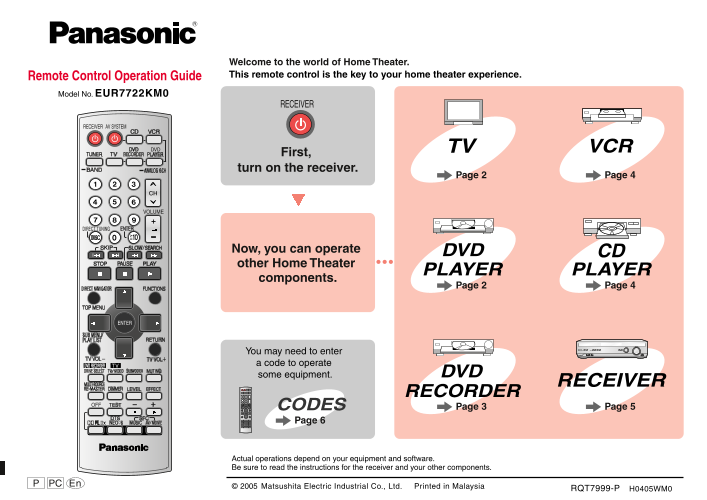
Page 1 Text Content
Welcome to the world of Home Theater. Remote Control Operation Guide This remote control is the key to your home theater experience.
Model No. EUR7722KM0
First, turn on the receiver.
Page 4Page 2
Now, you can operate other Home Theater components.
You may need to enter a code to operate some equipment.
RQT7999-P H0405WM0
Page Summary Contents For Panasonic EUR7722KM0 User Guide
Manual Details
| Brand | Panasonic |
|---|---|
| Pages | 6 |
| File Size | 1.80 MB |
| Published | June 15, 2026 |
Enter the captcha to get the download link:

Frequently Asked Questions
How do I enter a code to operate a non-Panasonic TV?
Press and hold the TV button, enter the first digit, then the second digit from the code table. The TV should turn on or off if the code is correct. Try another code if it doesn't work.
What if my DVD recorder does not respond to the remote?
Check the DVD recorder's remote control code. Press [ENTER] and the button ([1], [2], or [3]) matching that code. The factory setting for the remote is [1].
How do I adjust the speaker channel balance?
Press and hold the test signal button, select the speaker channel and adjust its output level. Then stop the test signal.
Can this remote control any brand of TV or VCR?
It can operate some brands of TVs, VCRs, and DVD players by entering the correct code, but it cannot operate all equipment or perform all functions.