# A B C D E F G H I J K L M N O P Q R S T U V W X Y Z

OMRON K3MA-J Handbook

Summary

This robust industrial process meter (K3MA-J) provides highly accurate and durable measurement of DC voltage and current across multiple ranges. Featuring a visible LCD display, 2-color LEDs, and an IP66 rating, it is built for demanding, harsh environments. The included documentation thoroughly covers detailed electrical specifications, functional operating guidelines, wiring diagrams, and comprehensive error troubleshooting, ensuring reliable setup and maintenance. Designed for automation engineers, industrial controls professionals, and quality assurance staff who require dependable data acquisition in critical processes.
📄 Preview PAGE OF 16

Page 1 Text Content

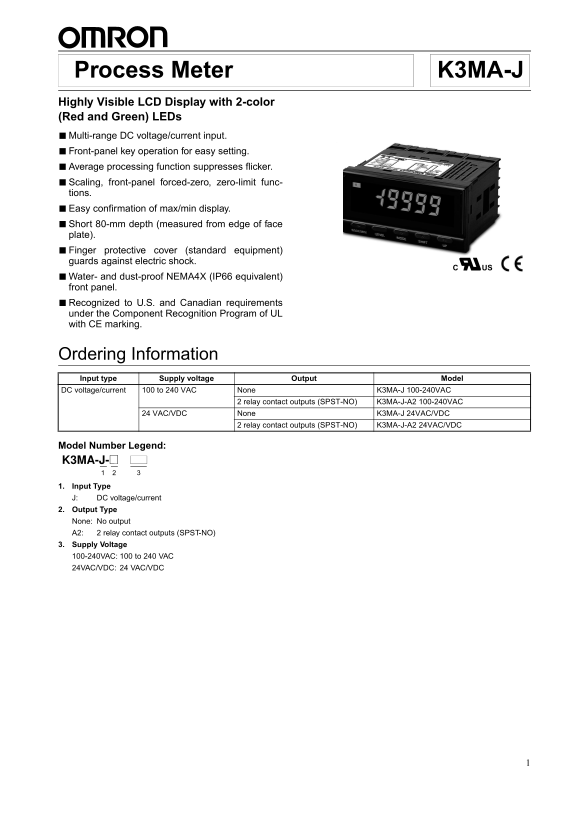
K3MA-J Process Meter

Highly Visible LCD Display with 2-color (Red and Green) LEDs ■Multi-range DC voltage/current input. ■Front-panel key operation for easy setting. ■Average processing function suppresses flicker. ■Scaling, front-panel forced-zero, zero-limit func- tions. ■Easy confirmation of max/min display. ■Short 80-mm depth (measured from edge of face plate). ■Finger protective cover (standard equipment) guards against electric shock.

■Water- and dust-proof NEMA4X (IP66 equivalent) front panel. ■Recognized to U.S. and Canadian requirements under the Component Recognition Program of UL with CE marking.

Ordering Information Input type Supply voltage Output Model DC voltage/current 100 to 240 VAC None K3MA-J 100-240VAC

2 relay contact outputs (SPST-NO) K3MA-J-A2 100-240VAC

24 VAC/VDC None K3MA-J 24VAC/VDC

2 relay contact outputs (SPST-NO) K3MA-J-A2 24VAC/VDC

Model Number Legend: K3MA-J-@ 1 2 3 1. Input Type J: DC voltage/current 2. Output Type None: No output A2: 2 relay contact outputs (SPST-NO) 3. Supply Voltage 100-240VAC: 100 to 240 VAC 24VAC/VDC: 24 VAC/VDC

Page Summary Contents For OMRON K3MA-J Handbook

Page 1 K3MA-J Process Meter Highly Visible LCD Display with 2-color (Red and Green) LEDs ■Multi-range DC voltage/current input. ■Front-panel key operation for easy setting. ■Average processing function suppr...
Page 2 K3MA-JK3MA-J Specifications Ratings Model K3MA-J 100-240VAC, K3MA-J-A2 100-240VAC K3MA-J 24VAC/VDC, K3MA-J-A2 24VAC/VDC Supply voltage 100 to 240 VAC 24 VAC/VDC Operating voltage range 85% to 110% of ...
Page 3 K3MA-JK3MA-J Measuring Ranges Process Voltage/Current Inputs Input Measuring range Measuring accuracy Input impedance Displayable range DC voltage 1.000 to 5.000 V 0.1% FS 1 digit max. 1 M min. –199...
Page 4 K3MA-JK3MA-J Nomenclature 2. Operation indicators Max Min 1. Main indicator 3. Level indicator SV MAX/MIN LEVEL SHIFTMODE UP 4. MAX/MIN key 8. Up key 7. Shift key5. Level key 6. Mode key Name Function...
Page 5 K3MA-JK3MA-J Operation Main Functions Input Types and Ranges Input type (setting parameter) Function Input range Setting range (setting parameters) Input range () Selects DC voltage/current sig- 0...
Page 6 K3MA-JK3MA-J Teaching mode Use to shift to the next parameter Monitor mode “T” flashes. without registering. Use to register and shift to monitor mode. Normal change “T” lights to indicate that the pa...
Page 7 K3MA-JK3MA-J Parameter Initialization Changing the Display Color This function returns all of the parameters to their initial values. The color of the value displayed can be set to either red or green...
Page 8 K3MA-JK3MA-J External Connections Terminal Arrangement Power Output supply terminals Input terminals Models with comparative output 100- to 240-VAC type or OUT2 24-VAC/VDC type (No polarity for 24-VDC...
Page 9 K3MA-JK3MA-J Block Diagram Input Input circuit Micro- computer Display EEPROM Output Contact output circuit (See note.) Constant voltage circuit Power supply circuit Note: Relay output models only. Le...
Page 10 K3MA-JK3MA-J Parameters Note: 1. Some parameters are not displayed for certain models. 2. The K3MA-J will stop measurement if the level is changed to the initial setting level or the advanced-function...
Page 11 K3MA-JK3MA-J Press Level Key for more than 3 s. Press Level Key for more than 1 s. Initial setting level Advanced-function setting level Press Level Key for Enter more than 1 s. password Parameter Inp...
Page 12 K3MA-JK3MA-J Press Level Key + Mode Key for more than 1 s. Protect level Operation level Press Level Key + Mode Key for more than preset time. Operation/adjustment lockouts Setting level lockout Setti...
Page 13 K3MA-JK3MA-J Setting Example Initial Settings Display value The settings for the following example are shown here. DISPLAY 2 Example: Tank pressure display 4 to 20 m A Max Min0 to 980 k Pa SV DISPLAY ...
Page 14 K3MA-JK3MA-J Dimensions Finger protective 101.2 Main indicator Panel cut-out cover (provided) character size 120 min. 14.2 mm 7.6 mm 75 min. UPSHIFTMODELEVELMAX/MIN Optional Parts (Order Separately) N...
Page 15 K3MA-JK3MA-J Unit Markings (Provided) The unit markings are not attached to the K3MA-J. Select the de- sired markings from the provided sheet. Note: For scales and gauges, use the unit markings that a...
Page 16 K3MA-JK3MA-J To prevent inductive noise, separate the terminal block wiring for Increasing Service Life the product from high-voltage or high-current power lines. Do not Do not use the product in loca...