Netgear XAVB5401 - Powerline 500 PassThru 1-Port Product Data Sheet
Summary
Extend your reliable, wired internet connection to any room in your home with this high-speed 500 Mbps Powerline adapter. This compact, noise-filtered device is perfect for streaming HD video, connecting smart TVs, and powering game consoles throughout your residence without running long cables. The manual provides step-by-step instructions for quick plug-and-play setup, allowing you to secure an enhanced network connection simply by plugging into available power outlets. Ideal for homes needing superior data throughput across multiple rooms.
Page 1 Text Content
Powerline 500 1 Port, Extra Outlet Data Sheet
XAVB5401
Extend Internet access to any power outlet
• Extra noise-fi ltered power outlet • Perfect for connecting smart TVs & game consoles • Ideal for HD streaming & gaming
Overview
The NETGEAR Powerline 500 extends your Internet access to any power outlet. With speeds up to 500 Mbps†, it’s perfect for connecting smart TVs and game consoles. It’s also ideal for streaming music and HD video. Extra noise-fi ltered power outlet provides connection for additional devices.
Plug-and-play Noise-fi ltered power outlet Push-and-Secure
Set up in minutes, no need to confi gure Provides an extra outlet and improves Encrypts Powerline network connections or install soft ware. the overall Powerline network with the touch of a button.
performance.
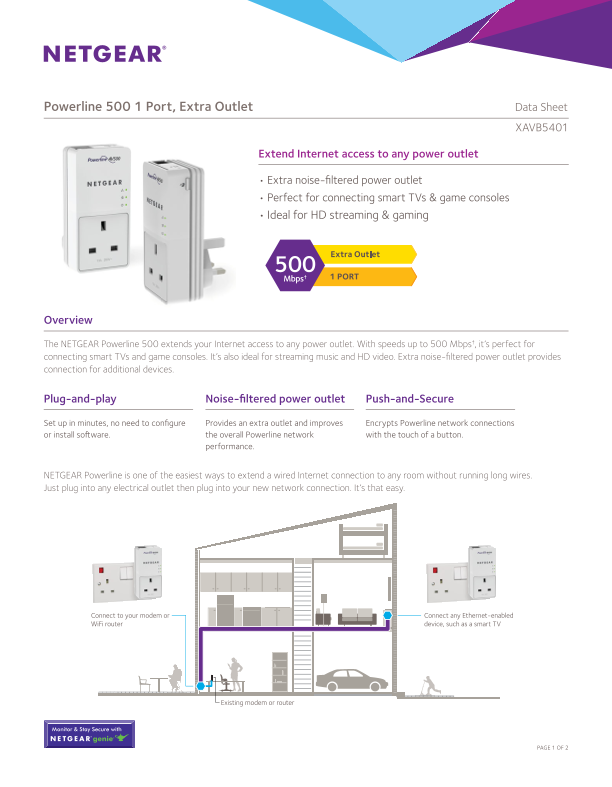
NETGEAR Powerline is one of the easiest ways to extend a wired Internet connection to any room without running long wires. Just plug into any electrical outlet then plug into your new network connection. It’s that easy.
Connect to your modem or Connect any Ethernet-enabled Wi Fi router device, such as a smart TV
Existing modem or router
Monitor & Stay Secure with
PAGE 1 OF 2
Page Summary Contents For Netgear XAVB5401 - Powerline 500 PassThru 1-Port Product Data Sheet
Manual Details
| Brand | Powerline |
|---|---|
| Pages | 2 |
| File Size | 123.69 KB |
| Published | June 04, 2026 |
Enter the captcha to get the download link:

Frequently Asked Questions
How do I set up the Powerline system?
The setup is plug-and-play; simply connect it to your modem or router and then to an Ethernet port.
What networking standards does the device support?
It supports HomePlug® AV, IEEE® 1901 compliance via software, and physical connection via RJ-45 Ethernet ports.
How far can this product extend internet access?
The typical coverage is specified up to 500m (5,382ft), but actual performance may vary due to environmental factors.
Is the device for outdoor use?
No, it is strictly designated for indoor use only. Outlets must be electrically connected in order for it to function.