Netgear PLP1000 – Powerline 1000 + Extra Outlet Installation Guide
Summary
Extend your home or office network reliably using these Powerline adapters, which leverage existing electrical wiring for a robust wired connection. This comprehensive guide provides step-by-step instructions covering initial setup, device configuration, secure network pairing, and detailed troubleshooting tips. Perfect for homeowners, small businesses, or tech enthusiasts needing to expand fast internet access to multiple rooms or areas without running cumbersome Ethernet cables. Learn how to interpret all LED indicators and ensure maximum link performance for ideal digital connectivity.
Page 1 Text Content
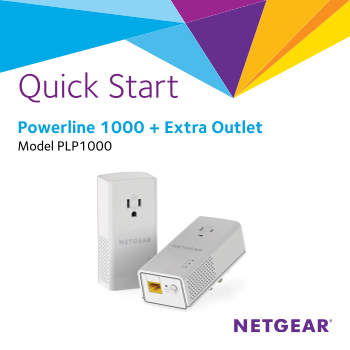
Quick Start Powerline 1000 + Extra Outlet Model PLP1000
Page Summary Contents For Netgear PLP1000 – Powerline 1000 + Extra Outlet Installation Guide
Page 1
Quick Start Powerline 1000 + Extra Outlet Model PLP1000
Page 2
Package Contents In some regions, a resource CD is included with your product.
Page 3
Getting Started Powerline adapters give you an alternative way to extend your network using your existing electrical wiring. Plug two or more Powerline adapters into electrical outlets to create a wir...
Page 4
Meet Your Adapter Before you install your adapter, familiarize yourself with its LEDs, buttons, and port. Power LED Ethernet LED Pick A Plug LED Security button Ethernet port Factory Reset button
Page 5
Power LED Solid green. The electrical power is on. Solid amber. The adapter is in power saving mode. Blinking green. The adapter is in the process of setting up security. Off. The adapter is not recei...
Page 6
Ethernet port Use an Ethernet cable to connect your wired devices, including computers, Wi Fi routers, or game consoles, to your Powerline network. Security button Use the Security button to create a ...
Page 7
Install Your Adapters Room 1 Room 2
Page 8
Secure Your Network To create a secure network: 1. Plug in your new adapters. 2. Wait until the Pick A Plug LEDs are lit. 3. Press the Security button on one of the adapters for two seconds, then pres...
Page 9
Add Adapters To add adapters before you configure the security feature, just plug them in and connect the adapters to your equipment. To add adapters to a Powerline network with security set: 1. Plug ...
Page 10
Troubleshooting Tips Power LED is off. Make sure that power is supplied to the electrical outlet, and that the Powerline devices are not plugged into an extension cord, power strip, or surge protector...
Page 11
Pick A Plug LED is Something is interfering with communication between amber or red. adapters. To resolve this, do the following: • Move the adapter to another outlet. • Unplug devices that might be c...
Page 12
Support Thank you for purchasing this NETGEAR product. You can visit www.netgear.com/support to register your product, get help, access the latest downloads and user manuals, and join our community. W...
Manual Details
| Brand | Powerline |
|---|---|
| Pages | 12 |
| File Size | 1.19 MB |
| Published | June 05, 2026 |
38 views
Enter the captcha to get the download link:
