Netgear HDX101 Powerline HD Ethernet Adapter User's Manual and Specifications
Summary
Extend your reliable, high-speed network coverage using only your electrical wiring with this Powerline HD Ethernet Adapter. This secure solution provides a single, combined connection for all wired devices while remaining encrypted for household safety. The included manual offers comprehensive setup guidance, teaching you how to properly connect and configure multiple adapters. It also details the meaning of status lights, guides advanced network ID settings for security, and includes troubleshooting tips to guarantee optimal performance throughout your premises.
Page 1 Text Content
Prepare to Install Your Powerline HD Ethernet Adapter
ITEM DESCRIPTION
The Powerline HD Ethernet Adapter is designed for easy installation. Check that these
1. Power LED (color green):
HDX101 Powerline HD Ethernet Adapter
minimum requirements are met:
Solid green when electrical power is on.
Your Ethernet network is set up and an Ethernet port available on your network. Off when there is no electrical power.
Start Here 2. Link LED—Powerline network status (color blue):
Each computer that will use the Powerline HD Ethernet Adapter must have an
Ethernet port available and configured to work on your network. Usually, the default Solid on when connected to a Powerline network.
These instructions explain how to add HDX101 Powerline HD Ethernet Adapters to your
configuration settings (TCP/IP and DHCP) are fine. Off when no other compatible Powerline devices using the
existing network. To do this, you complete these two simple steps:
same Powerline Network ID are found.
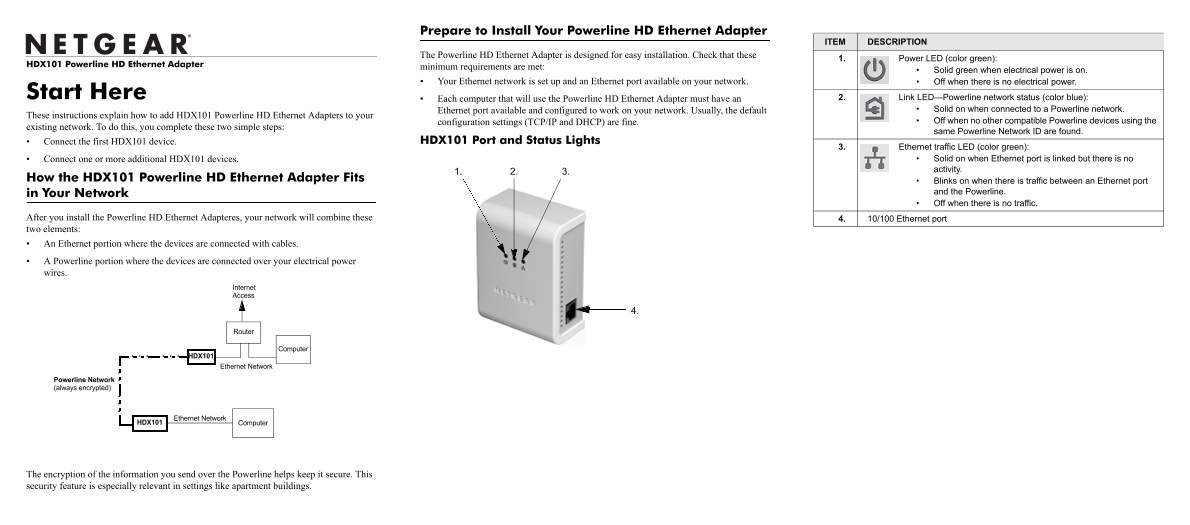
Connect the first HDX101 device. HDX101 Port and Status Lights
3. Ethernet traffic LED (color green):
Connect one or more additional HDX101 devices. Solid on when Ethernet port is linked but there is no activity.
How the HDX101 Powerline HD Ethernet Adapter Fits
Blinks on when there is traffic between an Ethernet port in Your Network and the Powerline. Off when there is no traffic.
After you install the Powerline HD Ethernet Adapteres, your network will combine these 4. 10/100 Ethernet port two elements: An Ethernet portion where the devices are connected with cables. A Powerline portion where the devices are connected over your electrical power wires.
Internet Access
Router
Computer
HDX101
Ethernet Network
Powerline Network (always encrypted)
HDX101 Computer Ethernet Network
The encryption of the information you send over the Powerline helps keep it secure. This security feature is especially relevant in settings like apartment buildings.
Page Summary Contents For Netgear HDX101 Powerline HD Ethernet Adapter User's Manual and Specifications
Manual Details
| Brand | Powerline |
|---|---|
| Pages | 2 |
| File Size | 110.99 KB |
| Published | June 04, 2026 |
Enter the captcha to get the download link:

Frequently Asked Questions
Where should I plug in the HDX101 adapter?
The unit must be plugged directly into a wall outlet, never into an extension cord or surge protector.
What does the blue Powerline Link LED indicate?
A solid blue light means the device is connected to an existing Powerline network. Without a connection, it will not light up.
How can I secure my Powerline network from unauthorized users?
Use the Security tab in the utility to set a unique Network ID, and ensure all devices use that same ID.