Lenovo 4330 Inkjet Printer Installation Guide (Simplified Chinese)
Summary
The comprehensive user guide for your printer provides step-by-step instructions for initial setup, making it ideal for new users establishing their workspace. This manual covers everything from safe unpacking and connecting power cords to installing print cartridges and loading paper. Furthermore, it includes detailed troubleshooting sections for common issues, including resolving power light failures and tackling software installation problems across various operating systems (Windows 98/2000/XP), ensuring a smooth start and reliable operation.
Page 1 Text Content
喷墨打印机安装指南 简体中文 4330 Inkjet Printer Setup (English)
www.lenovo.com
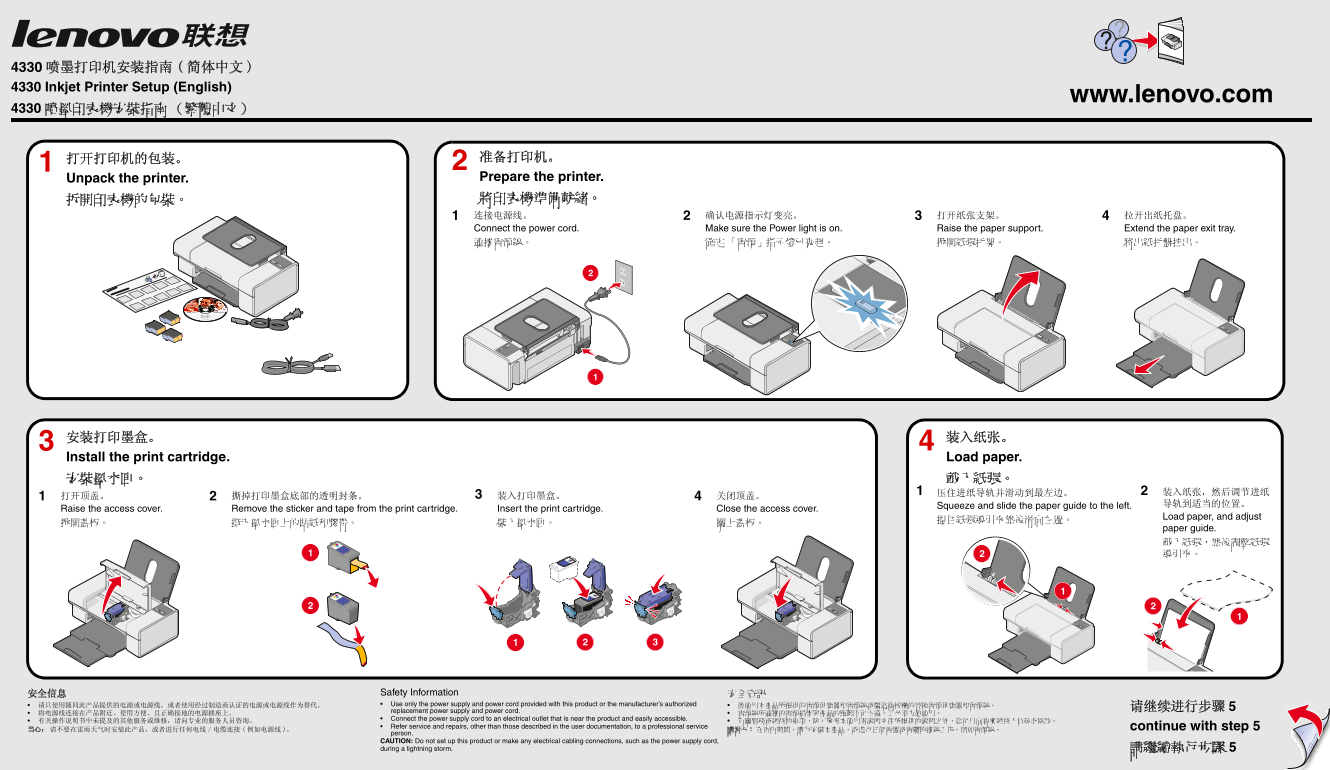
打开打印机的包装。 准备打印机。 Unpack the printer. Prepare the printer. 拆開印表機的包裝。 將印表機準備就緒。 连接电源线。 确认电源指示灯变亮。 打开纸张支架。 拉开出纸托盘。 Connect the power cord. Make sure the Power light is on. Raise the paper support. Extend the paper exit tray. 連接電源線。 確定 「電源」指示燈已亮起。 掀開紙張托架。 將出紙托盤拉出。
安装打印墨盒。 装入纸张。 Install the print cartridge. Load paper. 安裝墨水匣。 載入紙張。
Squeeze and slide the paper guide to the left. 导轨到适当的位置。
Raise the access cover. Remove the sticker and tape from the print cartridge. Insert the print cartridge. Close the access cover.
Load paper, and adjust
paper guide. 載入紙張,然後調整紙張 導引夾。
安全信息 Safety Information 安全資訊 请只使用随同此产品提供的电源或电源线,或者使用经过制造商认证的电源或电源线作为替代。 Use only the power supply and power cord provided with this product or the manufacturer’s authorized 僅使用本產品所提供的電源供應器和電源線或製造商授權的替換電源供應器和電源線。
replacement power supply and power cord.
Connect the power supply cord to an electrical outlet that is near the product and easily accessible.
Refer service and repairs, other than those described in the user documentation, to a professional service continue with step 5
person. CAUTION: Do not set up this product or make any electrical cabling connections, such as the power supply cord, during a lightning storm. 請繼續執行步驟 5
Page Summary Contents For Lenovo 4330 Inkjet Printer Installation Guide (Simplified Chinese)
Manual Details
| Brand | Lenovo |
|---|---|
| Pages | 2 |
| File Size | 935.32 KB |
| Published | June 03, 2026 |
Enter the captcha to get the download link:
