Lenovo M7206_ M7216 Quick Installation Guide
Summary
This practical quick start guide provides essential instructions for setting up your new printing device. It walks users through proper hardware installation, including correctly fitting consumables like toner and drum units, as well as loading paper efficiently. The manual also covers crucial initial setup steps such as selecting country settings and language preferences. Furthermore, it guides you on installing the full driver suite via CD or downloading necessary software from the manufacturer's website, ensuring your device is fully initialized and ready for use right out of the box.
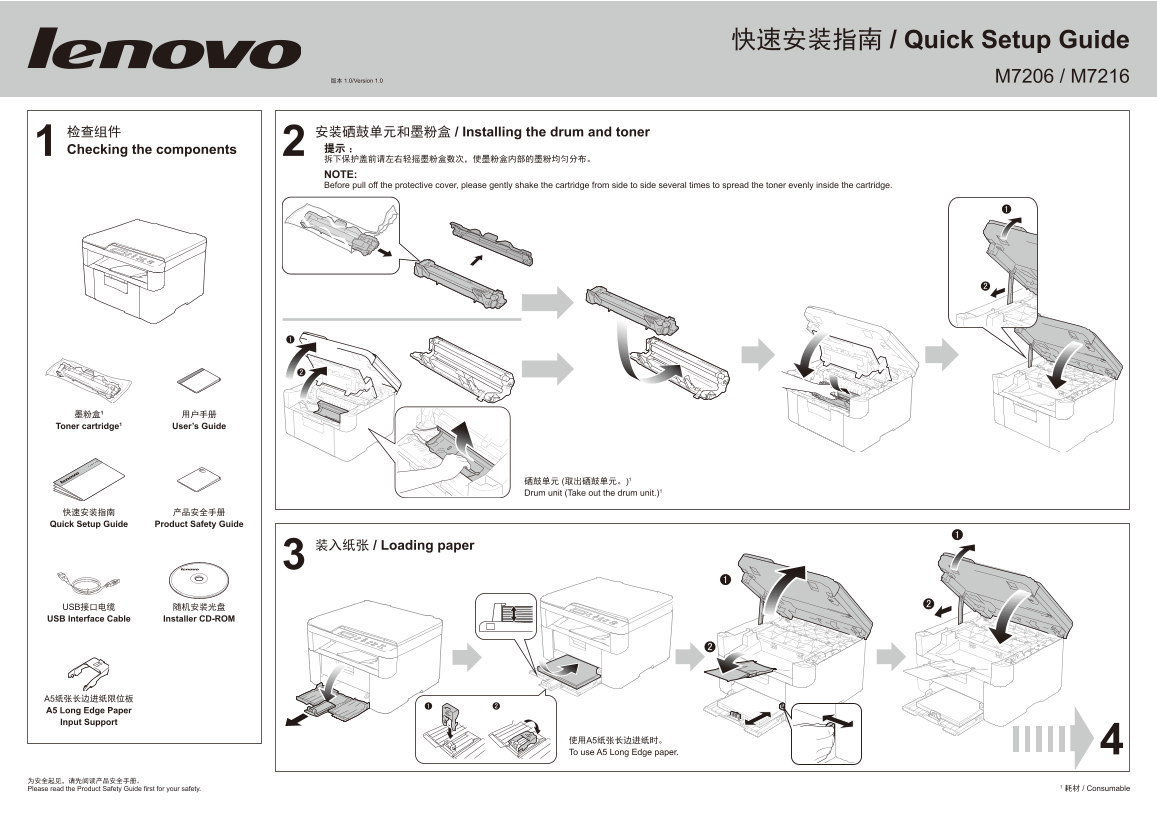
Page 1 Text Content
快速安装指南 / Quick Setup Guide
版本 1.0/Version 1.0 M7206 / M7216
1 检查组件 Checking the components 2 安装硒鼓单元和墨粉盒 / Installing the drum and toner 提示: 拆下保护盖前请左右轻摇墨粉盒数次,使墨粉盒内部的墨粉均匀分布。 NOTE: Before pull off the protective cover, please gently shake the cartridge from side to side several times to spread the toner evenly inside the cartridge.
Toner cartridge1 User’s Guide
硒鼓单元 (取出硒鼓单元。)1 Drum unit (Take out the drum unit.)1
快速安装指南 产品安全手册 Quick Setup Guide Product Safety Guide
3 装入纸张 / Loading paper
USB接口电缆 随机安装光盘 USB Interface Cable Installer CD-ROM
A5纸张长边进纸限位板 A5 Long Edge Paper Input Support
使用A5纸张长边进纸时。 To use A5 Long Edge paper.
1 耗材 / Consumable
Please read the Product Safety Guide first for your safety.
Page Summary Contents For Lenovo M7206_ M7216 Quick Installation Guide
Manual Details
| Brand | Lenovo |
|---|---|
| Pages | 2 |
| File Size | 2.77 MB |
| Published | June 03, 2026 |
Enter the captcha to get the download link:

Frequently Asked Questions
在使用A5长边进纸时有什么注意事项?
您应该使用A5纸张长边进纸限位板进行输入。
第一次安装设备后需要执行哪些设置步骤?
在初始化时,您可能需要设定所在国家以及选择所需语言,并依照屏幕提示完成设置。
如果我需要了解设备的详细信息和更多教程怎么办?
请阅读产品安全手册,并在后续步骤可以通过用户手册进行操作。
无法打开光盘上的PDF说明书该如何解决?
您需要到控制面板中将文件关联修改为“Adobe Reader”。