Lenovo V20-10 Quick Installation Guide
Summary
This comprehensive manual provides all necessary information for setting up, operating, and maintaining the monitor unit. It covers critical safety warnings, including electrical procedures and proper handling guidelines. Users will find detailed technical specifications, essential system support guides, and documentation confirming compliance with various hazardous substances regulations required globally. Ideal for end-users and technicians, this resource ensures safe operation and provides direct access to drivers and firmware downloads via the official Lenovo support portal.
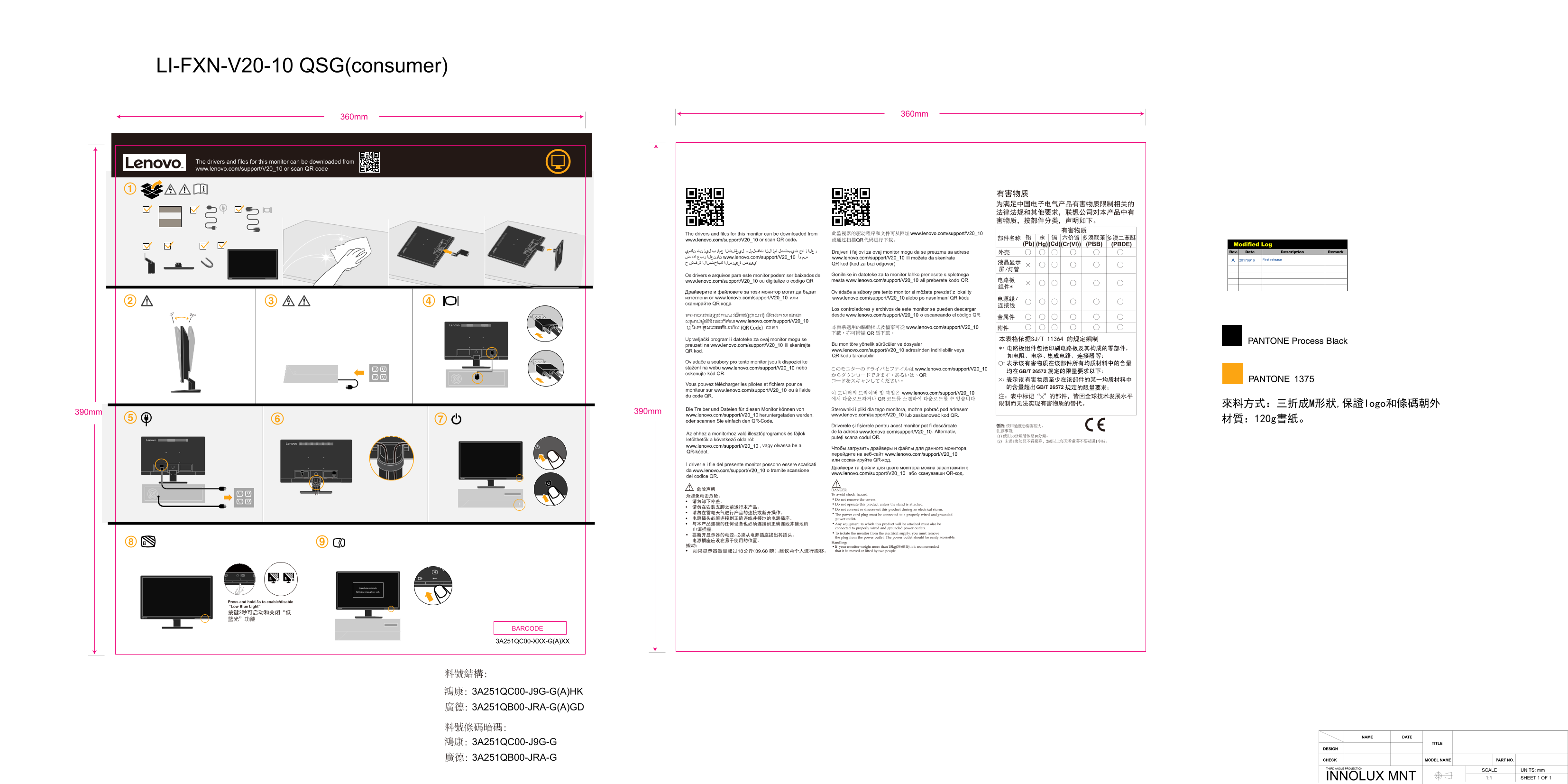
Page 1 Text Content
LI-FXN-V20-10 QSG(consumer)
360mm
360mm
The drivers and files for this monitor can be downloaded from www.lenovo.com/support/V20_10 or scan QR code
www.lenovo.com/support/V20_10
www.lenovo.com/support/V20_10
(Pb) (PBB) (PBDE)(Hg)(Cd)(Cr(VI)) Modified Log
Rev. Date Description Remark
www.lenovo.com/support/V20_10 www.lenovo.com/support/V20_10
First release
www.lenovo.com/support/V20_10 www.lenovo.com/support/V20_10
www.lenovo.com/support/V20_10 www.lenovo.com/support/V20_10
-5 www.lenovo.com/support/V20_10
www.lenovo.com/support/V20_10
www.lenovo.com/support/V20_10
本表格依据SJ/T 11364 的规定编制
www.lenovo.com/support/V20_10
www.lenovo.com/support/V20_10
www.lenovo.com/support/V20_10 www.lenovo.com/support/V20_10
GB/T 26572
GB/T 26572
www.lenovo.com/support/V20_10
www.lenovo.com/support/V20_10
注:表中标记“ ”的部件,皆因全球技术发展水平 限制而无法实现有害物质的替代。 來料方式:三折成M形狀,保證logo和條碼朝外
390mm 390mm
www.lenovo.com/support/V20_10 www.lenovo.com/support/V20_10
www.lenovo.com/support/V20_10
www.lenovo.com/support/V20_10
www.lenovo.com/support/V20_10
www.lenovo.com/support/V20_10
www.lenovo.com/support/V20_10 або сканувавши QR-код.
DANGER To avoid shock hazard: Do not remove the covers. Do not operate this product unless the stand is attached. Do not connect or disconnect this product during an electrical storm. The power cord plug must be connected to properly wired and grounded power outlet. Any equipment to which this product will be attached must also be connected to properly wired and grounded power outlets. To isolate the monitor from the electrical supply, you must remove
the plug from the power outlet. The power outlet should be easily accessible.
Handling: If your monitor weighs more than 18kg(39.68 lb),it is recommended that it be moved or lifted by two people.
Press and hold 3s to enable/disable “Low Blue Light” 按键3秒可启动和关闭“低 蓝光”功能
BARCODE
3A251QC00-XXX-G(A)XX
料號結構: 鴻康:3A251QC00-J9G-G(A)HK 廣德:3A251QB00-JRA-G(A)GD
NAME DATE
鴻康:3A251QC00-J9G-G TITLE
DESIGN
廣德:3A251QB00-JRA-G CHECK MODEL NAME PART NO.
THIRD ANGLE PROJECTION
SCALE UNITS: mm 1:1 SHEET 1 OF 1INNOLUX MNT
Page Summary Contents For Lenovo V20-10 Quick Installation Guide
Manual Details
| Brand | Lenovo |
|---|---|
| Pages | 1 |
| File Size | 2.94 MB |
| Published | May 31, 2026 |
Enter the captcha to get the download link:

Frequently Asked Questions
How do I activate or deactivate 'Low Blue Light' mode?
Press and hold the designated key for three seconds to start and stop the function.
Where can I download drivers and files for this monitor model?
Drivers are available at www.lenovo.com/support/V20_10, or by scanning the dedicated QR code provided.
What safety measures must I follow when operating the power cord?
The plug must connect to a properly wired and grounded outlet, and you must unplug it from the outlet during an electrical storm.
How should I move or lift this monitor safely?
If the unit weighs more than 18kg (39.68 lb), it is recommended that two people handle the movement.