Lenovo ThinkVision P32u-10 Quick Install Guide (Standalone) 20200430
Summary
Optimize your setup with high-speed USB 3.0 connectivity. This documentation provides essential guidelines on data transfer rates across various standards (USB 3.1 Gen 1 to USB 3.2). It advises users that the actual throughput depends on factors like connected peripherals, file type, and system architecture. Use this resource for reliable performance expectations when integrating demanding electronic devices.
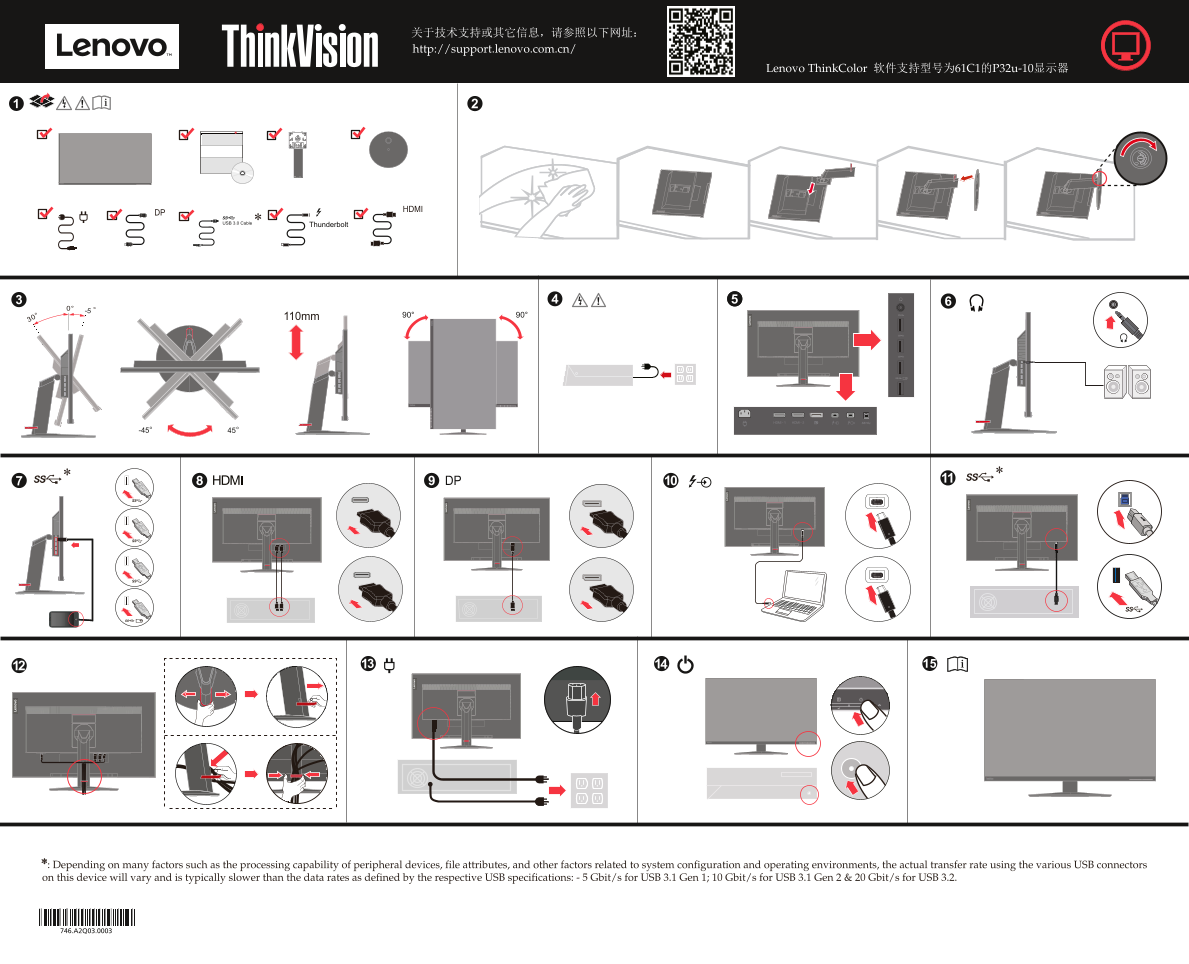
Page 1 Text Content
USB 3.0 Cable
* : Depending on many factors such as the processing capability of peripheral devices, file attributes, and other factors related to system configuration and operating environments, the actual transfer rate using the various USB connectors on this device will vary and is typically slower than the data rates as defined by the respective USB specifications: - 5 Gbit/s for USB 3.1 Gen 1; 10 Gbit/s for USB 3.1 Gen 2 & 20 Gbit/s for USB 3.2.
Page Summary Contents For Lenovo ThinkVision P32u-10 Quick Install Guide (Standalone) 20200430
Manual Details
| Brand | Lenovo |
|---|---|
| Pages | 2 |
| File Size | 9.81 MB |
| Published | May 31, 2026 |
Enter the captcha to get the download link:

Frequently Asked Questions
Will the USB transfer speed be consistent?
No, the actual rate varies depending on factors like peripheral processing capability, file attributes, and overall system configuration.
What are the specific data rates for different USB types?
The defined rates include 5 Gbit/s (USB 3.1 Gen 1), 10 Gbit/s (USB 3.1 Gen 2), and up to 20 Gbit/s (USB 3.2).
What type of technical support is provided?
The product includes a 12-month on-site service, although other repair options require sending the ThinkVision monitor unit for repair.