Lenovo L20-10 Quick Installation Guide
Summary
This user guide provides comprehensive instructions for operating your electronic device, focusing on smart features like the "Low Blue Light" mode activation and deactivation. It is designed for end-users who require clear operational guidelines, troubleshooting tips, and an understanding of product compliance standards. For detailed technical support, parts information, or advanced functionalities, users are directed to the official Lenovo support website to ensure proper setup and continuous use.
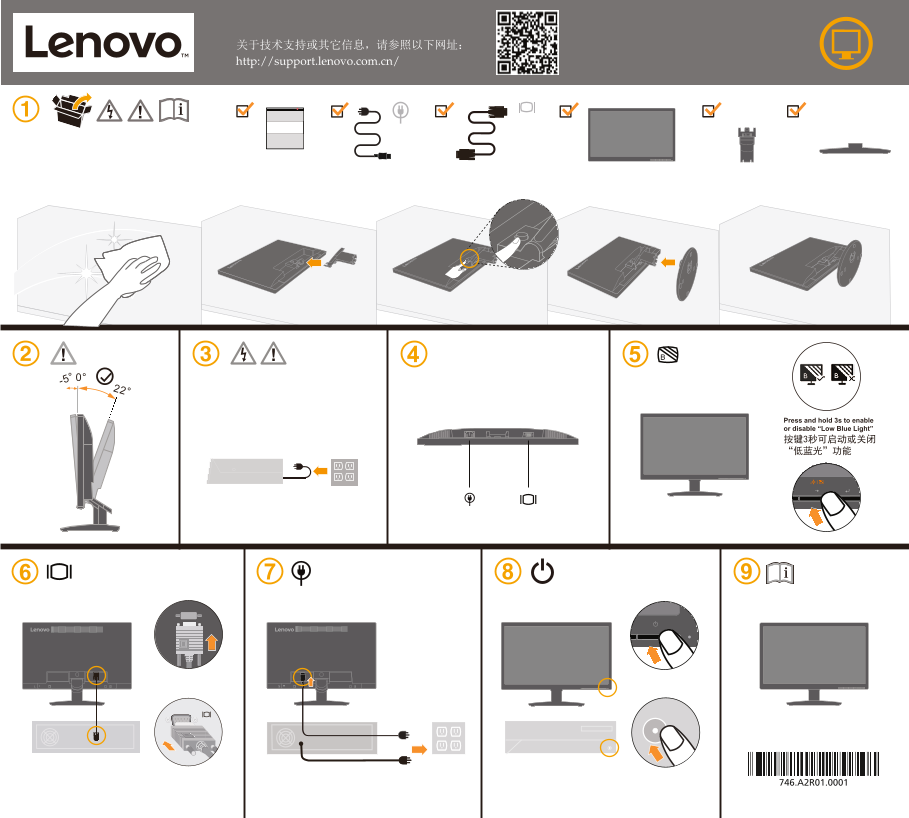
Page 1 Text Content
关于技术支持或其它信息,请参照以下网址: http://support.lenovo.com.cn/
Press and hold 3s to enable or disable “Low Blue Light” 按键3秒可启动或关闭 “低蓝光”功能
Page Summary Contents For Lenovo L20-10 Quick Installation Guide
Manual Details
| Brand | Lenovo |
|---|---|
| Pages | 2 |
| File Size | 394.21 KB |
| Published | June 01, 2026 |
Enter the captcha to get the download link:

Frequently Asked Questions
在哪里可以获取技术支持或更多信息?
请访问网址 http://support.lenovo.com.cn/。
如何启动或关闭“低蓝光”功能?
只需按住相应键 3 秒即可启用或禁用该功能。
部件表中标记为“×”的组件代表什么限制?
这些部件由于全球技术发展水平的限制,尚无法用无害物质进行替代。