Lenovo All-in-One M710 Quick Installation Guide
Summary
This Quick Installation Guide covers everything necessary to set up your multi-function all-in-one device successfully. The manual provides step-by-step instructions for initial setup, from safely connecting the power supply and loading paper to installing print cartridges and completing the scanner unit closure. Users will find guidance on connecting USB cables, running the software disc, and following onscreen prompts to ensure fully functional operation. It is designed for new users needing a clear guide to get their professional device operational quickly and reliably.
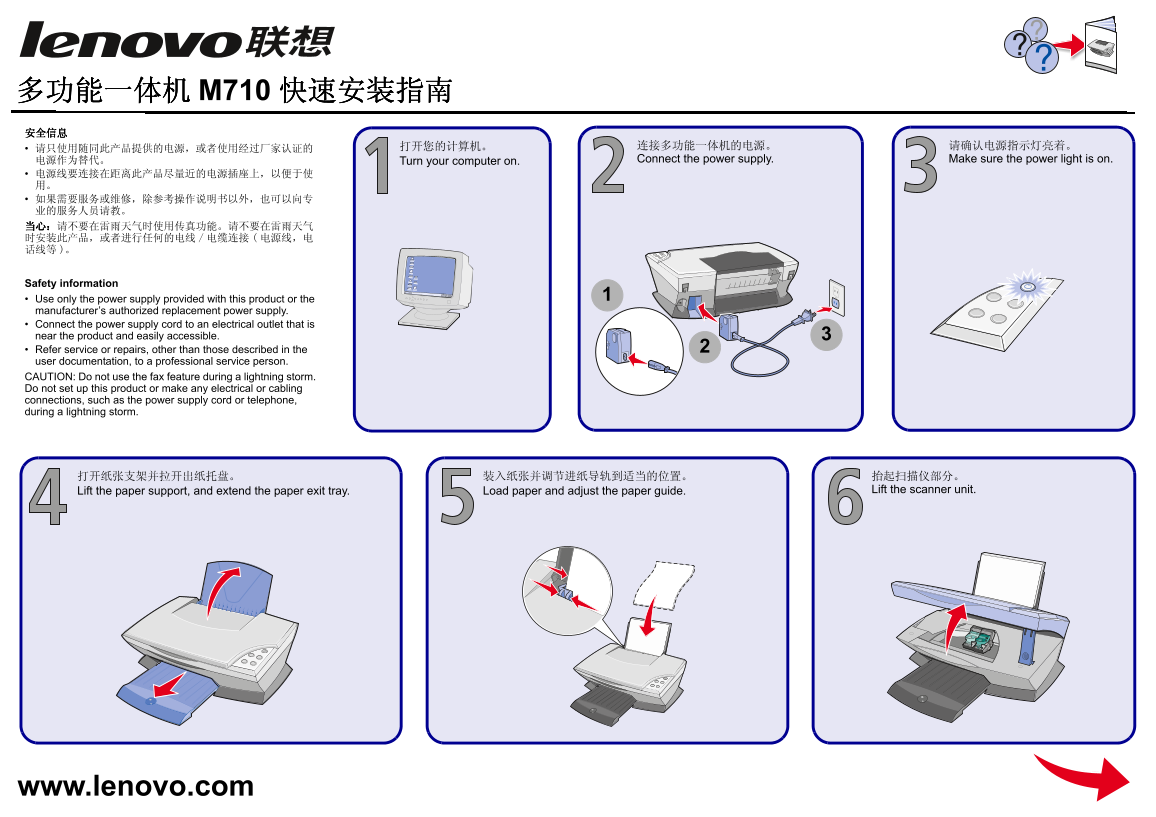
Page 1 Text Content
电源作为替代。 Turn your computer on. Connect the power supply. Make sure the power light is on.
Safety information Use only the power supply provided with this product or the manufacturers authorized replacement power supply. Connect the power supply cord to an electrical outlet that is near the product and easily accessible. Refer service or repairs, other than those described in the user documentation, to a professional service person. CAUTION: Do not use the fax feature during a lightning storm. Do not set up this product or make any electrical or cabling connections, such as the power supply cord or telephone, during a lightning storm.
Lift the paper support, and extend the paper exit tray. Load paper and adjust the paper guide. Lift the scanner unit.
www.lenovo.com
Page Summary Contents For Lenovo All-in-One M710 Quick Installation Guide
Manual Details
| Brand | Lenovo |
|---|---|
| Pages | 2 |
| File Size | 490.26 KB |
| Published | June 05, 2026 |
Enter the captcha to get the download link:

Frequently Asked Questions
如何连接多功能一体机电源?
使用随附的或厂家认证的电源供应器,并将电源线连接到靠近产品的电源插座上。
安装过程中需要注意哪些安全事项?
在雷雨天气时,请不要使用传真功能、设置产品或进行任何电气/电缆连接。
如何装入纸张和墨盒?
开口支架拉出纸托盘,放入纸张并调节进纸导轨;撕掉电缆底部的透明封条,再装入打印墨盒。
如果设备需要维修或服务,应该怎么办?
请参考操作手册,或联系专业的服务人员进行处理。