HP Photosmart 370 Series Printer User Guide (Chinese Simplified, Traditional)
Summary
Introducing the HP Photosmart 370 series printer, your reliable tool for high-quality photo printing. This resource manual guides new users through every step of the process, from initial setup and language selection to installing ink cartridges. Learn how to print perfect photos directly from memory cards or USB inputs. Get started easily with comprehensive instructions on paper loading, alignment page creation, and optimizing your prints.
Page 1 Text Content
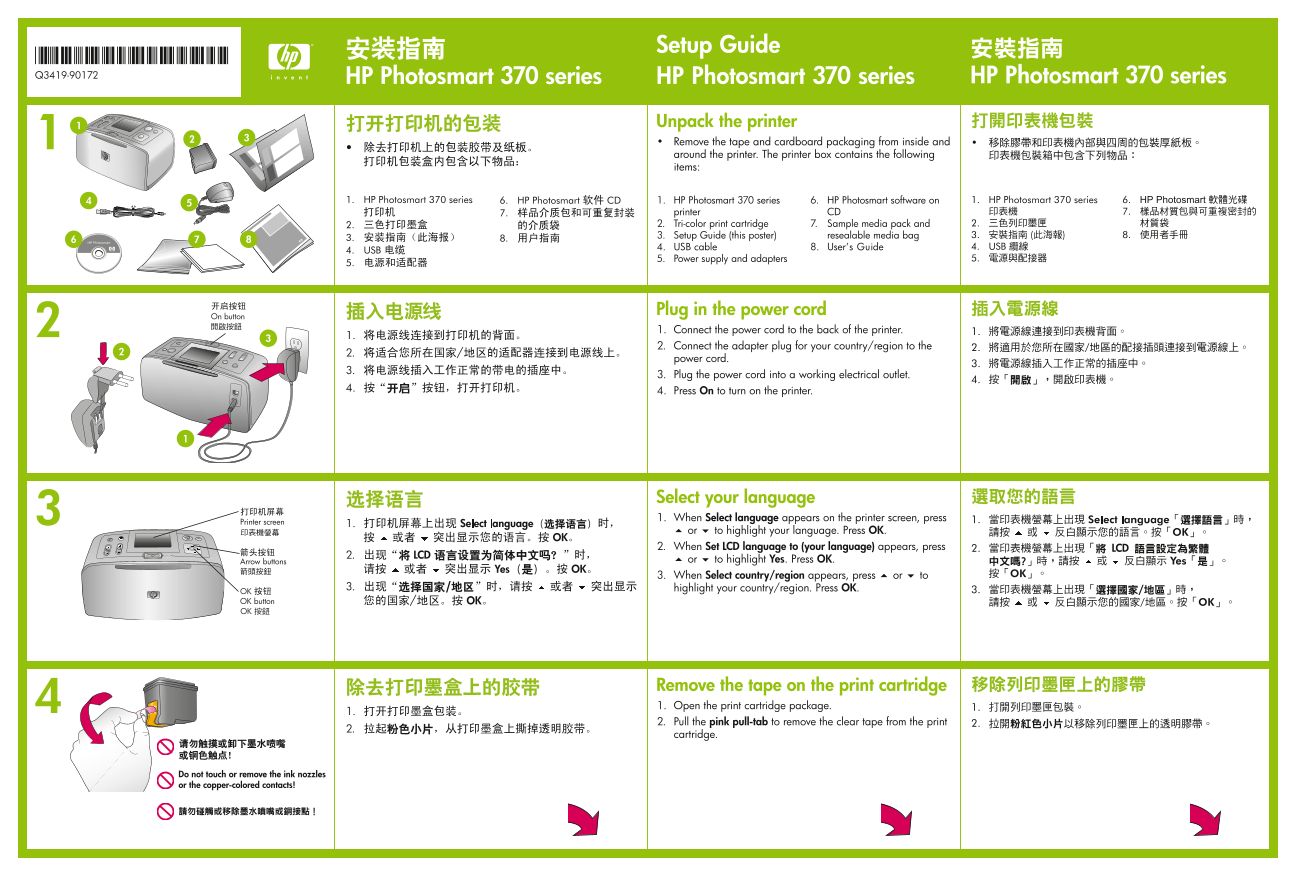
Setup Guide
*Q3419-90172* Q3419-90172 HP Photosmart 370 series
Unpack the printer Remove the tape and cardboard packaging from inside and around the printer. The printer box contains the following items:
1. HP Photosmart 370 series 6. HP Photosmart software on printer CD 2. Tri-color print cartridge 7. Sample media pack and 3. Setup Guide (this poster) resealable media bag 4. USB cable 8. User’s Guide 5. Power supply and adapters
Plug in the power cord
On button
1. Connect the power cord to the back of the printer. 2. Connect the adapter plug for your country/region to the power cord. 3. Plug the power cord into a working electrical outlet. 4. Press On to turn on the printer.
Select your language 1. When Select language appears on the printer screen, press
Printer screen
or to highlight your language. Press OK. 2. When Set LCD language to (your language) appears, press Arrow buttons or to highlight Yes. Press OK. 3. When Select country/region appears, press or to highlight your country/region. Press OK.
OK button
Remove the tape on the print cartridge 1. Open the print cartridge package. 2. Pull the pink pull-tab to remove the clear tape from the print cartridge.
Do not touch or remove the ink nozzles or the copper-colored contacts!
Page Summary Contents For HP Photosmart 370 Series Printer User Guide (Chinese Simplified, Traditional)
Manual Details
| Brand | HP |
|---|---|
| Pages | 2 |
| File Size | 1.47 MB |
| Published | May 31, 2026 |
Enter the captcha to get the download link:

Frequently Asked Questions
How do I first turn on the printer and complete basic setup?
Connect the power cord to the back, plug it into an outlet, and press On. Then select your language and country/region.
What is the correct way to install the tri-color print cartridge?
Open the access door, insert the cartridge with copper contacts facing inside, and push until it snaps securely into the cradle.
How do I use the printer to print photos from a memory card?
Insert the memory card, then use the arrow buttons to view and select your photo before pressing Print.
What precautions should I take when handling the ink cartridge tape?
When removing the tape, ensure you do not touch or remove the ink nozzles or the copper-colored contacts.