Illustrated Parts & Service Map for HP Pro 3380 Microtower Business PC
Summary
This essential technical manual provides a comprehensive service guide and illustrated parts map for the HP Pro 3330/3380 Microtower Business PC. It details every hardware component, including connectivity ports (USB, VGA, HDMI), available spare parts, and critical cables. Users and technicians will find detailed information on diagnostic LED codes, power management settings, system board replacements, and proper assembly procedures, ensuring efficient maintenance and repair for professional IT environments.
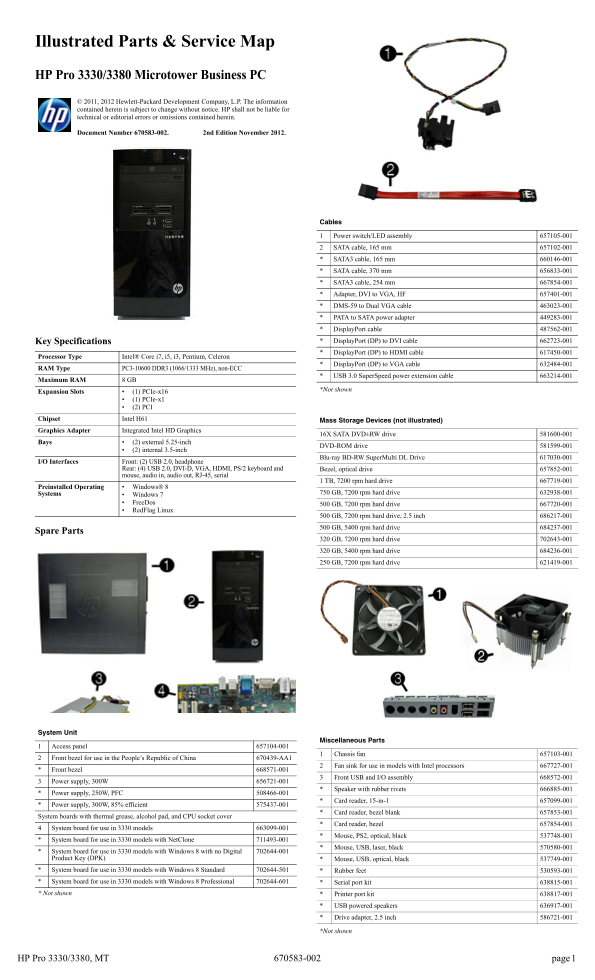
Page 1 Text Content
Illustrated Parts & Service Map HP Pro 3330/3380 Microtower Business PC © 2011, 2012 Hewlett-Packard Development Company, L.P. The information contained herein is subject to change without notice. HP shall not be liable for
technical or editorial errors or omissions contained herein.
Document Number 670583-002. 2nd Edition November 2012.
Cables
Power switch/LED assembly 657105-001 SATA cable, 165 mm 657102-001 SATA3 cable, 165 mm 660146-001 SATA cable, 370 mm 656833-001 SATA3 cable, 254 mm 667854-001 Adapter, DVI to VGA, HF 657401-001 DMS-59 to Dual VGA cable 463023-001 PATA to SATA power adapter 449283-001 Display Port cable 487562-001 Key Specifications Display Port (DP) to DVI cable 662723-001 Display Port (DP) to HDMI cable 617450-001
Processor Type Intel® Core i7, i5, i3, Pentium, Celeron
Display Port (DP) to VGA cable 632484-001
RAM Type PC3-10600 DDR3 (1066/1333 MHz), non-ECC
USB 3.0 Super Speed power extension cable 663214-001
Maximum RAM 8 GB
*Not shown
Expansion Slots (1) PCIe-x16
(1) PCIe-x1 (2) PCI
Chipset Intel H61 Mass Storage Devices (not illustrated) Graphics Adapter Integrated Intel HD Graphics
16X SATA DVD±RW drive 581600-001
Bays (2) external 5.25-inch
DVD-ROM drive 581599-001
(2) internal 3.5-inch
Blu-ray BD-RW Super Multi DL Drive 617030-001
I/O Interfaces Front: (2) USB 2.0, headphone
Rear: (4) USB 2.0, DVI-D, VGA, HDMI, PS/2 keyboard and Bezel, optical drive 657852-001 mouse, audio in, audio out, RJ-45, serial
1 TB, 7200 rpm hard drive 667719-001
Preinstalled Operating Windows® 8
Systems 750 GB, 7200 rpm hard drive 632938-001
Windows 7 Free Dos 500 GB, 7200 rpm hard drive 667720-001 Red Flag Linux
500 GB, 7200 rpm hard drive, 2.5 inch 686217-001 500 GB, 5400 rpm hard drive 684237-001
Spare Parts
320 GB, 7200 rpm hard drive 702643-001 320 GB, 5400 rpm hard drive 684236-001 250 GB, 7200 rpm hard drive 621419-001
System Unit
Miscellaneous Parts
Access panel 657104-001
Chassis fan 657103-001
Front bezel for use in the People’s Republic of China 670439-AA1
Fan sink for use in models with Intel processors 667727-001
Front bezel 668571-001
Front USB and I/O assembly 668572-001
Power supply, 300W 656721-001
Speaker with rubber rivets 666885-001
Power supply, 250W, PFC 508466-001
Card reader, 15-in-1 657099-001
Power supply, 300W, 85% efficient 575437-001
Card reader, bezel blank 657853-001
System boards with thermal grease, alcohol pad, and CPU socket cover
Card reader, bezel 657854-001
System board for use in 3330 models 663099-001
Mouse, PS2, optical, black 537748-001
System board for use in 3330 models with Net Clone 711493-001
Mouse, USB, laser, black 570580-001
System board for use in 3330 models with Windows 8 with no Digital 702644-001 Product Key (DPK) Mouse, USB, optical, black 537749-001 System board for use in 3330 models with Windows 8 Standard 702644-501 Rubber feet 530593-001 System board for use in 3330 models with Windows 8 Professional 702644-601 Serial port kit 638815-001 * Not shown Printer port kit 638817-001
USB powered speakers 636917-001 Drive adapter, 2.5 inch 586721-001
*Not shown
HP Pro 3330/3380, MT 670583-002
Page Summary Contents For Illustrated Parts & Service Map for HP Pro 3380 Microtower Business PC
Manual Details
| Brand | HP |
|---|---|
| Pages | 4 |
| File Size | 634.27 KB |
| Published | June 03, 2026 |
Enter the captcha to get the download link:

Frequently Asked Questions
What types of processors are compatible with this PC model?
Intel® Core i7, i5, i3, Pentium, or Celeron processors are supported.
How is troubleshooting done based on LED colors?
Specific blinking patterns (e.g., 2 red blinks) indicate detailed hardware failures like processor not installed or power supply overload.
What specific connections are available on the rear I/O panel?
It includes four USB 2.0 ports, DVI-D, VGA, HDMI, PS/2 keyboard port, audio in and out, RJ-45 (network), and serial port.
What is the maximum amount of RAM supported?
The system supports a total of up to 8 GB of RAM.