HP Scitex FB10000 Industrial Printing Press Geffen TS Error 67025
Summary
This comprehensive technical manual provides expert troubleshooting and diagnostic guidance for industrial printing systems, specifically addressing safety error code 67025 related to the rising media detector on the loader side. It is designed for maintenance technicians and skilled plant operators who require deep knowledge of sensor systems and substrate handling. The guide covers a full spectrum of potential failures—including mechanical issues, wiring faults, sensor misalignment, and incorrect substrate quality—by outlining clear diagnostic flowcharts and detailed calibration procedures. Using the book ensures accurate diagnosis and reliable restoration of machine operation.
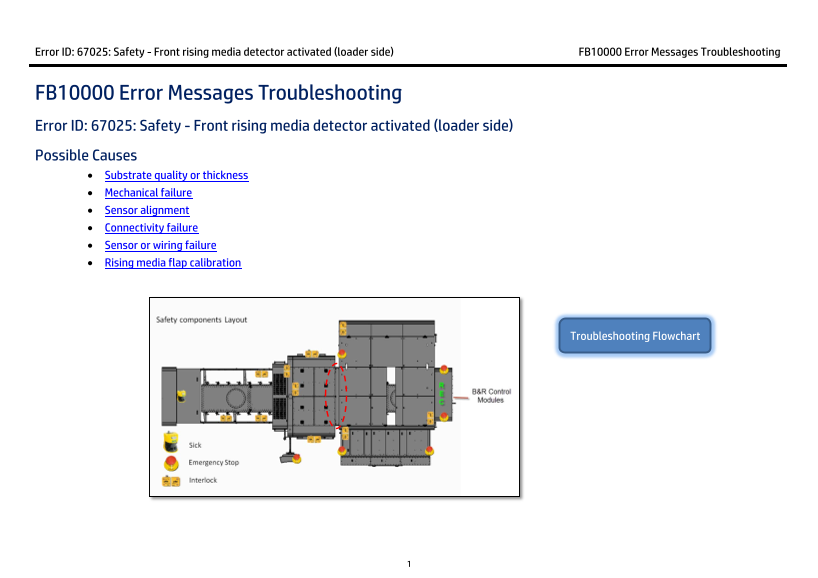
Page 1 Text Content
Error ID: 67025: Safety - Front rising media detector activated (loader side) FB10000 Error Messages Troubleshooting
FB10000 Error Messages Troubleshooting Error ID: 67025: Safety - Front rising media detector activated (loader side) Possible Causes • Substrate quality or thickness • Mechanical failure • Sensor alignment • Connectivity failure • Sensor or wiring failure • Rising media flap calibration
Troubleshooting Flowchart
Page Summary Contents For HP Scitex FB10000 Industrial Printing Press Geffen TS Error 67025
Manual Details
| Brand | HP |
|---|---|
| Pages | 9 |
| File Size | 416.99 KB |
| Published | June 15, 2026 |
Enter the captcha to get the download link:

Frequently Asked Questions
What should I do if Error ID 67025 occurs due to minor issues?
First, push the Reset button and click Refresh; if the error disappears, check that the substrate is flat. If not, pull out any stuck media.
The front rising media flap isn't moving smoothly. What's the fix?
Check the pivot pin for mechanical issues or insufficient lubrication. If the problem persists, lubricate the pin and re-check the movement.
My sensor LED is on when it should be off; how do I correct this?
Recalibrate the flap until the bracket crosses the fork sensor and the connected LED turns off. Then ensure the green LEDs are operational if required by troubleshooting.
I need to perform a full sensor calibration cycle. What materials are needed?
You need calibrated jigs (no’1 & 2), ensuring the vacuum knife is at home, and following specific Z axis height adjustments for optimal sensor positioning.