HP Scitex FB10000 Industrial Printing Press Geffen TS Error 67008
Summary
This comprehensive guide provides systematic troubleshooting for critical safety interlock failures, specifically addressing "Bridge front door open" alerts. It is designed for certified maintenance electricians and engineers managing industrial machinery safety systems. The manual details diagnostic flows covering mechanical checks of the hood/door status, precise alignment verification of interlocks, fault detection in wiring and cables (CX161-03430), and step-by-step replacement procedures for B&R Safety Modules (PLC). Use this resource to safely identify whether the issue is source-related or module-related, ensuring rapid restoration of safe system operation.
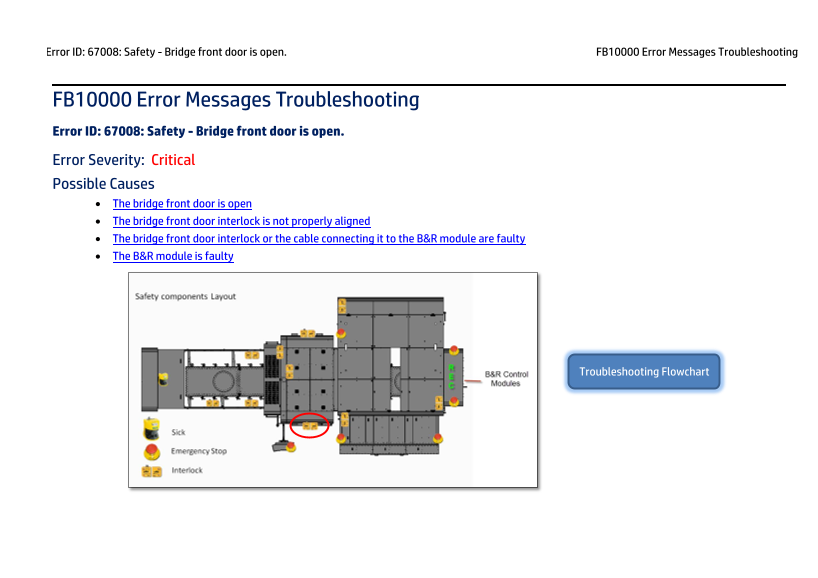
Page 1 Text Content
Error ID: 67008: Safety - Bridge front door is open. FB10000 Error Messages Troubleshooting
FB10000 Error Messages Troubleshooting Error ID: 67008: Safety - Bridge front door is open. Error Severity: Critical Possible Causes The bridge front door is open The bridge front door interlock is not properly aligned
The bridge front door interlock or the cable connecting it to the B&R module are faulty The B&R module is faulty
Troubleshooting Flowchart
Page Summary Contents For HP Scitex FB10000 Industrial Printing Press Geffen TS Error 67008
Manual Details
| Brand | HP |
|---|---|
| Pages | 8 |
| File Size | 670.99 KB |
| Published | June 18, 2026 |
Enter the captcha to get the download link:

Frequently Asked Questions
What is the initial step for solving error ID 67008?
Close the hood, ensure it's fully closed, and press the blue Reset button on the operator console.
How can I check if the bridge door interlock is improperly aligned?
Ensure the interlock parts are firmly attached to the printer, check their orientation, and confirm the distance between them is 0-3 mm.
What steps verify if the cable or interlock receiver is faulty?
Check continuity: test 2SDI2-SI17(13) with the door closed, and 2SDI2-SI18(23) with the door open. If checks pass, inspect for damage.
If the B&R safety module is suspected to be faulty, how should I replace it?
Only replace the Bus Unit (BU); press the two latches on the BU and unplug it from its base. Plug the new BU into the base.