HP Photosmart Multi-function Printer Series - B010Setup Poster
Summary
Connect your new HP Photosmart D110 series All-in-One printer with confidence! This comprehensive guide provides clear, step-by-step instructions for setting up your device, covering everything from initial power connection to flawless wireless setup using WPS or a guided wizard. Designed for first-time users and existing owners alike, this documentation ensures you can easily maximize the printer's potential for printing, copying, and scanning right out of the box. Get quick support and start printing today!
Page 1 Text Content
PHOTOSMART All-IN-ONE B010
HP Photosmart D110 series Get to know your HP Photosmart 3 Setup troubleshooting 2 Inside...
Start setup here... Networked printer setup and use 6 What’s new? Web Services 5 Print, copy, scan features and tips 4
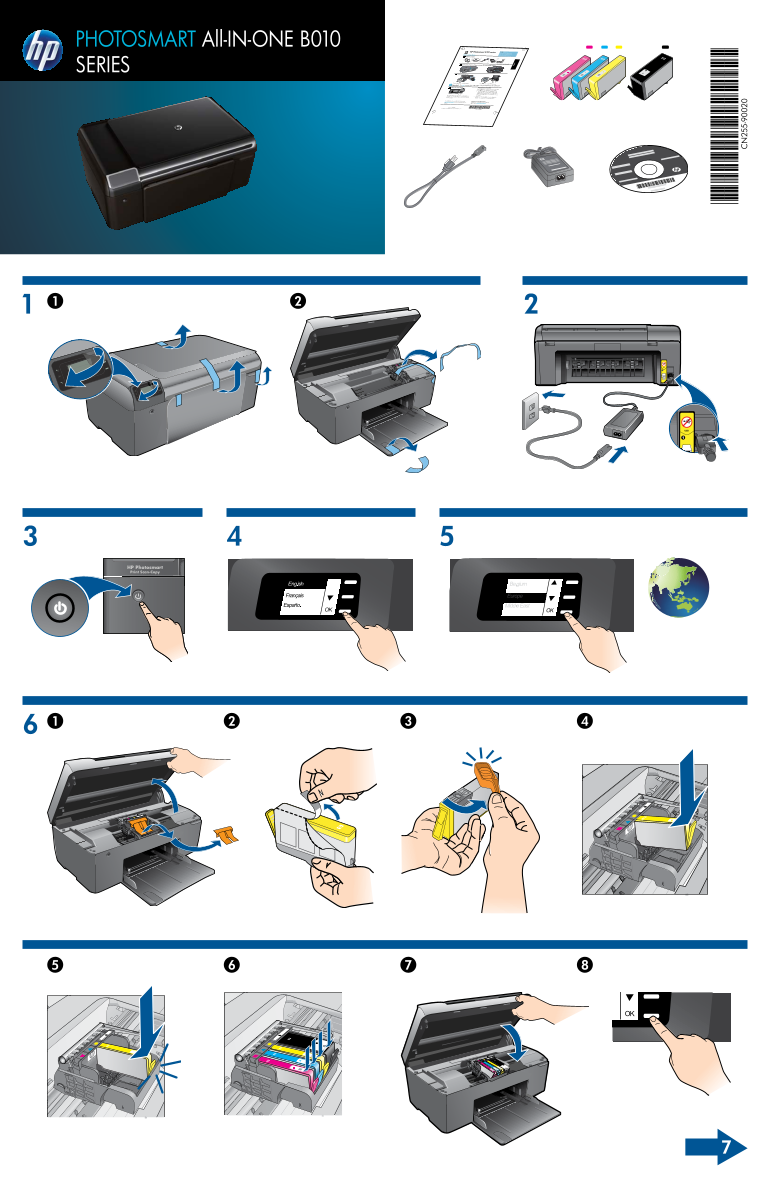
Verify box contents
Unpack printer. Remove all tape, protective film, and packing material * Not included with all models
SERIES
Connect and power on
Connect the power cord and adapter. Press to turn on the HP Photosmart.
Important! Do not connect the USB cable until prompted by the software!
Follow the Setup Wizard This HP Photosmart supports Wi Fi Protected Setup Wi Fi Protected Setup (WPS)
(WPS) for easy one-button wireless setup. During the setup, if you are prompted on the
press the WPS button on the router. The wireless display for WPS, and you have a WPS router,
Be sure to follow the instructions on the display as successful. LED on the printer will turn on if the connection is
HP Photosmart. it guides you through setting up and connecting the display. Also, see inside this guide for details. Otherwise, follow the setup wizard on the printer
www.hp.com/support to download and install the For computers without a CD/DVD drive, go to Get quicker service and support alerts by Register your HP Photosmart
software. registering at www.register.hp.com.
© 2009 Hewlett-Packard Development Company, L.P. Printed in [English] *CN731-90029*
CN731-90029
En gli sh
Page Summary Contents For HP Photosmart Multi-function Printer Series - B010Setup Poster
Manual Details
| Brand | HP |
|---|---|
| Pages | 2 |
| File Size | 3.64 MB |
| Published | June 01, 2026 |
Enter the captcha to get the download link:

Frequently Asked Questions
When should I connect the USB cable during initial setup?
Connect the power cord and adapter first, then press the power button. Important: Do not connect the USB cable until prompted by the software!
How can I set up my printer using WPS for easier wireless connection?
If prompted for WPS, press the WPS button on your router; the wireless LED on the printer turning on indicates a successful connection.
What steps should I take if I cannot use a CD/DVD drive to install software?
Go to www.hp.com/support to download and install drivers, or register at www.register.hp.com to get service alerts for quicker support.