HP Photosmart 7520 Series Installation Poster
Summary
This comprehensive guide and the PHOTOSMART 7520 e-ALL-IN-ONE SERIES device are designed for users seeking a versatile, high-performance office solution. Serving as an all-in-one machine, it combines advanced printing, scanning, and copying capabilities into one unit. The accompanying manual provides detailed instructions on setup, operation, connectivity, and troubleshooting in multiple languages, ensuring ease of use for both technical novices and experienced professionals requiring consistent, multi-functional results.
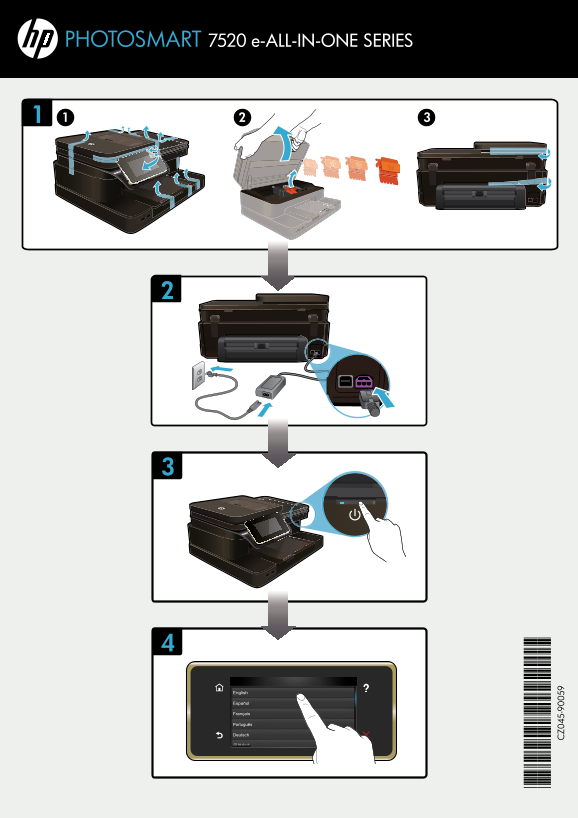
Page 1 Text Content
PHOTOSMART 7520 e-ALL-IN-ONE SERIES
English
Español
Français
Português
Deutsch
Page Summary Contents For HP Photosmart 7520 Series Installation Poster
Manual Details
| Brand | HP |
|---|---|
| Pages | 2 |
| File Size | 1023.75 KB |
| Published | May 22, 2026 |
Enter the captcha to get the download link:

Frequently Asked Questions
What is the name of this all-in-one printer series?
This is the PHOTOSMART 7520 e-ALL-IN-ONE SERIES.
Where can I find general product support?
You can find support at www.hp.com/support.
How do I manage wireless printing settings?
Details are available at www.hp.com/go/wirelessprinting.
What service allows for easy remote printing?
The device supports ePrintCenter, accessible via www.hp.com/go/ePrintCenter.