HP OfficeJet Pro 8730 Series Installation Poster
Summary
Designed for professional print suppliers and vendors, this technical guide provides comprehensive specifications for creating localized marketing collateral using the HP OfficeJet Pro series. The manual details global printing mandates, including specific paper stocks, CMYK color profiling, regional fold options, and compulsory language localization requirements across multiple markets. It also includes crucial setup instructions for device initialization, network connection (Wi-Fi, Ethernet, USB), ensuring print jobs are compliant and ready for international deployment.
Page 1 Text Content
Printing supplier must not manipulate or modify any electronic files without HP approval.
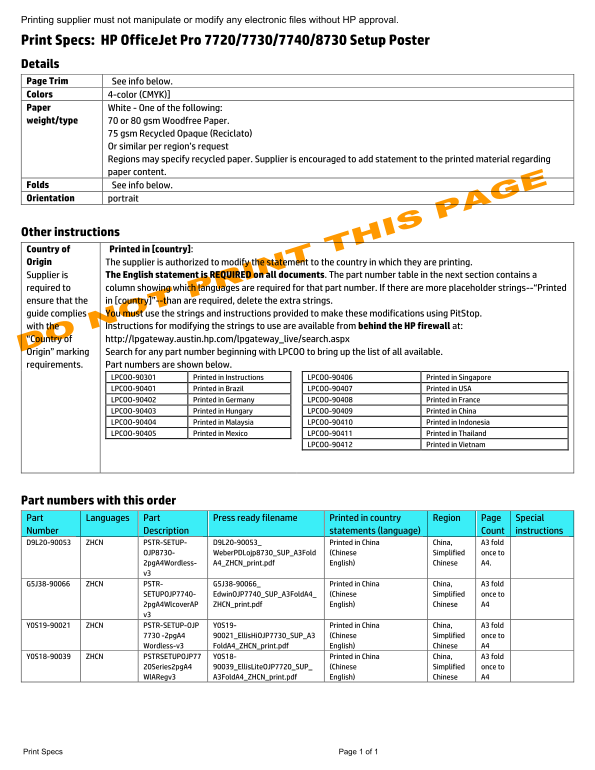
Print Specs: HP Office Jet Pro 7720/7730/7740/8730 Setup Poster Details Page Trim See info below. Colors 4-color (CMYK)] Paper White - One of the following: weight/type 70 or 80 gsm Woodfree Paper.
75 gsm Recycled Opaque (Reciclato) Or similar per region’s request Regions may specify recycled paper. Supplier is encouraged to add statement to the printed material regarding paper content.
Folds See info below. Orientation portrait
Other instructions Country of Printed in [country]: Origin The supplier is authorized to modify the statement to the country in which they are printing.
Supplier is The English statement is REQUIRED on all documents. The part number table in the next section contains a
required to column showing which languages are required for that part number. If there are more placeholder strings--“Printed ensure that the in [country]”--than are required, delete the extra strings. guide complies You must use the strings and instructions provided to make these modifications using Pit Stop.
with the Instructions for modifying the strings to use are available from behind the HP firewall at:
“Country of http://lpgateway.austin.hp.com/lpgateway_live/search.aspx Origin” marking Search for any part number beginning with LPCOO to bring up the list of all available. requirements. Part numbers are shown below.
LPCOO-90301 Printed in Instructions LPCOO-90406 Printed in Singapore LPCOO-90401 Printed in Brazil LPCOO-90407 Printed in USA LPCOO-90402 Printed in Germany LPCOO-90408 Printed in France LPCOO-90403 Printed in Hungary LPCOO-90409 Printed in China LPCOO-90404 Printed in Malaysia LPCOO-90410 Printed in Indonesia LPCOO-90405 Printed in Mexico LPCOO-90411 Printed in Thailand
LPCOO-90412 Printed in Vietnam
Part numbers with this order Part Languages Part Press ready filename Printed in country Region Page Special Number Description statements (language) Count instructions D9L20-90053 ZHCN PSTR-SETUP- D9L20-90053_ Printed in China China, A3 fold
OJP8730- Weber PDLojp8730_SUP_A3Fold (Chinese Simplified once to 2pg A4Wordless- A4_ZHCN_print.pdf English) Chinese A4. v3
G5J38-90066 ZHCN PSTR- G5J38-90066_ Printed in China China, A3 fold
SETUPOJP7740- Edwin OJP7740_SUP_A3Fold A4_ (Chinese Simplified once to 2pg A4Wlcover AP ZHCN_print.pdf English) Chinese A4 v3
Y0S19-90021 ZHCN PSTR-SETUP-OJP Y0S19- Printed in China China, A3 fold
7730 -2pg A4 90021_Ellis Hi OJP7730_SUP_A3 (Chinese Simplified once to Wordless-v3 Fold A4_ZHCN_print.pdf English) Chinese A4
Y0S18-90039 ZHCN PSTRSETUPOJP77 Y0S18- Printed in China China, A3 fold
20Series2pg A4 90039_Ellis Lite OJP7720_SUP_ (Chinese Simplified once to Wl ARegv3 A3Fold A4_ZHCN_print.pdf English) Chinese A4
Print Specs Page 1 of 1
Page Summary Contents For HP OfficeJet Pro 8730 Series Installation Poster
Manual Details
| Brand | HP |
|---|---|
| Pages | 5 |
| File Size | 1.98 MB |
| Published | May 31, 2026 |
Enter the captcha to get the download link:

Frequently Asked Questions
What steps do I need to follow for initial printer setup?
Turn on the power, set language/date/time on the screen, install ink cartridges, load paper, and then initialize the device according to the display instructions.
How do I connect my printer to a network (Wi-Fi, Ethernet, or USB)?
For wireless, select 'wireless' on the setup screen. For Ethernet or USB, download HP software from 123.hp.com and follow the specific connection prompts.
What are the default login credentials for setting up the printer?
The default username is `admin` and the password is `52723098`. This information is also printed on the label on the back of the printer.