# A B C D E F G H I J K L M N O P Q R S T U V W X Y Z

EverFocus ED335 Operation Instructions

Summary

This professional IR Dome Camera is an advanced surveillance solution designed for versatile indoor monitoring day and night. Featuring a high-resolution CCD sensor and 34 IR LEDs, it captures clear images in low-light conditions up to 66 feet away. Its unique 3-axis positioning system allows users to adjust the viewing angle from almost any mounted position. The manual provides complete professional guidelines covering safe installation, operation, technical specifications, and optimal maintenance for installers seeking reliable, high-performance security camera systems.
📄 Preview PAGE OF 18

Page 1 Text Content

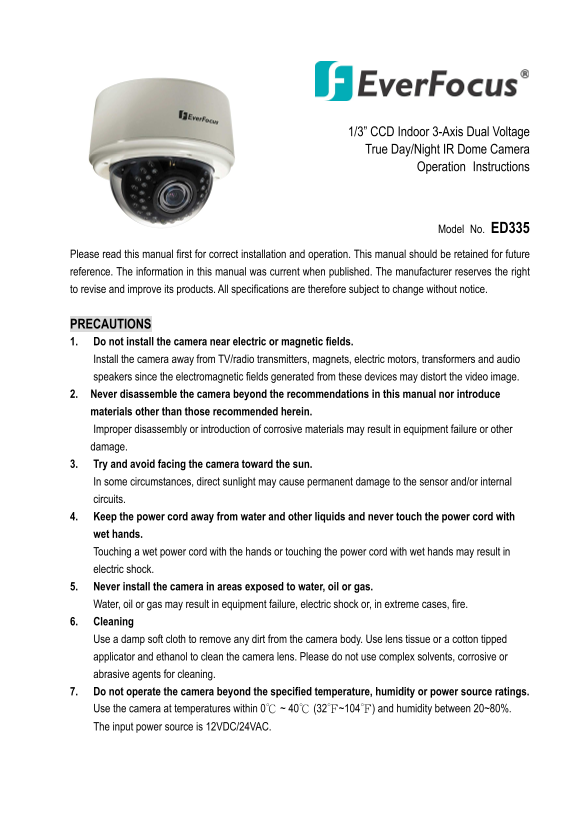
1/3” CCD Indoor 3-Axis Dual Voltage True Day/Night IR Dome Camera

Operation Instructions

Model No. ED335

Please read this manual first for correct installation and operation. This manual should be retained for future reference. The information in this manual was current when published. The manufacturer reserves the right to revise and improve its products. All specifications are therefore subject to change without notice.

PRECAUTIONS 1. Do not install the camera near electric or magnetic fields. Install the camera away from TV/radio transmitters, magnets, electric motors, transformers and audio speakers since the electromagnetic fields generated from these devices may distort the video image. 2. Never disassemble the camera beyond the recommendations in this manual nor introduce materials other than those recommended herein. Improper disassembly or introduction of corrosive materials may result in equipment failure or other damage. 3. Try and avoid facing the camera toward the sun. In some circumstances, direct sunlight may cause permanent damage to the sensor and/or internal circuits. 4. Keep the power cord away from water and other liquids and never touch the power cord with wet hands. Touching a wet power cord with the hands or touching the power cord with wet hands may result in electric shock. 5. Never install the camera in areas exposed to water, oil or gas. Water, oil or gas may result in equipment failure, electric shock or, in extreme cases, fire. 6. Cleaning Use a damp soft cloth to remove any dirt from the camera body. Use lens tissue or a cotton tipped applicator and ethanol to clean the camera lens. Please do not use complex solvents, corrosive or abrasive agents for cleaning. 7. Do not operate the camera beyond the specified temperature, humidity or power source ratings. Use the camera at temperatures within 0℃ ~ 40℃ (32℉~104℉) and humidity between 20~80%. The input power source is 12VDC/24VAC.

Page Summary Contents For EverFocus ED335 Operation Instructions

Page 1 1/3” CCD Indoor 3-Axis Dual Voltage True Day/Night IR Dome Camera Operation Instructions Model No. ED335 Please read this manual first for correct installation and operation. This manual should be ret...
Page 2 PRODUCT OVERVIEW ED335 is a new design IR Dome camera from Everfocus. It incorporates breakthrough DSP technology to provide brilliant color images in well lit environments. Using a SONY Super HAD CCD...
Page 3 Power supply pigtail Video test cable Accessory pack #2 containing two flush mounting clips DIMENSIONS
Page 4 SPECIFICATIONS Pickup Device 1/3” SONY Super HAD CCD Video Format NTSC or PAL Scanning System NTSC: 525 TV lines, 60 fields/sec; PAL: 625 TV lines, 50 fields/sec. Picture Element 768 x 494 (NTSC); 752...
Page 5 MAJOR PARTS: NAMES AND FUNCTIONS Front View 1. Outer Base 3. Lens 2. IR LEDs 4. Light sensor 5. Cover Side View 6. Focus Adjust 7. Zoom Adjust 8. Video Output 9. Power Input
Page 6 Back View Video Test Output Iris level adjust 1. Base The camera unit sets in the dome base, when it is shipped from the factory. This base is used for surface mounting, and is discarded for flush mou...
Page 7 7. Zoom Ring To adjust the viewing angle, loosen the zoom ring knob. Turn the ring toward <W> to Zoom out or <T> to Zoom in as necessary, and re-tighten when the adjustment is complete. 8....
Page 8 3-AXIS GIMBAL BRACKET The 3-axis gimbal enables installers to easily mount the camera on a wall or ceiling and then using the built in tilt and dual axis 180° twist, to adjust the viewing angle to the...
Page 9 INSTALLATION An ED335 camera may be mounted in two ways: surface mount and flush mount. Select the one that meets your needs. Installation - Surface Mount 1. Paste the drilling template on the ceiling...
Page 10 4. Remove dome cover (4 captive hex head screws); remove inner base from outer base (4 Phillips head screws – retain these for later re-assembly). 5. Pull the cables to be connected to power and video...
Page 11 7. Attach power and video cables from source to cables from camera and push excess wire back into hole. 8. Insert inner base into outer base and secure using the 4 Phillips removed in the earlier step...
Page 12 10. Once the camera view is as desired, attach the cover to outer base with the captive hex head screws.
Page 13 Installation - Flush Mount 1. Paste the drilling template on the ceiling or wall. Please refer to the drilling template below. 2. Use the appropriate tool to drill the OUTER holes; carefully cut along...
Page 14 5. Unscrew the 4 Philips screws (retain for future use) to detach the inner base from the outer base. Set aside the outer base. 6. Screw the 2 spring tabs in the orientation shown to the slots at both...
Page 15 7. Attach power and video cables from source to cables from camera and push excess wire back into hole. Fold the spring tabs up. 8. Preposition camera so it is facing approximately in the desired dire...
Page 16 10. The spring tabs will open automatically to support the camera against the ceiling. 11. Use the long Phillips pan head screws (x4) provided to screw the base to the ceiling. Do NOT use washers.
Page 17 12. Attach video test cable to test point on rear of camera module. Aim and focus the camera. Remove test cable. 13. Screw the cover back to the base with captive hex head screws.
Page 18 Headquarters Office Beijing office 12F, No.79 Sec.1 Shin-Tai Wu Road, Room 609,Technology Trade Building. Hsi-Chi, Taipei, Taiwan Shangdi Information Industry Base, Tel: +886-2-26982334 Haidian Distri...

Manual Details

Brand EverFocus
Pages 18
File Size 858.37 KB
Published May 20, 2026
111 views

Enter the captcha to get the download link:

captcha

Frequently Asked Questions

What power sources does the ED335 support?

The system supports Dual Voltage input of 12VDC or 24VAC.

How should I clean the camera lens?

Use lens tissue or a cotton tipped applicator and ethanol to clean the camera lens. Never use complex solvents or abrasives.

What environmental dangers must I avoid when installing this camera?

Do not install near electric/magnetic fields, water, oil, gas, or directly facing sunlight.

How does installation adjust viewing angles?

It uses a 3-axis gimbal, built-in tilt, dual axis 180° twist, and a vari-focal lens for versatile positioning.