EPSON EMP-83 User's Manual
Summary
Illuminate your presentations with this professional, portable projector ideal for classrooms and boardrooms. Featuring 3LCD technology and 2200 ANSI lumens of bright, crisp image quality, it ensures engaging viewing in any setting. The manual provides comprehensive guides on setup, operation, connectivity, and advanced features, including remote management and automatic keystone correction. Perfect for educators and businesses needing a versatile, reliable, and energy-efficient projection solution.
Page 1 Text Content
Epson (UK) Ltd. (01.04.2007)
Epson EMP-83
Epson EMP 83
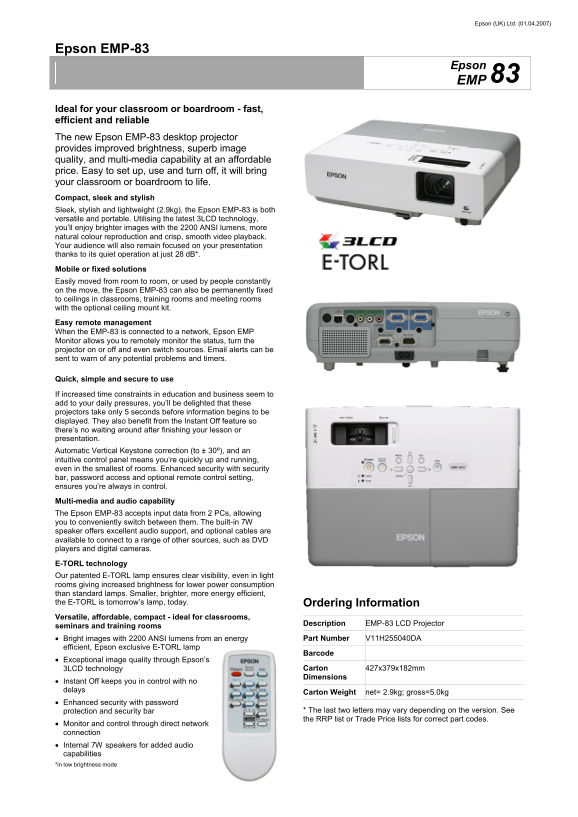
Ideal for your classroom or boardroom - fast, efficient and reliable The new Epson EMP-83 desktop projector provides improved brightness, superb image quality, and multi-media capability at an affordable price. Easy to set up, use and turn off, it will bring your classroom or boardroom to life. Compact, sleek and stylish Sleek, stylish and lightweight (2.9kg), the Epson EMP-83 is both versatile and portable. Utilising the latest 3LCD technology, you’ll enjoy brighter images with the 2200 ANSI lumens, more natural colour reproduction and crisp, smooth video playback. Your audience will also remain focused on your presentation thanks to its quiet operation at just 28 d B*. Mobile or fixed solutions Easily moved from room to room, or used by people constantly on the move, the Epson EMP-83 can also be permanently fixed to ceilings in classrooms, training rooms and meeting rooms with the optional ceiling mount kit. Easy remote management When the EMP-83 is connected to a network, Epson EMP Monitor allows you to remotely monitor the status, turn the projector on or off and even switch sources. Email alerts can be sent to warn of any potential problems and timers.
Quick, simple and secure to use
If increased time constraints in education and business seem to add to your daily pressures, you’ll be delighted that these projectors take only 5 seconds before information begins to be displayed. They also benefit from the Instant Off feature so there’s no waiting around after finishing your lesson or presentation. Automatic Vertical Keystone correction (to ± 30º), and an intuitive control panel means you’re quickly up and running, even in the smallest of rooms. Enhanced security with security bar, password access and optional remote control setting, ensures you’re always in control.
Multi-media and audio capability The Epson EMP-83 accepts input data from 2 PCs, allowing you to conveniently switch between them. The built-in 7W speaker offers excellent audio support, and optional cables are available to connect to a range of other sources, such as DVD players and digital cameras.
E-TORL technology Our patented E-TORL lamp ensures clear visibility, even in light rooms giving increased brightness for lower power consumption than standard lamps. Smaller, brighter, more energy efficient, the E-TORL is tomorrow’s lamp, today. Ordering Information Versatile, affordable, compact - ideal for classrooms,
Description EMP-83 LCD Projector
seminars and training rooms
• Bright images with 2200 ANSI lumens from an energy Part Number V11H255040DA
efficient, Epson exclusive E-TORL lamp
Barcode
• Exceptional image quality through Epson’s
3LCD technology Carton 427x379x182mm Dimensions
• Instant Off keeps you in control with no delays
Carton Weight net= 2.9kg; gross=5.0kg
• Enhanced security with password
protection and security bar * The last two letters may vary depending on the version. See the RRP list or Trade Price lists for correct part codes.
• Monitor and control through direct network connection • Internal 7W speakers for added audio capabilities *in low brightness mode
Page Summary Contents For EPSON EMP-83 User's Manual
Manual Details
| Brand | Epson |
|---|---|
| Pages | 3 |
| File Size | 1.42 MB |
| Published | May 30, 2026 |
Enter the captcha to get the download link:

Frequently Asked Questions
What is the maximum brightness level of the projector?
It utilizes 3LCD technology and provides 2200 ANSI lumens for bright image quality.
How quickly can the presentation start after powering on?
The projectors take only 5 seconds before information begins to be displayed, and features Instant Off upon completion.
Can I manage or control the projector remotely?
Yes, when networked, you can use Epson EMP Monitor for remote status monitoring, power control, and source switching.
Is the unit portable or can it be fixed in place?
It is lightweight (2.9kg) and mobile, but an optional ceiling mount kit allows permanent installation.