Dell XPS 720 H2C Installation Guide
Summary
Dell XPS desktop computer setup guide from April 2007 (KP694). Covers stand installation, monitor connection via DVI or VGA cable, keyboard and mouse setup, network adapter and modem connections, and power-on procedures. Includes optional Media Center components: remote control sensor, batteries, and TV tuner card setup for Windows Media Center Edition operating system.
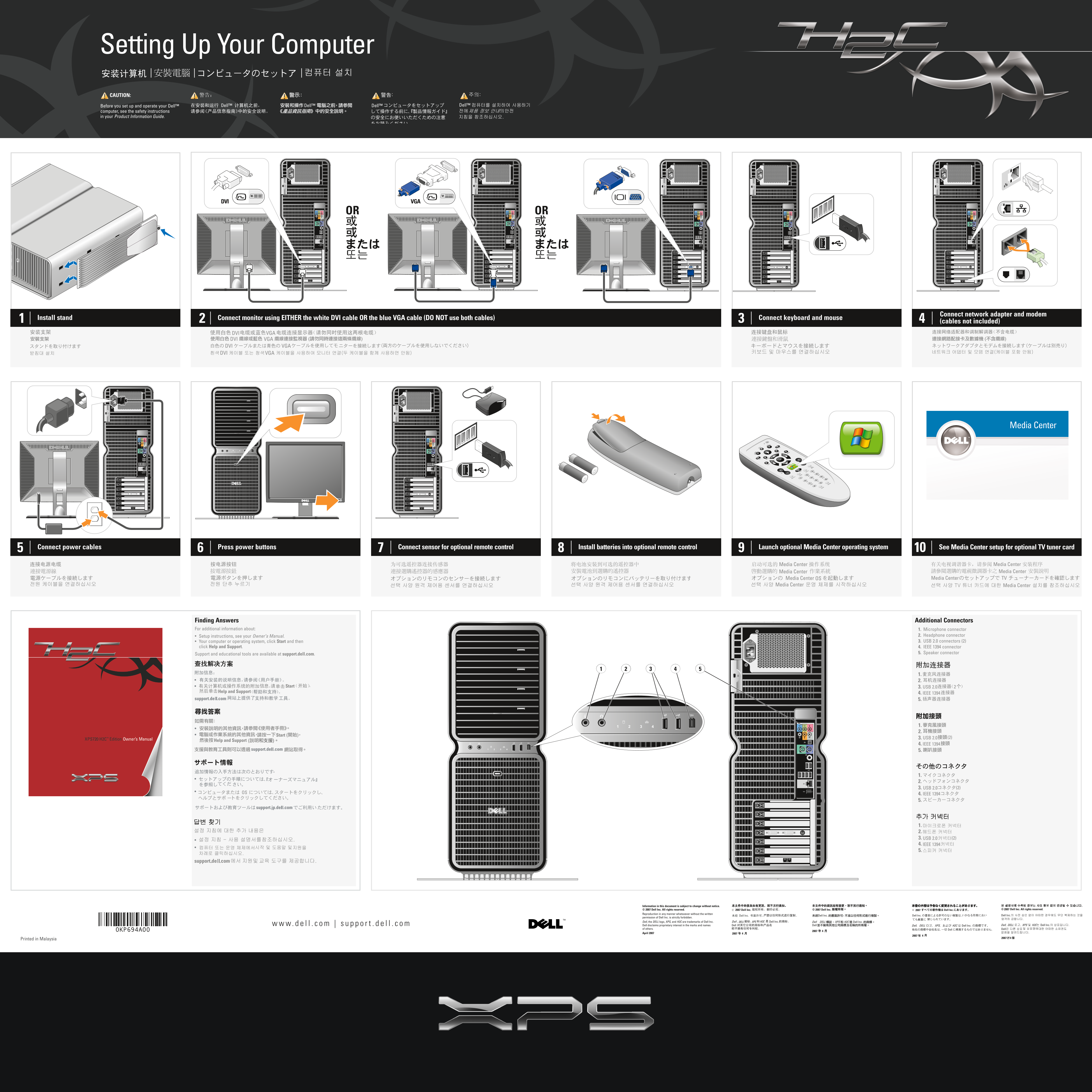
Page 1 Text Content
KP694ap0.qxd 10/04/2007 14:13 Page 1
Setting Up Your Computer | | | CAUTION:
Before you set up and operate your Dell™ Dell™
computer, see the safety instructions in your Product Information Guide.
DVI VGA
OR OR
Connect network adapter and modem
Install stand Connect monitor using EITHER the white DVI cable OR the blue VGA cable (DO NOT use both cables) Connect keyboard and mouse
(cables not included)
DVI VGA
DVI VGA
DVI VGA
DVI VGA
Connect power cables Press power buttons Connect sensor for optional remote control Install batteries into optional remote control Launch optional Media Center operating system See Media Center setup for optional TV tuner card8
Finding Answers Additional Connectors For additional information about: 1. Microphone connector
Setup instructions, see your Owner’s Manual. 2. Headphone connector Your computer or operating system, click Start and then 3. USB 2.0 connectors (2)
click Help and Support. 4. IEEE 1394 connector
5. Speaker connector
Support and educational tools are available at support.dell.com.
Start 3. USB 2.0
Help and Support
4. IEEE 1394 5.
Start
3. USB 2.0 (2)
Help and Support
4. IEEE 1394 5.
3. USB 2.0 (2)
4. IEEE 1394 5.
1. 2. 3. USB 2.0 (2) 4. IEEE 1394 5.
Information in this document is subject to change without notice. © 2007 Dell Inc. All rights reserved. 2007 Dell Inc. 2007 Dell Inc. Dell Inc. Reproduction in any manner whatsoever without the written permission of Dell Inc. is strictly forbidden.
Dell, the DELL logo, XPS, and H2C are trademarks of Dell Inc. XPSDELL H2C
Dell disclaims proprietary interest in the marks and names of others.
0KP694A00
April 2007
Printed in Malaysia
Page Summary Contents For Dell XPS 720 H2C Installation Guide
Manual Details
| Brand | Dell |
|---|---|
| Pages | 2 |
| File Size | 24.45 MB |
| Published | July 02, 2026 |
Enter the captcha to get the download link:

Frequently Asked Questions
What cables should I use to connect the monitor?
Use EITHER the white DVI cable OR the blue VGA cable; do not use both.
Are all necessary cables included with the computer?
No, the manual states that connecting cables are not included.
Where can I find setup instructions for additional connectors like the microphone or headphones?
For those connections, you should see your Owner’s Manual.
How do I find general support and education tools for my Dell computer?
Support resources are available at support.dell.com.