Dell XPS 630 Installation Guide
Summary
Dell desktop computer setup guide featuring multi-language instructions for monitor connection via DVI or VGA, keyboard and mouse attachment, network and modem cable connection, and power-on procedures. Includes system features overview with IEEE 1394, microphone, headphone, and USB 2.0 connectors, plus optional wireless network configuration diagram.
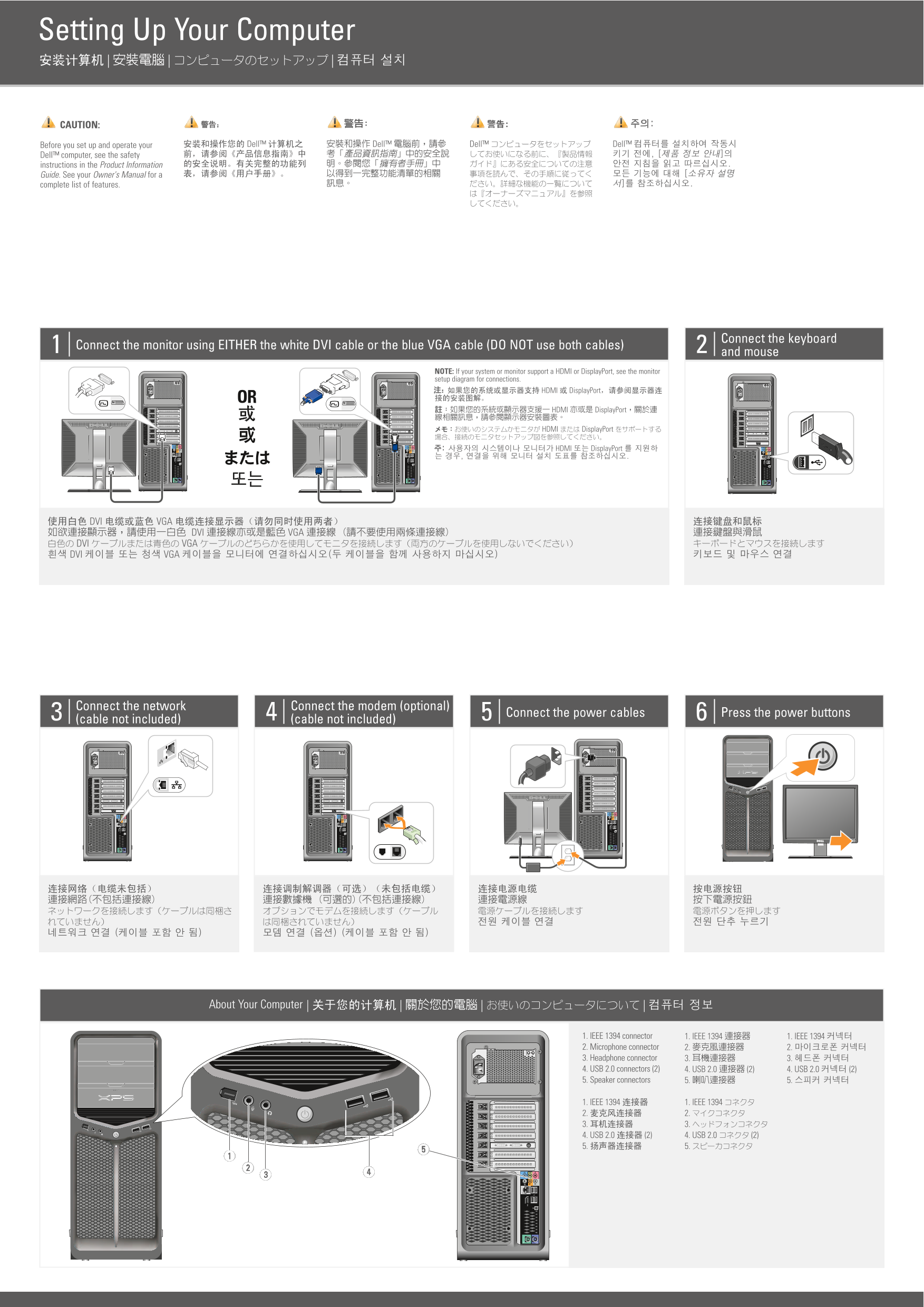
Page 1 Text Content
Setting Up Your Computer
CAUTION:
Before you set up and operate your Dell™ computer, see the safety instructions in the Product Information Guide. See your Owner's Manual for a complete list of features.
Connect the keyboard
Connect the monitor using EITHER the white DVI cable or the blue VGA cable (DO NOT use both cables)
and mouse
NOTE: If your system or monitor support a HDMI or Display Port, see the monitor setup diagram for connections.
Connect the network Connect the modem (optional)
Connect the power cables Press the power buttons
(cable not included) 4 (cable not included)
About Your Computer
1. IEEE 1394 connector 2. Microphone connector 3. Headphone connector 4. USB 2.0 connectors (2) 5. Speaker connectors
Page Summary Contents For Dell XPS 630 Installation Guide
Manual Details
| Brand | Dell |
|---|---|
| Pages | 2 |
| File Size | 1.66 MB |
| Published | July 02, 2026 |
Enter the captcha to get the download link:

Frequently Asked Questions
Which cables should I use to connect my monitor?
Use either the white DVI cable or the blue VGA cable, but do not use both.
What kinds of network connections are supported?
You can connect via Internet service (DSL/cable modem) or set up a wireless network using a router or adapter.
What ports are found on the back of the computer?
The ports include an IEEE 1394 connector, Microphone, Headphone connectors, two USB 2.0 connectors, and speaker connectors.
Where can I find complete information about the settings?
See your Owner's Manual or visit support.dell.com for documentation.