Dell Vostro 3420 Statement of Volatility
Summary
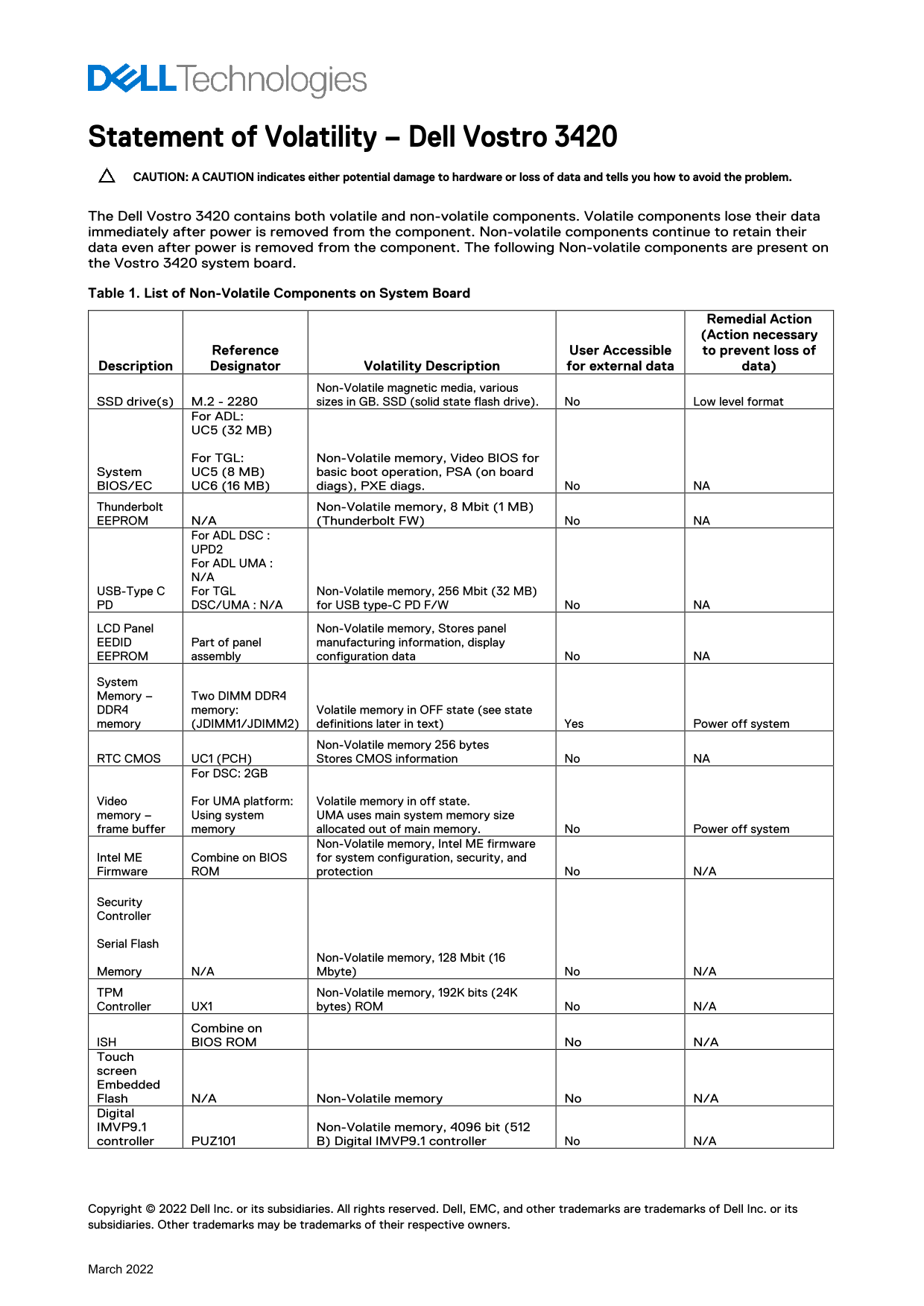
Statement of Volatility for Dell Vostro 3420 laptop documenting volatile and non-volatile components. The document lists all non-volatile components on the system board including SSD drives, BIOS/EC firmware, Thunderbolt EEPROM, USB-C PD firmware, LCD panel EDID, RTC CMOS, Intel ME firmware, and security chips. It specifies data retention characteristics and remedial actions for each component. Target users are security professionals and government agencies requiring volatility assessment for data sanitization.
Page 1 Text Content
Statement of Volatility – Dell Vostro 3420 CAUTION: A CAUTION indicates either potential damage to hardware or loss of data and tells you how to avoid the problem. The Dell Vostro 3420 contains both volatile and non-volatile components. Volatile components lose their data immediately after power is removed from the component. Non-volatile components continue to retain their data even after power is removed from the component. The following Non-volatile components are present on the Vostro 3420 system board. Table 1. List of Non-Volatile Components on System Board
Remedial Action (Action necessary
Reference User Accessible to prevent loss of
Description Designator Volatility Description for external data data)
Non-Volatile magnetic media, various
SSD drive(s) M.2 - 2280 sizes in GB. SSD (solid state flash drive). No Low level format
For ADL: UC5 (32 MB)
For TGL: Non-Volatile memory, Video BIOS for System UC5 (8 MB) basic boot operation, PSA (on board
BIOS/EC UC6 (16 MB) diags), PXE diags. No NA Thunderbolt Non-Volatile memory, 8 Mbit (1 MB) EEPROM N/A (Thunderbolt FW) No NA
For ADL DSC : UPD2 For ADL UMA : N/A USB-Type C For TGL Non-Volatile memory, 256 Mbit (32 MB)
PD DSC/UMA : N/A for USB type-C PD F/W No NA
LCD Panel Non-Volatile memory, Stores panel
EEDID Part of panel manufacturing information, display
EEPROM assembly configuration data No NA
System Memory – Two DIMM DDR4 DDR4 memory: Volatile memory in OFF state (see state memory (JDIMM1/JDIMM2) definitions later in text) Yes Power off system
Non-Volatile memory 256 bytes
RTC CMOS UC1 (PCH) Stores CMOS information No NA
For DSC: 2GB
Video For UMA platform: Volatile memory in off state. memory – Using system UMA uses main system memory size frame buffer memory allocated out of main memory. No Power off system
Non-Volatile memory, Intel ME firmware
Intel ME Combine on BIOS for system configuration, security, and Firmware ROM protection No N/A
Security Controller
Serial Flash
Non-Volatile memory, 128 Mbit (16
Memory N/A Mbyte) No N/A TPM Non-Volatile memory, 192K bits (24K Controller UX1 bytes) ROM No N/A
Combine on
ISH BIOS ROM No N/A Touch screen Embedded Flash N/A Non-Volatile memory No N/A Digital IMVP9.1 Non-Volatile memory, 4096 bit (512 controller PUZ101 B) Digital IMVP9.1 controller No N/A
Copyright © 2022 Dell Inc. or its subsidiaries. All rights reserved. Dell, EMC, and other trademarks are trademarks of Dell Inc. or its subsidiaries. Other trademarks may be trademarks of their respective owners.
March 2022
Page Summary Contents For Dell Vostro 3420 Statement of Volatility
Manual Details
| Brand | Dell |
|---|---|
| Pages | 1 |
| File Size | 161.25 KB |
| Published | July 01, 2026 |
Enter the captcha to get the download link:

Frequently Asked Questions
Does the core system memory (DDR4) lose data when I power down the Vostro 3420?
Yes, DDR4 memory is volatile, meaning it loses its data immediately after the power is removed from the component.
Which components retain critical information even if the power is cut off?
Non-volatile units like SSD drives, BIOS/EC, CMOS, and Intel ME firmware retain their data even without main system power.
If using UMA mode for video, what cautionary step must I follow regarding power cycling?
If the UMA uses main system memory for the frame buffer, you must not power off the system to prevent potential data loss.