Dell Universal Dock D6000 Quick Setup Guide
Summary
This quick start guide covers the Dell Universal Dock D6000. The manual provides setup instructions including driver installation, USB-A and USB-C connector selection for laptop connection, and display configuration. It covers maximum display support differences between USB-C and USB-A notebooks, corporate installation software package information, and regulatory compliance details. The guide includes driver download links and support resources. This documentation is intended for business professionals and mobile workers who need quick setup guidance for expanding their laptop connectivity through the Dell Universal Dock D6000.
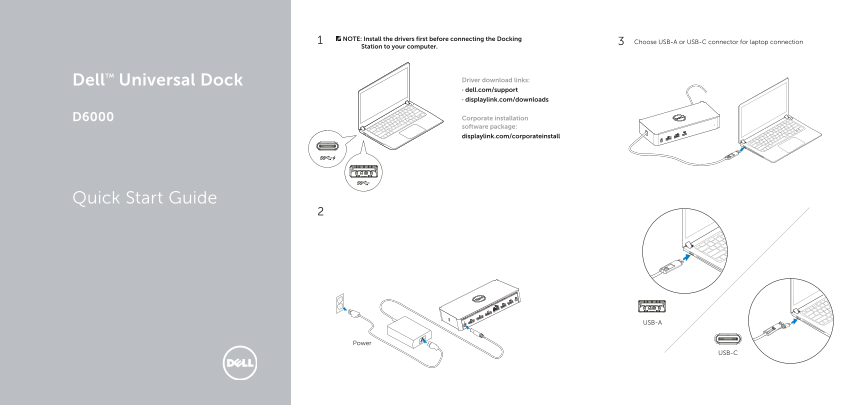
Page 1 Text Content
NOTE: Install the drivers first before connecting the Docking
Choose USB-A or USB-C connector for laptop connection
Station to your computer.
Dell TM Universal Dock Driver download links: · dell.com/support · displaylink.com/downloads
D6000 Corporate installation software package: displaylink.com/corporateinstall
Quick Start Guide
USB-A
Power
USB-C
Page Summary Contents For Dell Universal Dock D6000 Quick Setup Guide
Manual Details
| Brand | Dell |
|---|---|
| Pages | 2 |
| File Size | 2.95 MB |
| Published | June 16, 2026 |
Enter the captcha to get the download link:

Frequently Asked Questions
How many monitors can be connected?
USB-C notebook supports max 3 displays; USB-A notebook supports max 2 displays.
Do I need to install drivers?
Yes, install drivers first before connecting the Docking Station to your computer.
Where can I download the latest drivers?
Download from the Dell support site or the DisplayLink support website.
Who should use the corporate installation software?
Network/IT administrators should use the corporate install package.