Dell Rugged Desk Dock Quick User Guide
Summary
This Quick Start Guide for the Dell Rugged Desk Dock provides multilingual setup instructions for docking Dell Latitude Rugged Extreme laptops. It covers determining the correct mechanical adjustment setting based on laptop model (Latitude 12 Rugged Extreme, Latitude 14 Rugged Extreme, and future models), adjusting the front hook tray, connecting the power supply, aligning and docking the laptop, and ejecting it via the release button. Hardware features are documented with labeled diagrams. Designed for field workers and industrial users deploying rugged laptops in demanding environments.
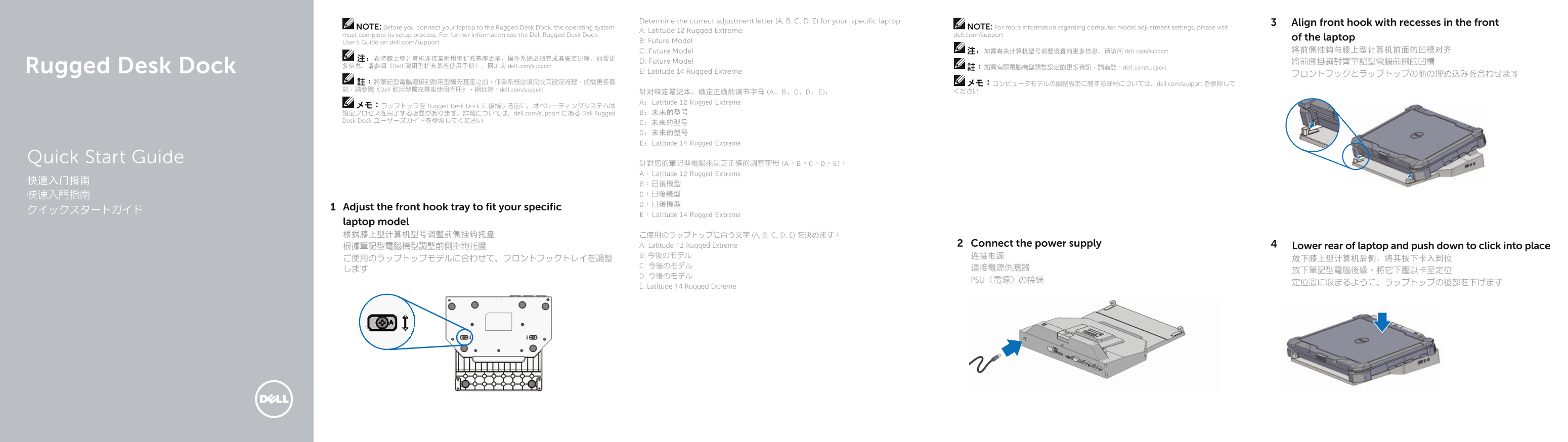
Page 1 Text Content
Determine the correct adjustment letter (A, B, C, D, E) for your specific laptop: Align front hook with recesses in the front
NOTE: Before you connect your laptop to the Rugged Desk Dock, the operating system NOTE: For more information regarding computer model adjustment settings, please visit
A: Latitude 12 Rugged Extreme
must complete its setup process. For further information see the Dell Rugged Desk Dock dell.com/support
of the laptop
User’s Guide on dell.com/support B: Future Model
C: Future Model 注:如需有关计算机型号调整设置的更多信息,请访问 dell.com/support 将前侧挂钩与膝上型计算机前面的凹槽对齐
D: Future Model 將前側掛鉤對齊筆記型電腦前側的凹槽
Rugged Desk Dock 多信息,请参阅《Dell 耐用型扩充基座使用手册》,网址为 dell.com/support 註:如需有關電腦機型調整設定的更多資訊,請造訪:dell.com/support
E: Latitude 14 Rugged Extreme
註:將筆記型電腦連接到耐用型擴充基座之前,作業系統必須完成其設定流程。如需更多資 メモ:コンピュータモデルの調整設定に関する詳細については、dell.com/support を参照して 訊,請參閱《Dell 耐用型擴充基座使用手冊》,網址為:dell.com/support ください
针对特定笔记本,确定正确的调节字母 (A、B、C、D、E): A:Latitude 12 Rugged Extreme
メモ:ラップトップを Rugged Desk Dock に接続する前に、オペレーティングシステムは
設定プロセスを完了する必要があります。詳細については、dell.com/support にある Dell Rugged B:未来的型号
Desk Dock ユーザーズガイドを参照してください
C:未来的型号 D:未来的型号 E:Latitude 14 Rugged Extreme
Quick Start Guide
針對您的筆記型電腦來決定正確的調整字母 (A、B、C、D、E): A:Latitude 12 Rugged Extreme
Adjust the front hook tray to fi t your specifi c
E:Latitude 14 Rugged Extreme
laptop model 根据膝上型计算机型号调整前侧挂钩托盘 ご使用のラップトップに合う文字 (A, B, C, D, E) を決めます:
A: Latitude 12 Rugged Extreme Connect the power supply
根據筆記型電腦機型調整前側掛鉤托盤 Lower rear of laptop and push down to click into place
PSU(電源)の接続
E: Latitude 14 Rugged Extreme
Page Summary Contents For Dell Rugged Desk Dock Quick User Guide
Manual Details
| Brand | Dell |
|---|---|
| Pages | 2 |
| File Size | 359.68 KB |
| Published | July 02, 2026 |
Enter the captcha to get the download link:

Frequently Asked Questions
What is required before connecting my laptop to the Rugged Desk Dock?
The operating system on your laptop must complete its setup process first. It is also essential to align the front hook with the recesses specific to your model type.
How do I safely remove or eject my laptop from the dock?
To remove the laptop, press the designated eject button located on the side of the Rugged Desk Dock.
What types of ports are available for external connections on the docking station?
The dock features multiple USB 3.0 connectors, a VGA port, an HDMI connector, and a network connection port.