Dell Thunderbolt Dock TB16 - Quick Setup Guide
Summary
Quick start guide for the Dell Thunderbolt Dock TB16. Provides essential setup instructions including the requirement to update computer BIOS and dock drivers to the latest versions before use. Notes that computers requiring more than 130W power must also use their own power adapter. Includes brief feature overview and directs users to Dell support website for drivers and regulatory compliance information. Intended for end users setting up the TB16 Thunderbolt docking station with compatible Dell laptops.
Page 1 Text Content
Dell Thunderbolt™ Dock TB16
Quick Start Guide
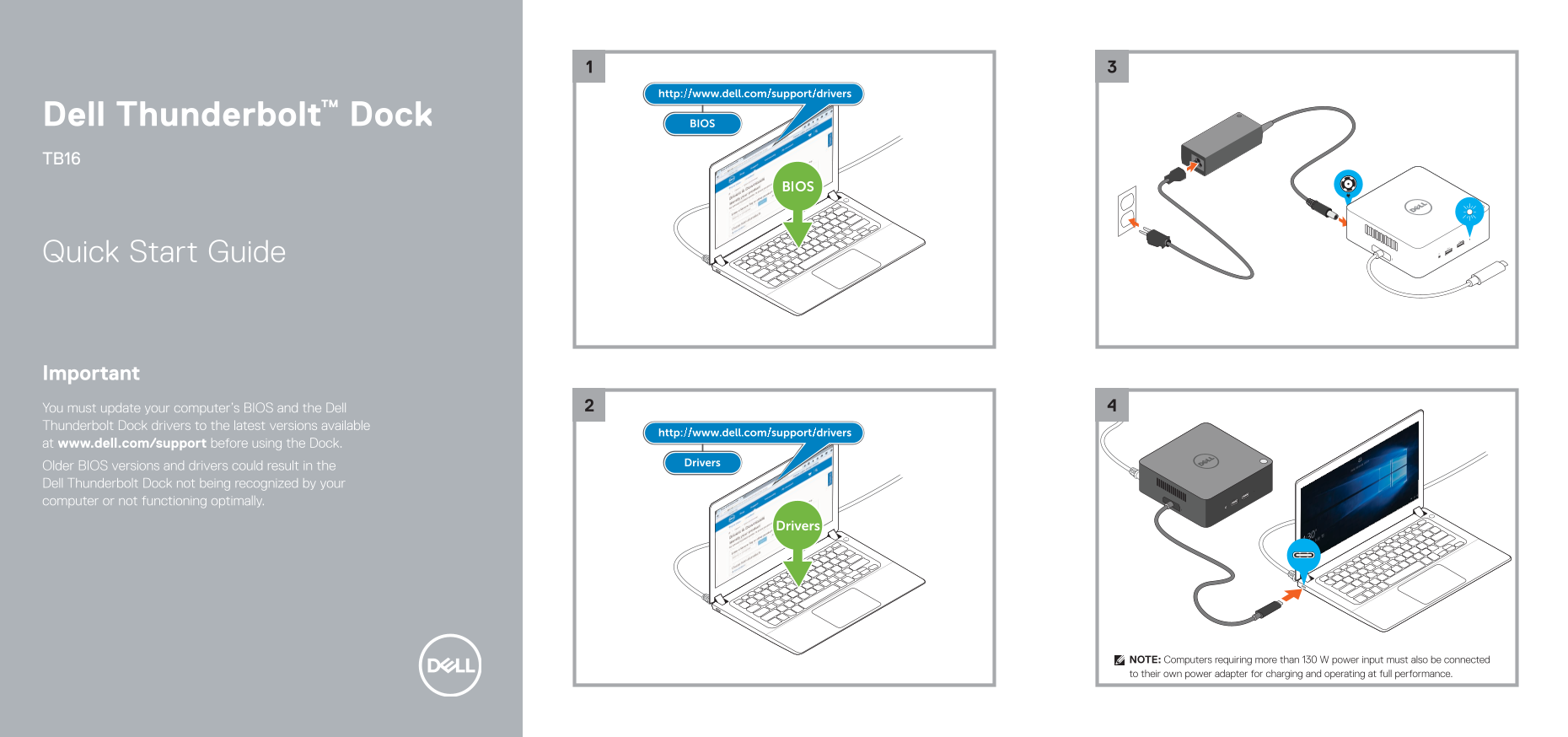
Important You must update your computer’s BIOS and the Dell Thunderbolt Dock drivers to the latest versions available at www.dell.com/support before using the Dock. Older BIOS versions and drivers could result in the Dell Thunderbolt Dock not being recognized by your computer or not functioning optimally.
NOTE: Computers requiring more than 130 W power input must also be connected to their own power adapter for charging and operating at full performance.
Page Summary Contents For Dell Thunderbolt Dock TB16 - Quick Setup Guide
Manual Details
| Brand | Dell |
|---|---|
| Pages | 2 |
| File Size | 717.22 KB |
| Published | June 26, 2026 |
Enter the captcha to get the download link:

Frequently Asked Questions
Do I need to update my computer’s BIOS and drivers before using the dock?
Yes, you must update both your computer’s BIOS and the Dell Thunderbolt Dock drivers to the latest versions available at www.dell.com/support.
What happens if I don't use the latest BIOS or drivers?
Older BIOS versions and drivers may prevent the dock from being recognized by your computer or limit its optimal functioning.
If my computer needs high power, what should I do?
Computers requiring more than 130 W power input must be connected to their own power adapter for full performance and charging.
Where can I download necessary drivers and support files?
You can find the required downloads at Dell.com/support/drivers.