Dell Thunderbolt Dock WD22TB4 Statement of Volatility
Summary
The Dell Thunderbolt Dock WD22TB4 Statement of Volatility documents the memory characteristics of this docking station's system components. It identifies non-volatile components including SPI ROMs for embedded controller, USB hub, DisplayPort MST hub, and Intel Thunderbolt controller firmware. The document specifies data retention behavior under primary and secondary power loss conditions. Target users include security professionals, government agencies, and organizations requiring volatility assessment for data sanitization and hardware disposal compliance.
Page 1 Text Content
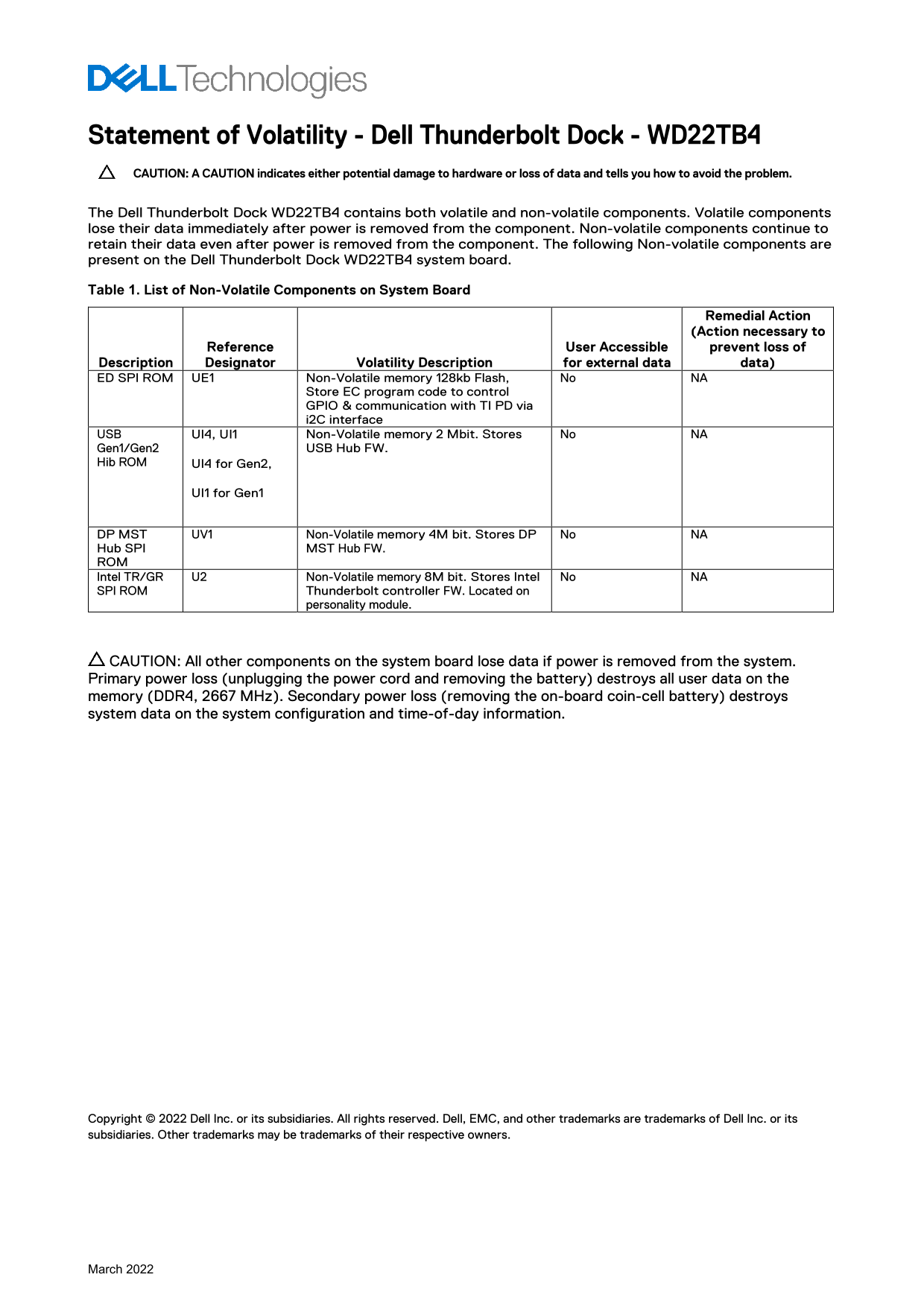
Statement of Volatility - Dell Thunderbolt Dock - WD22TB4 CAUTION: A CAUTION indicates either potential damage to hardware or loss of data and tells you how to avoid the problem. The Dell Thunderbolt Dock WD22TB4 contains both volatile and non-volatile components. Volatile components lose their data immediately after power is removed from the component. Non-volatile components continue to retain their data even after power is removed from the component. The following Non-volatile components are present on the Dell Thunderbolt Dock WD22TB4 system board. Table 1. List of Non-Volatile Components on System Board
Remedial Action (Action necessary to
Reference User Accessible prevent loss of
Description Designator Volatility Description for external data data) ED SPI ROM UE1 Non-Volatile memory 128kb Flash, No NA
Store EC program code to control GPIO & communication with TI PD via i2C interface
USB UI4, UI1 Non-Volatile memory 2 Mbit. Stores No NA Gen1/Gen2 USB Hub FW. Hib ROM UI4 for Gen2,
UI1 for Gen1
DP MST UV1 Non-Volatile memory 4M bit. Stores DP No NA Hub SPI MST Hub FW. ROM Intel TR/GR U2 Non-Volatile memory 8M bit. Stores Intel No NA SPI ROM Thunderbolt controller FW. Located on
personality module.
CAUTION: All other components on the system board lose data if power is removed from the system. Primary power loss (unplugging the power cord and removing the battery) destroys all user data on the memory (DDR4, 2667 MHz). Secondary power loss (removing the on-board coin-cell battery) destroys system data on the system configuration and time-of-day information.
Copyright © 2022 Dell Inc. or its subsidiaries. All rights reserved. Dell, EMC, and other trademarks are trademarks of Dell Inc. or its subsidiaries. Other trademarks may be trademarks of their respective owners.
March 2022
Page Summary Contents For Dell Thunderbolt Dock WD22TB4 Statement of Volatility
Manual Details
| Brand | Dell |
|---|---|
| Pages | 1 |
| File Size | 149.16 KB |
| Published | July 01, 2026 |
Enter the captcha to get the download link:

Frequently Asked Questions
What happens to user data if I unplug the power cord completely?
Primary power loss destroys all user data on memory (DDR4).
If I remove only the coin-cell battery, what type of system information is lost?
System configuration and time-of-day information will be destroyed.
Which components are designed to retain critical firmware even without power?
Non-volatile components store data like the Thunderbolt controller FW, USB Hub FW, and DP MST Hub FW.