Dell B2375dnf Quick Setup Guide
Summary
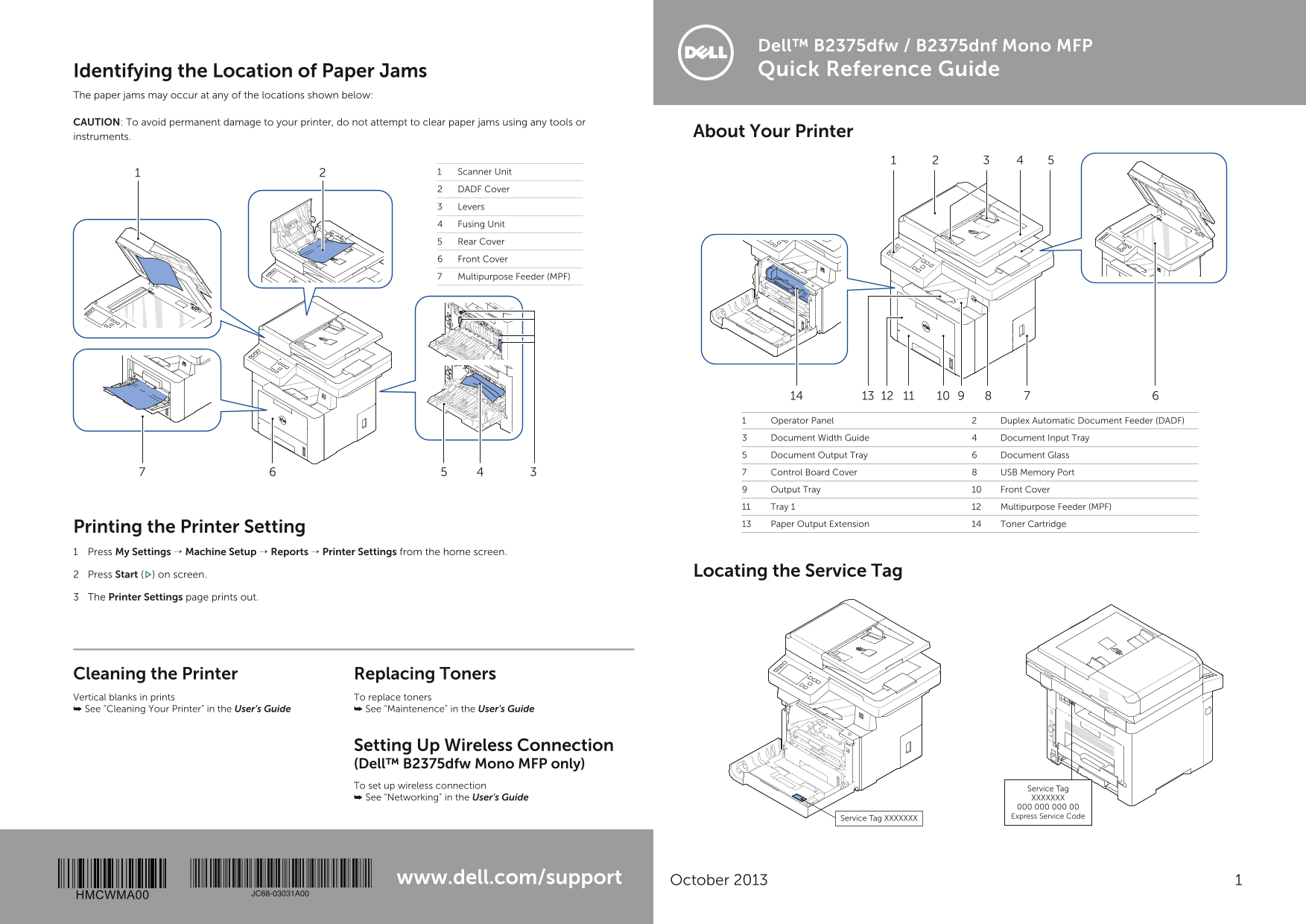
This is the quick reference guide for the Dell B2375dfw/B2375dnf Mono MFP (Multifunction Printer). The manual covers printer component identification, paper jam locations and clearing procedures, operator panel button functions, loading instructions for letterhead and envelopes, toner replacement, printer cleaning, and wireless connection setup for the B2375dfw model. It includes service tag location and printer settings reporting. Target users are office workers, small business users, and IT support staff managing Dell monochrome multifunction printers in business environments.
Page 1 Text Content
Dell™ B2375dfw / B2375dnf Mono MFP Identifying the Location of Paper Jams Quick Reference Guide
The paper jams may occur at any of the locations shown below:
CAUTION: To avoid permanent damage to your printer, do not attempt to clear paper jams using any tools or
instruments. About Your Printer
1 Scanner Unit
2 DADF Cover
3 Levers
4 Fusing Unit
5 Rear Cover
6 Front Cover
7 Multipurpose Feeder (MPF)
1 Operator Panel 2 Duplex Automatic Document Feeder (DADF)
3 Document Width Guide 4 Document Input Tray
5 Document Output Tray 6 Document Glass
7 Control Board Cover 8 USB Memory Port
9 Output Tray 10 Front Cover
11 Tray 1 12 Multipurpose Feeder (MPF)
13 Paper Output Extension 14 Toner Cartridge
Printing the Printer Setting 1 Press My Settings → Machine Setup → Reports → Printer Settings from the home screen.
2 Press Start ( ) on screen. Locating the Service Tag
3 The Printer Settings page prints out.
Cleaning the Printer Replacing Toners Vertical blanks in prints To replace toners ➥ See "Cleaning Your Printer" in the User's Guide ➥ See "Maintenence" in the User's Guide
Setting Up Wireless Connection (Dell™ B2375dfw Mono MFP only) To set up wireless connection Service Tag
➥ See "Networking" in the User's Guide XXXXXXX 000 000 000 00 Service Tag XXXXXXX Express Service Code
www.dell.com/support October 2013
HMCWMA00 JC68-03031A00
Page Summary Contents For Dell B2375dnf Quick Setup Guide
Manual Details
| Brand | Dell |
|---|---|
| Pages | 6 |
| File Size | 5.82 MB |
| Published | June 29, 2026 |
Enter the captcha to get the download link:

Frequently Asked Questions
What do I do if a paper jam occurs inside the device?
Do not attempt to clear jams using any tools or instruments to avoid permanent damage; consult the User's Guide.
If the Status LED is blinking orange, what does that signify?
It indicates either a minor error that needs clearing from the display, or that the toner cartridge is low.
How can I set up the printer's wireless connection?
On the Dell B2375dfw Mono MFP only, use the Wi-Fi/WPS button to configure the network easily without a computer.