Dell P1917S Monitor Quick Setup Guide
Summary
The Dell P1917S Monitor documentation package includes device drivers, Quick Setup Guide, User's Guide, and Dell Display Manager software. The P1917S is a professional-grade monitor featuring VGA, DP, and USB connectivity options with adjustable tilt angles. This documentation assists users in installing monitor drivers, configuring display settings, and utilizing Dell's display management software for optimal viewing experience in office and professional environments.
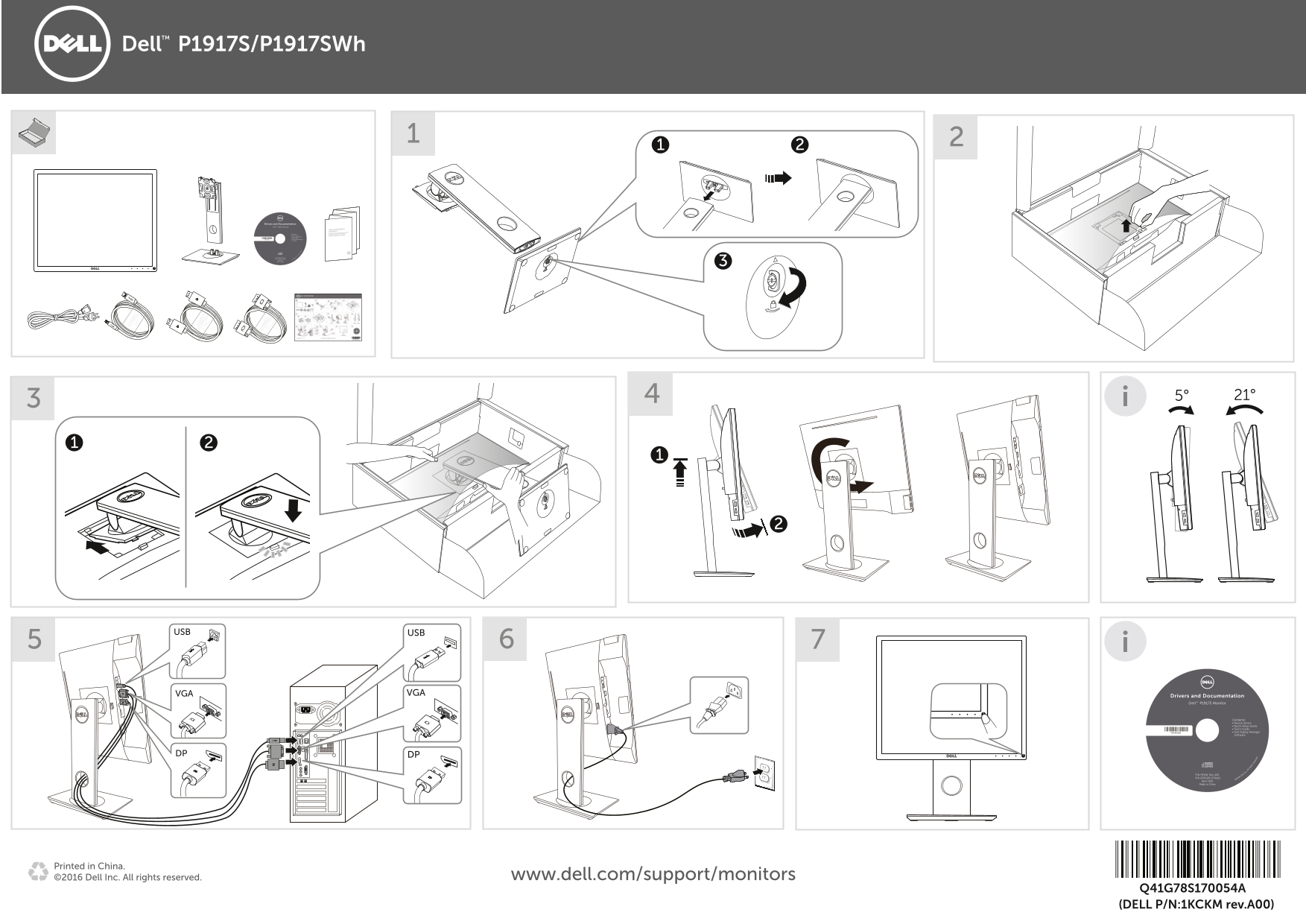
Page 1 Text Content
Dell P1917S/P1917SWh
Drivers and Documentation Dell™ P1917S Monitor
Contents: • Device drivers • Quick Setup Guide
YHVN1A00 • User's Guide • Dell Display Manager Software
P/N Q70G19C170012A P/N YHVN1 Rev. A00 ©2016 ell I nc. A
Made in China April 2016
ll rig ht re se rv
USB USB
VGA VGA Drivers and Documentation
Dell™ P1917S Monitor
Contents: • Device drivers
• Quick Setup Guide • User's Guide
YHVN1A00 • Dell Display Manager Software
DP DP
P/N YHVN1 Rev. A00 ell I nc.
April 2016
Made in China
Printed in China.
©2016 Dell Inc. All rights reserved. www.dell.com/support/monitors
Q41G78S170054A (DELL P/N:1KCKM rev.A00)
All rig
ht re
se rv ed
Page Summary Contents For Dell P1917S Monitor Quick Setup Guide
Manual Details
| Brand | Dell |
|---|---|
| Pages | 1 |
| File Size | 1.20 MB |
| Published | June 25, 2026 |
Enter the captcha to get the download link:

Frequently Asked Questions
What software comes with the Dell P1917S monitor?
The package includes Quick Setup Guide, User's Guide, Device drivers, and Dell Display Manager software.
Which connection ports are available on the Dell P1917S?
It features VGA, USB, and a type of digital connector (implied by multiple connectors listed).