Dell Statement of Volatility - Dell P1917S Monitor Owner's Manual
Summary
This statement of volatility provides comprehensive documentation for the Statement of Volatility. The document covers configuration instructions. This documentation is intended for IT professionals and system administrators. The manual provides detailed guidance to ensure proper operation and maintenance of the Statement of Volatility. Users will find step-by-step instructions and technical details necessary for effective utilization of the product.
Page 1 Text Content
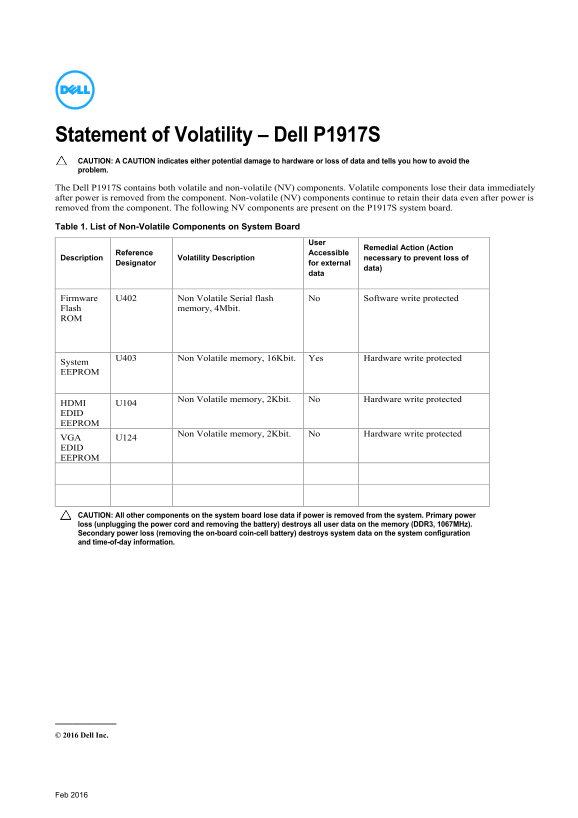
Statement of Volatility – Dell P1917S CAUTION: A CAUTION indicates either potential damage to hardware or loss of data and tells you how to avoid the problem. The Dell P1917S contains both volatile and non-volatile (NV) components. Volatile components lose their data immediately after power is removed from the component. Non-volatile (NV) components continue to retain their data even after power is removed from the component. The following NV components are present on the P1917S system board. Table 1. List of Non-Volatile Components on System Board
Remedial Action (Action
Reference Accessible
Description Volatility Description necessary to prevent loss of
Designator for external
data)
Firmware U402 Non Volatile Serial flash No Software write protected Flash memory, 4Mbit. ROM
U403 Non Volatile memory, 16Kbit. Yes Hardware write protected
System EEPROM
HDMI U104 Non Volatile memory, 2Kbit. No Hardware write protected EDID EEPROM VGA U124 Non Volatile memory, 2Kbit. No Hardware write protected EDID EEPROM
CAUTION: All other components on the system board lose data if power is removed from the system. Primary power loss (unplugging the power cord and removing the battery) destroys all user data on the memory (DDR3, 1067MHz). Secondary power loss (removing the on-board coin-cell battery) destroys system data on the system configuration and time-of-day information.
© 2016 Dell Inc.
Feb 2016
Page Summary Contents For Dell Statement of Volatility - Dell P1917S Monitor Owner's Manual
Manual Details
| Brand | Dell |
|---|---|
| Pages | 1 |
| File Size | 157.70 KB |
| Published | June 17, 2026 |
Enter the captcha to get the download link:

Frequently Asked Questions
What happens to data if the primary power is lost?
Data on volatile memory (DDR3) is immediately lost, and user data is destroyed.
Which components retain data after power is removed?
Non-volatile components such as the Firmware Serial flash, System EEPROM, and HDMI/VGA EDID EEPROM retain data.
How can I prevent the loss of system configuration data?
Prevent secondary power loss by ensuring the on-board coin-cell battery remains installed.