Dell Statement of Volatility – Dell EMC PowerEdge MX740c User's Guide
Summary
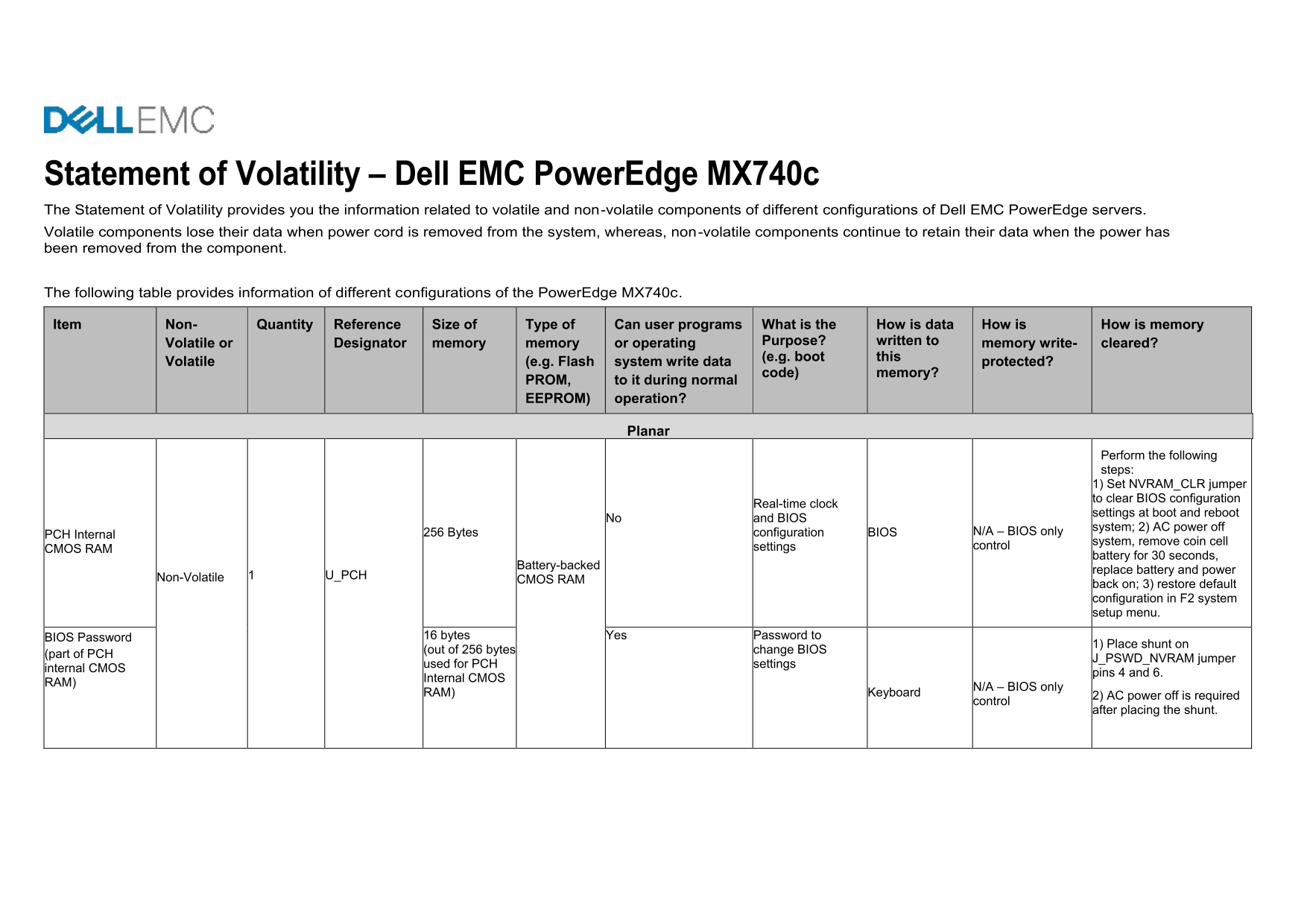
The Dell EMC PowerEdge MX740c is a modular server for the MX7000 chassis. This Statement of Volatility details volatile and non-volatile components including BIOS CMOS, SPI flash, RAID cache, and NVDIMM-N. Specifies volatility type, size, purpose, and data clearing procedures. For security administrators and IT professionals handling data sanitization.
Page 1 Text Content
Statement of Volatility – Dell EMC Power Edge MX740c The Statement of Volatility provides you the information related to volatile and non-volatile components of different configurations of Dell EMC Power Edge servers. Volatile components lose their data when power cord is removed from the system, whereas, non-volatile components continue to retain their data when the power has been removed from the component.
The following table provides information of different configurations of the Power Edge MX740c.
Item Non- Quantity Reference Size of Type of Can user programs What is the How is data How is How is memory
Volatile or Designator memory memory or operating Purpose? written to memory write- cleared? (e.g. boot this
Volatile (e.g. Flash system write data protected?
code) memory?
PROM, to it during normal EEPROM) operation?
Planar
Perform the following steps: 1) Set NVRAM_CLR jumper to clear BIOS configuration
Real-time clock
settings at boot and reboot
No and BIOS
system; 2) AC power off
256 Bytes configuration BIOS N/A – BIOS only
PCH Internal
system, remove coin cell
settings control
CMOS RAM
battery for 30 seconds,
Battery-backed
replace battery and power
Non-Volatile U_PCH
CMOS RAM
back on; 3) restore default configuration in F2 system setup menu.
BIOS Password 16 bytes Yes Password to
1) Place shunt on
(out of 256 bytes change BIOS
(part of PCH
J_PSWD_NVRAM jumper
used for PCH settings
internal CMOS
pins 4 and 6.
Internal CMOS
N/A – BIOS only
RAM) Keyboard
2) AC power off is required
control
after placing the shunt.
Page Summary Contents For Dell Statement of Volatility – Dell EMC PowerEdge MX740c User's Guide
Manual Details
| Brand | Dell |
|---|---|
| Pages | 16 |
| File Size | 658.10 KB |
| Published | June 24, 2026 |
Enter the captcha to get the download link:

Frequently Asked Questions
How do I clear BIOS configuration settings?
Set NVRAM_CLR jumper to clear BIOS settings at boot and reboot the system.
What are the memory limits for the system?
Up to 128GB of DRAM and up to 6 NVDIMM-N per CPU.
How is data handled during a power loss?
Volatile components lose data when power is removed; non-volatile components retain data.
Can user programs be written to the primary BIOS ROM?
No, the Primary BIOS SPI ROM is not writable by user programs.