Dell EMC PowerEdge XR11 Statement of Volatility
Summary
This is the Statement of Volatility for the Dell EMC PowerEdge XR11 rugged server, documenting volatile and non-volatile memory components. It provides detailed tables showing component types, reference designators, sizes, volatility characteristics, user accessibility, purposes, data input methods, write protection mechanisms, and clearing procedures. The document serves security professionals and organizations requiring comprehensive memory component documentation for compliance and data sanitization purposes.
Page 1 Text Content
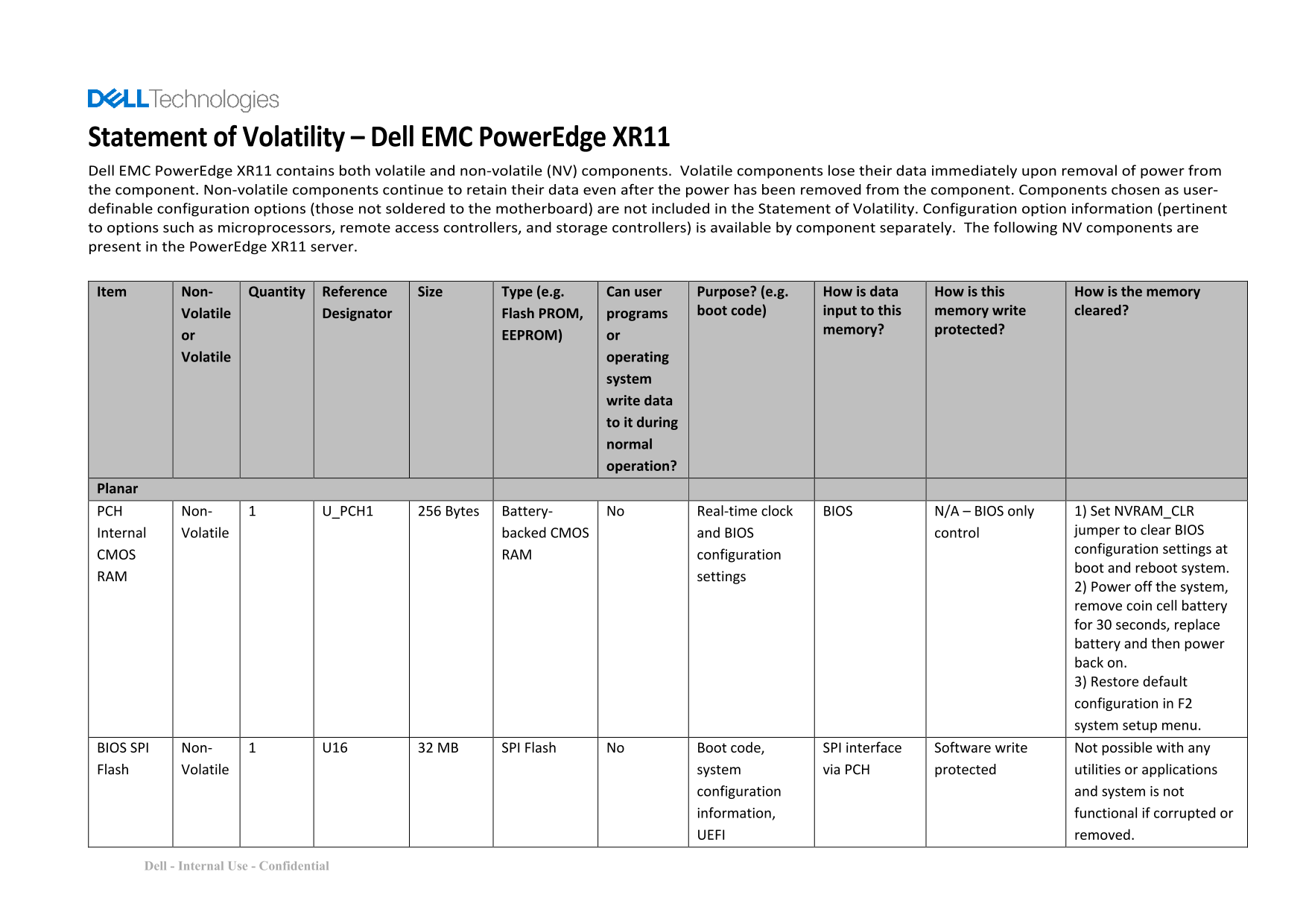
Statement of Volatility – Dell EMC Power Edge XR11 Dell EMC Power Edge XR11 contains both volatile and non-volatile (NV) components. Volatile components lose their data immediately upon removal of power from the component. Non-volatile components continue to retain their data even after the power has been removed from the component. Components chosen as user- definable configuration options (those not soldered to the motherboard) are not included in the Statement of Volatility. Configuration option information (pertinent to options such as microprocessors, remote access controllers, and storage controllers) is available by component separately. The following NV components are present in the Power Edge XR11 server.
Item Non- Quantity Reference Size Type (e.g. Can user Purpose? (e.g. How is data How is this How is the memory Volatile Designator Flash PROM, programs boot code) input to this memory write cleared?
memory? protected?
or EEPROM) or Volatile operating
system write data to it during normal operation?
Planar
PCH Non- 1 U_PCH1 256 Bytes Battery- No Real-time clock BIOS N/A – BIOS only 1) Set NVRAM_CLR Internal Volatile backed CMOS and BIOS control jumper to clear BIOS configuration settings at
CMOS RAM configuration
boot and reboot system.
RAM settings
2) Power off the system, remove coin cell battery for 30 seconds, replace battery and then power back on. 3) Restore default configuration in F2 system setup menu.
BIOS SPI Non- 1 U16 32 MB SPI Flash No Boot code, SPI interface Software write Not possible with any Flash Volatile system via PCH protected utilities or applications
configuration and system is not information, functional if corrupted or UEFI removed.
Dell - Internal Use - Confidential
Page Summary Contents For Dell EMC PowerEdge XR11 Statement of Volatility
Manual Details
| Brand | Dell |
|---|---|
| Pages | 17 |
| File Size | 534.23 KB |
| Published | June 23, 2026 |
Enter the captcha to get the download link:

Frequently Asked Questions
How do I clear the BIOS configuration settings?
Set the NVRAM_CLR jumper to clear BIOS control, power off, remove the coin cell battery for 30 seconds, replace it, and power back on.
Can I clear the iDRAC volatile memory data?
User data, lifecycle logs, and firmware images can be cleared by accessing the Lifecycle Controller interface and selecting Delete Configuration and Retire System.
How much memory can the PowerEdge XR11 support?
It supports up to 256GB per system using RDIMM and LRDIMM memory.
Is the volatile memory protected?
System volatile memory is protected during normal operation, and volatile MCU information on risers is protected and not auto-updated or visible to the host.