Dell EMC PowerEdge M640 Statement of Volatility
Summary
This technical guide provides comprehensive documentation on the data volatility of internal memory components within the Dell EMC PowerEdge FC640 and M640 servers. It details which hardware elements—such as BIOS, iDRAC controllers, and various caches—retain information after power loss versus those that are volatile. The manual is essential for IT professionals and system administrators requiring precise procedures for clearing settings, managing firmware parameters, or troubleshooting data retention during system maintenance.
Page 1 Text Content
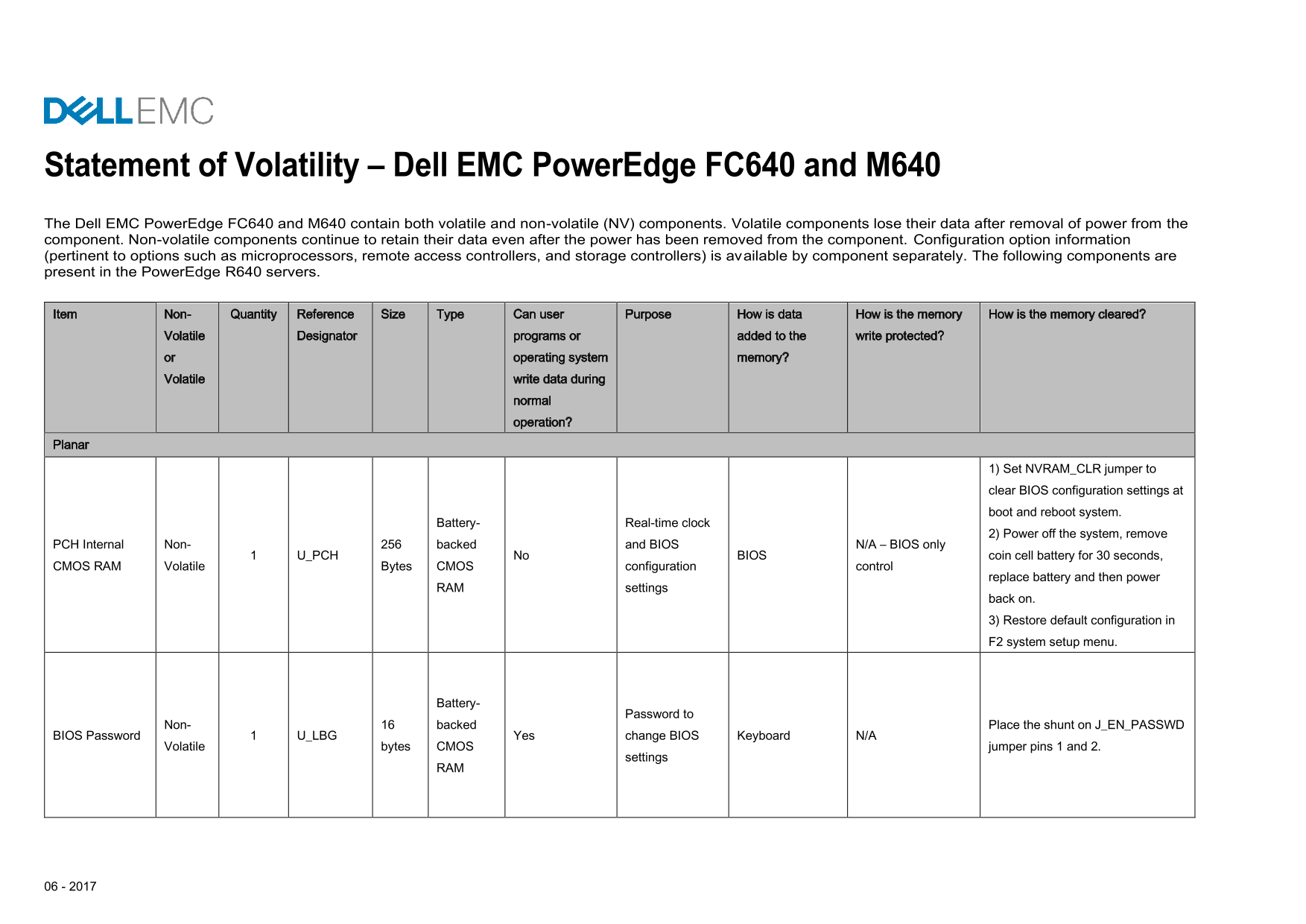
Statement of Volatility – Dell EMC Power Edge FC640 and M640 The Dell EMC Power Edge FC640 and M640 contain both volatile and non-volatile (NV) components. Volatile components lose their data after removal of power from the component. Non-volatile components continue to retain their data even after the power has been removed from the component. Configuration option information (pertinent to options such as microprocessors, remote access controllers, and storage controllers) is available by component separately. The following components are present in the Power Edge R640 servers.
Item Non- Quantity Reference Size Type Can user Purpose How is data How is the memory How is the memory cleared?
Volatile Designator programs or added to the write protected? or operating system memory? Volatile write data during
normal operation?
Planar
1) Set NVRAM_CLR jumper to clear BIOS configuration settings at boot and reboot system.
Battery- Real-time clock
2) Power off the system, remove
PCH Internal Non- backed and BIOS N/A – BIOS only
1 U_PCH No BIOS coin cell battery for 30 seconds,
CMOS RAM Volatile Bytes CMOS configuration control
replace battery and then power
RAM settings
back on. 3) Restore default configuration in F2 system setup menu.
Battery-
Password to
Non- backed Place the shunt on J_EN_PASSWD
BIOS Password 1 U_LBG Yes change BIOS Keyboard N/A
Volatile bytes CMOS jumper pins 1 and 2.
settings
Page Summary Contents For Dell EMC PowerEdge M640 Statement of Volatility
Manual Details
| Brand | Dell |
|---|---|
| Pages | 7 |
| File Size | 453.17 KB |
| Published | June 23, 2026 |
Enter the captcha to get the download link:

Frequently Asked Questions
How can I clear the BIOS configuration settings?
Set the NVRAM_CLR jumper to clear BIOS configuration settings at boot and reboot the system.
What parts contain non-volatile memory (NV)?
Components like embedded BMC EMMC, NVSRAM, and U3 indicate Non-volatile storage retention after power removal.
Can I clear the data stored in iDRAC/BMC components?
User data such as lifecycle log, SEL, and archive can be cleared using Delete Configuration through Lifecycle Controller.
Which volatile memory type is used for system OS operations?
DIMM System Memory (DRAM) supplies volatile memory for the Operating System.